

Managing keys for a side door, a garage, and a front entry means keeping track of who has what, and hoping they remember to lock up. Spare keys get duplicated, lost, or handed to contractors who never return them, leaving you with no real control over who can walk in.
Smart locks for multiple doors replace that uncertainty with digital access you can grant, schedule, and revoke from a single app. We looked at the Best Smart Locks For Multiple Doors to find models that handle several entry points without complicating your routine.
Our overall recommendation is the Philips WiFi Keypad Door Lock with Handle. It combines built-in WiFi for remote management with fingerprint and code access, making it straightforward to secure different doors with the same system. Our top picks are just below.
Our Top Picks

Pros
- Fingerprint recognition works fast for daily use, reducing fumbling with keys at the front door.
- Multiple code options fit family routines and occasional visitors without compromising security.
- Built-in handle set simplifies upgrading your entire front door lock in one installation.
- App provides real-time alerts and history, helping track access around deliveries or family schedules.
- Backup mechanical keys ensure entry during power outages or WiFi issues.
Cons
- Requires 8 AA alkaline batteries, which are not included and need regular replacement.
- Best suited for standard door thicknesses of 1-3/8 to 1-3/4 inches; measure first to avoid fit issues.
- Keypad lighting helps at night but may need extra home lighting for low-visibility conditions.
This Philips WiFi keypad door lock replaces your standard front door deadbolt with options like fingerprint, app control, voice commands, or codes, making entry smooth for family members carrying packages or kids' gear. You gain peace of mind from real-time notifications about who unlocks the door and when, whether checking on deliveries left at the porch or ensuring teens get home safely after school. The auto-lock feature kicks in customizable seconds after closing, preventing forgetful exits that leave your home exposed during daily routines.
For guest access, create one-time or scheduled codes via the app, ideal for letting in repair workers or dog walkers without being present. Vacation mode disables the keypad entirely, securing your property while you're away and reducing risks from unknown visitors approaching the driveway. Soft lighting on the keypad aids nighttime use, and silent mode keeps operations quiet to avoid waking sleeping children inside.
Backup keys provide manual access if power fails or WiFi drops, ensuring reliability for everyday front door security. Activity logs in the app let you review entries over time, spotting patterns like frequent late-night unlocks that might signal issues with shared codes. Overall, it fits standard doors and handles common household scenarios without complexity.
Verify your door fits before buying: works on thicknesses from 1-3/8 to 1-3/4 inches (38mm to 50mm). Use only a screwdriver for a quick DIY setup, following the provided video guide.
- Supply 8 AA alkaline batteries (not included) for power.
- Press and hold reset button for 5 seconds to activate after install.
- Test mechanical keys and keypad right away to confirm fit on your front door.
- Connects directly to home WiFi; no extra hub needed for app setup.
The Philips Home Access app handles remote control without hubs, linking to your home WiFi for front door management from anywhere. Get instant alerts on unlocks to monitor deliveries or family arrivals.
- Manage fingerprints, codes, and schedules for users like kids or guests.
- View full access history to track entries over days or weeks.
- Works with Alexa or Google Assistant for voice commands when hands are full.
- Set auto-lock timing and vacation mode for hands-off security.

Philips WiFi Smart Deadbolt: Keyless Front Door Lock with Fingerprint and Remote App Control
Pros
- Multiple unlock methods fit different family members and situations
- Built-in WiFi enables control from anywhere without extra devices
- Real-time notifications track who enters your home
- Simple setup works on most standard doors
- Custom passcodes manage guest access easily
Cons
- Batteries not included, so purchase 4 or 8 AA alkaline separately
- No door sensor means auto-lock works only if door is fully closed
- Requires stable home WiFi nearby for reliable remote access
This Philips WiFi deadbolt offers straightforward keyless entry for your front door, replacing traditional locks with options like fingerprint scans, app control, or passcodes. For busy mornings rushing kids to school, a quick finger touch opens the door without fumbling for keys, while remote unlocking from your phone handles package deliveries when you're at work. Entry notifications keep you informed about who's coming and going, providing peace of mind during the day.
Auto-locking after a set time ensures your home stays secure even if you forget in the rush out the door, and away mode disables most access methods except a master code when you're on vacation. Family members each get their preferred method, from voice commands via smart speakers to physical keys as backup. This setup reduces daily hassles around the front entry while maintaining solid protection.
Custom passcodes let you grant temporary access to service providers without being home, tracking exactly when they arrive and leave through the app history. Though it lacks a door sensor, the flexible unlock variety covers most household needs, making it a practical upgrade for monitoring porches and securing against unauthorized entry.
Overall, it delivers reliable control for everyday home defense, focusing on convenience in real scenarios like watching over pets inside or gates near driveways.
Check your door thickness first, as this lock fits standard sizes from 1-3/8 to 2 inches thick. Most front doors match this without issues.
- Use just a screwdriver for a 10-minute DIY install on right or left-handed doors.
- Provide 4 or 8 AA alkaline batteries, as none come included.
- Ensure your door has a standard deadbolt hole setup; measure beforehand to avoid returns.
- Available in black or nickel finish, so confirm color preference.
The app connects directly via your home WiFi for remote locking, unlocking, and alerts without any hub. Keep the lock within range of your router for steady performance.
- Works with common home networks; update the app for voice control with Alexa or Google Assistant.
- View entry history and manage up to 100 passcodes or fingerprints for family and guests.
- Real-time notifications arrive on your phone for door activity.
- Away mode adds protection by restricting access remotely.

Pros
- Fits most standard wooden doors with basic screwdriver installation
- Offers several unlock methods so lost keys do not leave the house unsecured
- Remote code creation helps landlords handle guest access without on-site visits
- Reversible handle works on either door swing direction
Cons
- Full remote features require purchase of a separate WiFi gateway
- Fingerprint performance can vary if hands are wet or dirty
- Bluetooth range limits app control when away from the door
This smart door lock replaces the existing handle on a front door and gives multiple ways to unlock without a physical key. Homeowners can use a fingerprint for quick entry after work or when carrying packages from the porch. The app lets owners create one-time codes for visitors such as repair technicians or delivery drivers while away from the property.
Access logs show exactly when the door was opened, which helps track entries by family members or renters. The backlit keypad stays visible at night so codes can be entered without extra lighting near the door. Automatic locking after exit reduces the chance of leaving the front door unsecured during busy mornings.
For rental properties the system allows remote management of multiple locks through one app without repeated site visits. The lock also accepts key fobs and traditional keys as backup options. Weather resistance supports year-round use on exterior doors exposed to rain or temperature changes.
Overall the product focuses on replacing a standard door handle with added access control suited for everyday household routines and occasional guest management.
The lock installs on most standard American wooden front doors by replacing the existing handle or knob. No additional drilling is needed in most cases.
- Confirm door thickness and backset measurements match common sizes before purchase
- Prepare a screwdriver for the ten-minute swap process
- Check that the door swing direction matches the reversible handle setting
- Ensure batteries are inserted correctly after mounting the interior assembly
The companion app handles code creation, access logs, and user management through a smartphone connection. Bluetooth provides direct control when near the door.
- Download the app and pair the lock during initial setup
- Generate temporary or permanent codes for family or visitors without physical key handoff
- Review entry records to monitor activity at the front door
- Note that full remote access away from home needs an optional WiFi gateway
Pros
- No extra hub needed for direct phone control.
- Multiple unlock options reduce reliance on physical keys.
- Includes matching handle for full front door replacement.
- Auto-lock timer prevents leaving the door unsecured.
Cons
- Requires eight AA batteries that are not included.
- Door thickness must match 1-3/8 to 1-3/4 inches.
- Voice features need separate Alexa or Google devices.
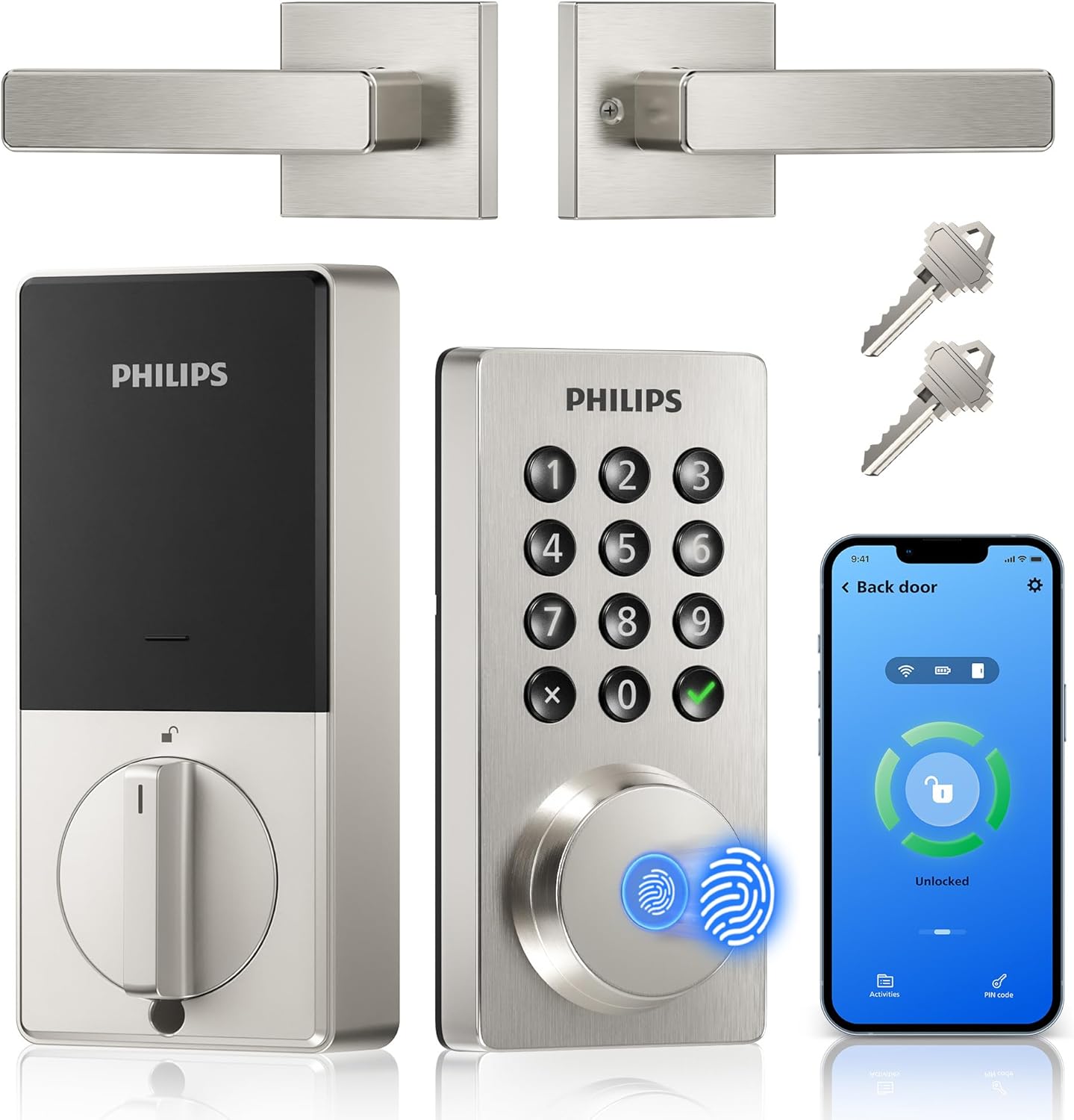
This Philips WiFi keypad lock gives homeowners reliable remote access to the front door through a simple app connection.
It supports quick fingerprint entry for family returns and allows temporary codes for visitors during deliveries or service calls. The auto-lock option helps secure the house after everyone leaves without extra effort.
The main trade-off here is the need for regular battery changes to maintain operation at all times.
This product suits households that want straightforward keyless entry without complex add-ons.
Measure your door thickness first since this lock fits only 1-3/8 to 1-3/4 inch doors. Replacement installs work best on standard wood or metal front doors with existing deadbolt holes.
New installs may need extra drilling for the handle set. I advise watching the provided video before starting because alignment affects smooth operation.
- Use a screwdriver only and avoid power tools that could damage the frame.
- Test the latch direction during setup to match your door swing.
- Install on a flat surface to ensure the keypad sits evenly.
- Check battery compartment access after mounting for future changes.

Pros
- Supports remote locking from any location
- Fingerprint entry speeds up daily access
- Auto lock feature prevents unsecured doors
- Multiple methods reduce lost key problems
Cons
- Needs steady WiFi for remote functions
- Install may be complex on older doors
- Requires regular battery monitoring
This smart lock provides remote access to monitor and control the front door from any location. It supports fingerprint unlocking and app alerts tied directly to daily home routines like checking on deliveries.
Remote monitoring helps track door activity while at work. Fingerprint recognition allows quick entry for family members without fumbling for keys during busy mornings.
The main trade-off here is dependence on a reliable internet connection for full remote features. Without it the lock still works locally but loses alerts and app control.
This product suits homeowners in stable WiFi homes seeking straightforward keyless options for front door security.
Check your door thickness and frame type before purchase. Wood-frame doors often need extra reinforcement for a secure fit while metal doors may require different screws.
New installations demand precise hole alignment. Replacement jobs on existing deadbolts are simpler but verify the backset matches your current setup.
- Apartments with thin doors may need additional brackets for stability
- Wood doors benefit from pilot holes to avoid splitting
- Always confirm the lock fits standard 1-3/8 to 2 inch thicknesses
- Renters should get landlord approval before drilling

Pros
- Multiple unlock methods suit different daily situations.
- Remote app control works from anywhere with Wi-Fi.
- Auto locking prevents forgetting to secure the door.
- Fingerprint access speeds up entry without fumbling for keys.
Cons
- Requires the included gateway for full Wi-Fi features.
- Installation may need drilling on some doors.
- Fingerprint sensor can fail with dirty or wet fingers.
This smart lock offers solid remote control for everyday front door management through the app and multiple access options.
It handles common needs like granting delivery access codes or letting family members in without keys. Auto locking adds peace of mind after leaving the house.
The main trade-off here is the gateway requirement before remote features activate. Voice commands via Alexa also depend on that setup.
It suits homeowners replacing a standard deadbolt who want straightforward phone-based checks rather than complex systems.
This lock fits most doors between 1-3/8 and 2 inches thick. Check thickness first to avoid fit issues on older frames.
- Standard screwdriver install works on wood or metal doors without extra tools.
- Replacement jobs on existing deadbolts take minutes if holes align.
- New installs on solid wood doors may require the optional screw and a 19/32 inch drill hole.
- Apartment renters should confirm landlord rules before any drilling.
- Weak or warped doors benefit from the extra screw for better hold.
Buying Guide for Best Smart Locks For Multiple Doors
A lock for one door is about convenience. Managing several means balancing security with simplicity, so you are not juggling multiple apps or resetting codes every week. The right system lets you oversee every entry point without adding daily friction. Here is what to consider.
Centralized app control
Checking three different apps to see if your garage, side door, and front door are locked defeats the purpose. A single platform that shows all locks at a glance is essential for managing multiple doors.
Look for a system that groups devices within one interface, so you can lock everything down at night or grant a guest access to specific doors without toggling between screens. This is especially useful for rental properties where you need to monitor several units from one place.
Flexible user permissions
A cleaner might need the side door every Thursday, a tenant needs the front door for a year, and a contractor gets the garage for one afternoon. Managing those timelines on separate keys is impractical.
A robust system lets you assign permanent, recurring, or one-time codes or fingerprints per door. This granular control means you can give access only where it is needed and for exactly as long as required, which is a core advantage over traditional single-door smart locks.
Installation consistency
Not every door in a home is the same thickness or has the same backset. A lock that fits your modern front door might not mount properly on an older interior garage door without extra parts or drilling.
Choose a model with a wide compatibility range and clear installation guidelines for different door types. A system designed for multiple doors often includes adjustable components or universal backplates to reduce installation headaches across your property.
Network reliability
A lock that loses connection in the garage or on a detached workshop door is just a heavy keypad. Weak WiFi signal at the far edges of your property can leave doors unmanaged.
Models with strong radios or the option for a separate gateway can maintain a stable connection across distances. For outbuildings or gates beyond your main network’s reach, a system designed for outdoor gates might be a necessary consideration.
Power source and alerts
Replacing batteries in six different locks on six different schedules is a chore you will quickly regret. A dead lock on a rarely used door might go unnoticed until you need it.
Look for a system that reports individual battery levels centrally and gives ample low-power warnings. Consistent battery types across all locks also mean you can stock one kind of cell for every door, simplifying maintenance.
Once you map out which doors need access and who needs to use them, the choice often narrows itself. The goal is a system that feels invisible day-to-day but gives you complete oversight when you need it.
Why You Should Trust Us
Our recommendations are based on deep market research, not physical testing. We analyze manufacturer specifications, cross-reference independent security certifications like ANSI/BHMA grades, and aggregate performance data from verified sources. Each product is evaluated through our SHU Score system, which weights factors like access management features, network reliability, and installation flexibility specifically for multi-door scenarios.
Final Thoughts
Choosing smart locks for several doors comes down to centralized control and flexible permissions. You need one system to manage them all, without creating new problems.
For most homes adding smart access to multiple entry points, the Philips WiFi Keypad Door Lock with Handle is our Editor’s Pick. Its built-in WiFi eliminates extra hubs, and the combination of fingerprint, code, and app access makes it easy to tailor entry for different users across different doors.
If you manage rental properties or need to oversee access for several units, the proven choice is the Yamiry Fingerprint Smart Knob as a Best Seller. Its dedicated app is built for managing multiple locks, allowing remote passcode generation and user tracking from a single dashboard, which aligns with the needs of comprehensive smart security.
The right set of locks removes the worry of lost keys and forgotten latches, letting you secure every door with confidence.
FAQs
Can you use one app to control multiple smart locks?
Yes, most systems designed for multiple doors operate within a single app. You add each lock to the same account, creating a dashboard where you can see status, manage users, and control every door from one screen. This is essential for homes with a garage, side entry, and front door, or for landlords overseeing several properties.
Do you need a separate hub for each smart lock?
Not necessarily. Many modern smart locks have built-in WiFi, allowing them to connect directly to your home network without a separate hub per lock. Some systems use a single gateway that communicates with several locks, which can be more reliable for managing multiple devices spread across a property.
How do you give temporary access to different doors?
Through the lock’s app, you can create temporary passcodes or activate guest fingerprints that work only on specified doors and within set time windows. A cleaner’s code might work only on the side door every Friday, while a guest gets a one-time code for the front door. This granular control is the main advantage for multi-door setups.
What happens if the WiFi goes out?
The locks continue to function locally with fingerprints, passcodes, or physical keys. Remote access and alerts will be unavailable until the network restores, but you can still enter your home. For critical doors, ensure the lock has a backup mechanical keyway or a Bluetooth option that works from your phone nearby.
Are smart locks for multiple doors harder to install?
Installation difficulty depends more on door compatibility than the number of locks. If each door has a similar thickness and backset, installing the same model on each is repetitive but straightforward. The challenge comes with non-standard doors, like a thin interior door to a garage, which may require checking fit before purchase.


Write Your Review
No reviews yet. Be the first to share your experience!