

You pull the door shut behind you, groceries in both hands, and that familiar doubt creeps in. Did you lock it? The physical key is buried in your bag, and the deadbolt feels like a chore you have to manage instead of a simple part of your routine.
A smart lock with a handle replaces that friction with a single, fluid motion. You get the security of a deadbolt combined with the natural action of turning a lever, all controlled from your phone. We looked at the Best Smart Locks With Handle to find options that install without rewiring and work for families, renters, and anyone tired of fumbling for keys.
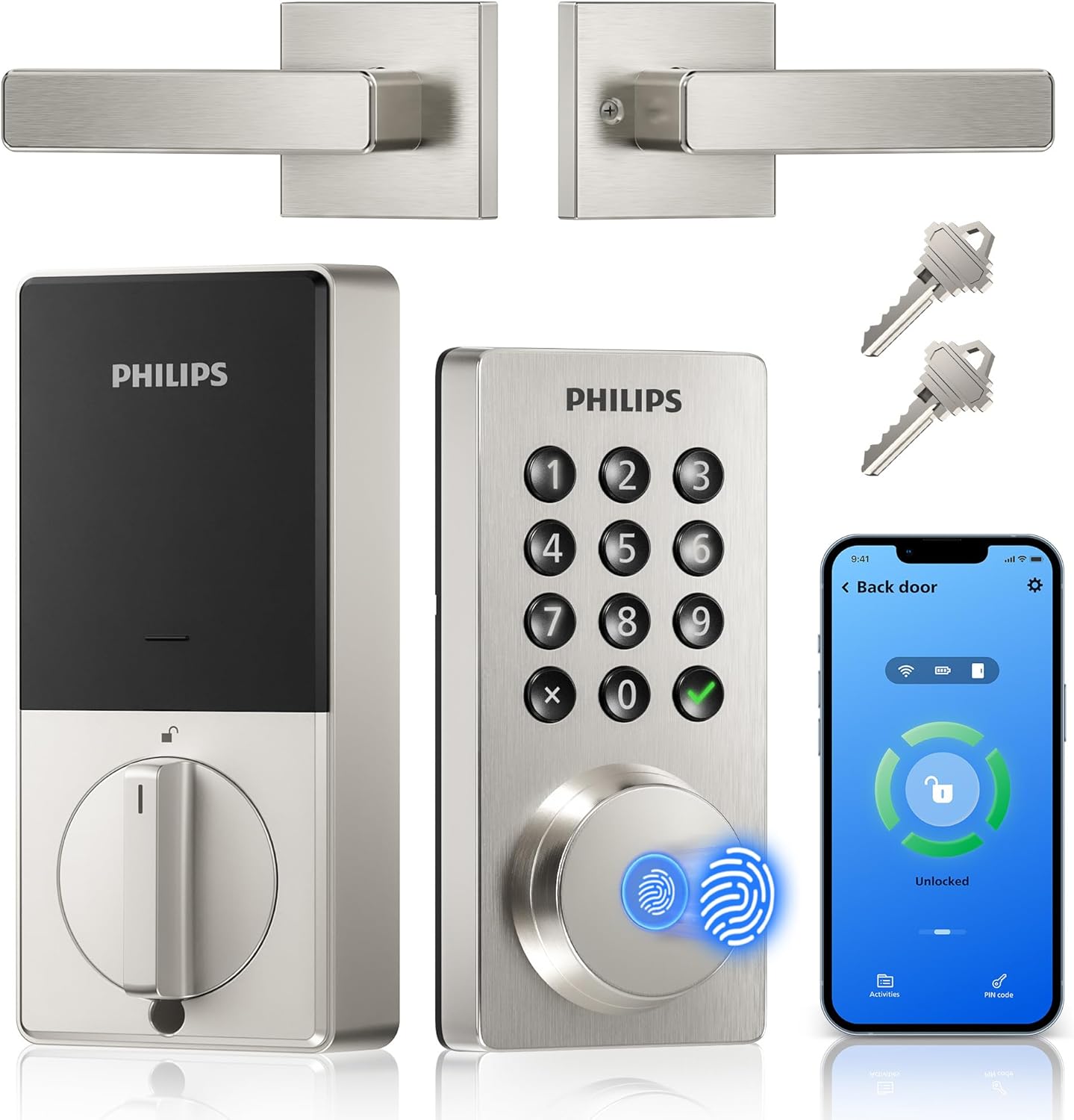
Our overall pick is the Philips WiFi Keypad Door Lock with Handle. It connects directly to your home network for remote access without an extra hub, making it a straightforward upgrade for a front or side door. Our top picks are just below.
Our Top Picks
Pros
- No extra hub needed for direct phone control.
- Multiple unlock options reduce reliance on physical keys.
- Includes matching handle for full front door replacement.
- Auto-lock timer prevents leaving the door unsecured.
Cons
- Requires eight AA batteries that are not included.
- Door thickness must match 1-3/8 to 1-3/4 inches.
- Voice features need separate Alexa or Google devices.
This Philips WiFi keypad lock gives homeowners reliable remote access to the front door through a simple app connection.
It supports quick fingerprint entry for family returns and allows temporary codes for visitors during deliveries or service calls. The auto-lock option helps secure the house after everyone leaves without extra effort.
The main trade-off here is the need for regular battery changes to maintain operation at all times.
This product suits households that want straightforward keyless entry without complex add-ons.
Measure your door thickness first since this lock fits only 1-3/8 to 1-3/4 inch doors. Replacement installs work best on standard wood or metal front doors with existing deadbolt holes.
New installs may need extra drilling for the handle set. I advise watching the provided video before starting because alignment affects smooth operation.
- Use a screwdriver only and avoid power tools that could damage the frame.
- Test the latch direction during setup to match your door swing.
- Install on a flat surface to ensure the keypad sits evenly.
- Check battery compartment access after mounting for future changes.

Philips WiFi Smart Lock for Front Door Keyless Entry and Remote Monitoring
Pros
- Multiple access methods reduce dependence on physical keys during daily routines.
- App notifications provide alerts for door activity while away at work.
- Auto-lock feature prevents accidental unsecured doors after quick exits.
- Fingerprint option speeds up entry for frequent users.
Cons
- Extra security screws require drilling a specific hole in the door.
- WiFi dependency means loss of remote features during internet outages.
- Door thickness must be verified before purchase to avoid fit issues.
This smart lock set combines a handle with deadbolt functions to secure the main entry of a typical home. Homeowners can lock or unlock the front door from their phone while checking on package deliveries left outside.
Fingerprint and PIN options allow quick access for household members returning from work or school without searching for keys. Temporary codes help manage entry for service visits or short-term guests arriving at the back gate area.
The auto-lock setting ensures the door secures itself after a set period, which helps when leaving in a hurry with pets or children. Access logs show who entered and when, supporting oversight of daily comings and goings around the property.
Overall it provides straightforward control over a primary doorway without requiring constant physical key management.
Confirm door thickness falls between 1-3/8 and 2 inches before starting. Most standard front doors meet this range for direct fit.
- Use a screwdriver for basic assembly that takes only a few minutes on compatible doors.
- Optional reinforcement screws need a 19/32 inch hole drilled if the door feels weak or warped.
- Verify handle alignment with the existing strike plate to maintain smooth operation.
The app allows locking, unlocking, and status checks from any location with internet access. Real-time alerts notify of door activity such as entries or failed attempts.
- Share codes or permissions with family members or temporary visitors through the phone interface.
- Review access history to track usage patterns around the home.
- Voice commands work with common assistants for hands-free operation at the doorway.

eufy C33 Smart Lock: Fingerprint Keypad for Front Doors, Bedrooms, Secure Keyless Entry
Pros
- Fingerprint recognition works quickly for multiple family members, speeding up daily entries.
- App sends instant notifications for all access attempts, helping monitor front door activity.
- IP53 rating handles outdoor weather on exposed doors without failing.
- Stores 50 fingerprints and 100 passcodes for flexible sharing without physical keys.
- DIY install takes 15 minutes on standard doors, no special tools needed.
Cons
- Slight internal noise and loose feel during operation, though it does not impact security.
- Limited to eufy ecosystem, Alexa, and Google; no Apple HomeKit or Matter support.
- Requires precise door dimensions for fit, not ideal for non-standard setups.
This smart lock fits standard knobs on front doors or interior bedrooms, offering fingerprint, keypad, and app-based entry to replace traditional keys. For homeowners juggling family schedules, instant fingerprint unlock means quick access when hands are full from shopping or chasing kids, while remote app control lets you lock or check status from work, reducing worry about open doors after deliveries.
Real-time notifications alert your phone to every entry attempt, useful for watching who comes through the side door or garage during the day. Auto-lock with countdown ensures doors secure themselves shortly after closing, adding protection for properties with frequent visitors like cleaners or repair folks. Pairing with eufy cameras gives a full view of front porch activity, confirming if packages are safe or if unexpected guests arrive.
Built for everyday exposure, the IP53 weather resistance stands up to rain on exterior doors, and eight AA batteries last through months of use without surprise failures. While some movement feels present inside the mechanism, it maintains solid locking strength for basic home defense. This setup suits renters or owners seeking simple, reliable control over multiple entry points without complex wiring.
Access management through the app allows setting schedules for bedrooms or basement doors, ideal for teens needing independence while parents stay informed. Overall, it delivers practical security for busy households focused on family safety and property monitoring.
Confirm your door matches these specs before buying to avoid fit issues on front doors or garages.
- Bore hole diameter: 2 1/8 inches.
- Backset: 2 3/8 or 2 3/4 inches.
- Door thickness: 1 3/8 to 2 1/6 inches.
- Works on wood or metal doors; installs in 15 minutes with no drilling using basic tools.
- Fits left- or right-hand doors for bedrooms, side entries, or interiors.
The built-in Wi-Fi connects directly to your home network for control without extra hubs, focusing on reliable daily use.
- Remote unlock and status checks from anywhere to secure drives or gates while shopping.
- Real-time push notifications for all entries, helping track kids or deliveries at the front door.
- Manage up to 50 fingerprints and 100 passcodes; view activity logs for peace of mind.
- Works with eufy doorbells and cameras for combined alerts; supports Alexa and Google Home voice commands.
- No Apple HomeKit or Matter yet; uses eufy app for core functions like auto-lock scheduling.

Philips WiFi Smart Door Lock with Fingerprint for Front Door Security and Family Access
Pros
- Multiple entry methods cover common situations like forgotten keys or full hands
- Remote app control works from anywhere to check status or grant guest access
- Auto-lock and modes adapt to different household routines without extra hardware
- Fits many standard doors with basic measurements and no hub required
Cons
- Only works on doors with exact 2-1/8 inch hole and minimum spacing from deadbolt
- Requires eight AA batteries that need periodic replacement
- Limited to 2.4 GHz WiFi connections which may require router changes
This lock combines a handle with fingerprint reader and keypad to secure a main entry point. Homeowners can use it on the front door to manage daily comings and goings while tracking activity through the app.
Fingerprint recognition supports up to 50 stored prints for fast household entry. PIN codes handle recurring access for cleaners or recurring visitors and one-time codes cover delivery personnel or short-term guests.
Auto-lock activates after a set delay to prevent the door from remaining open after children or pets pass through. Privacy mode limits unlocking to the main code or physical key when the home needs extra quiet periods.
Remote commands allow checking or changing the lock status during travel or while at work. The included mechanical key serves as backup during extended power loss.
Measure the door before purchase to confirm fit. The lock needs a 2-1/8 inch diameter hole and backset of either 2-3/8 or 2-3/4 inches.
- Door thickness must fall between 1-3/8 and 2 inches.
- Center-to-center distance from handle to existing deadbolt requires at least 4.53 inches.
- If spacing is too close the latches interfere and positions may need swapping.
- Eight AA alkaline batteries power the unit and are not included.
The app provides remote lock and unlock plus activity history from any location with internet. Real-time alerts arrive when codes are used or the battery level drops.
- Passage mode turns the handle into free entry without codes or prints.
- Timed and recurring codes support scheduled access for pet sitters or service workers.
- Voice commands work through compatible assistants for hands-free operation.
- Anti-peep code entry protects PIN privacy on the keypad.
Buying Guide for Best Smart Locks With Handle
A lock with a handle needs to feel secure when you are away and effortless when you are home. The right one turns locking from a task into a background habit. These are the practical details that separate a reliable upgrade from one that adds new problems.
Built-in WiFi versus hub requirements
Direct WiFi connection means you can check or control the lock from anywhere using just your phone and the manufacturer’s app. This is crucial for letting in a neighbor to water plants or confirming a package delivery was secured, all without buying and setting up a separate bridge device.
For renters or anyone avoiding extra hardware, a built-in connection is the simpler path. Just ensure your home network is stable where the door is located, as these locks typically require a 2.4GHz signal. Compared to retrofit smart locks that work with your existing hardware, a full handle set with WiFi is a more integrated solution.
Fingerprint reliability and placement
A fingerprint sensor built into the handle lets you unlock the door while your hands are full, a genuine advantage over fumbling for a keypad. The sensor needs to work consistently in different conditions, recognizing a print even if your finger is slightly damp from rain or cold from winter air.
Look for a model that stores multiple prints per user and learns over time. The sensor should be positioned so your natural grip on the handle aligns your finger correctly. A system that fails too often will have you relying on the backup keypad, which defeats the purpose of the biometric upgrade.
Battery life and failure warnings
These locks run on batteries, and a dead lock is more than an inconvenience. It is a security failure. Pay less attention to the maximum estimated life and more to how the lock warns you. A clear alert in the app days in advance is essential, giving you time to replace batteries without an emergency.
Some models include a low-power mode that maintains basic locking functions or a physical key override for absolute backup. For an outdoor gate exposed to temperature swings, this reliability is non-negotiable. The peace of mind comes from knowing the lock will tell you it is getting weak before it leaves you locked out.
Auto-lock timing and manual override
An auto-lock feature that engages after a set delay can cure the habit of second-guessing whether you locked the door. The timer should be adjustable to match your routine, a short delay for a busy family door or a longer one for a side entrance you use while working in the yard.
This feature must have a simple way to temporarily disable it, like a passage mode. When you are carrying groceries inside or letting kids run in and out, you need the door to stay unlocked without constantly reaching for your phone. The system should work for your life, not force you to adapt to it.
Physical key as a necessary backup
No matter how advanced the digital access, a traditional keyway is your final backup. It is for the rare cases when batteries fail completely, the WiFi is down, or the electronics malfunction. The key should be a standard type you can copy easily and store securely away from the door.
This is not a sign of weakness in the smart system, but a responsible redundancy. Think of it like the emergency release on an electronic garage door. You hope to never need it, but its presence is what allows you to trust the technology fully for daily use.
Once you weigh how you actually use your door against these points, the choice becomes clearer. The goal is a lock that disappears into your routine while actively keeping your home secure.
Why You Should Trust Us
Our recommendations are based on deep market research and analysis, not physical product testing. We evaluate manufacturers’ specifications, cross-reference industry certifications like ANSI/BHMA grades for deadbolt strength, and analyze the architecture of smart home integration. Our SHU Score rating system synthesizes this data, weighing factors like security protocols, user access management, and real-world reliability reports to provide a balanced assessment. We aim to cut through marketing claims and identify which features translate to practical, dependable home security.
Final Thoughts
Choosing a smart lock with a handle comes down to reliable access and silent operation. You want the deadbolt to engage with certainty and the handle to turn without thought, whether you are using a fingerprint, a code, or your phone.
For most homes, the Philips WiFi Keypad Door Lock with Handle is the right balance. Its direct WiFi connection removes the need for extra hardware, and the integrated fingerprint reader makes entry intuitive. It is a strong choice for a primary entrance where you want remote management and keyless convenience in one package.
If you prioritize a proven track record and robust weather resistance for a frequently used door, the eufy Security Smart Lock C33 offers a dependable design with straightforward app control. Its grip-integrated fingerprint sensor is built for daily use. For other entry points like a garage or side door, a simpler smart door knob might be a more focused solution.
The right lock removes the small, daily worry about your door and replaces it with a quiet confidence that your home is secure.
FAQs
Can a smart lock with a handle be installed on any door?
Most models fit standard residential doors within a specific thickness range, typically between one and three-eighths and two inches. You must measure your door’s thickness and the existing bore holes before purchase to ensure compatibility, as retrofitting a non-standard door often requires professional modification.
Do you need a separate hub for WiFi smart locks?
Many modern smart locks have WiFi built directly into the unit, eliminating the need for a separate bridge or hub. These connect to your home’s 2.4GHz network, allowing for remote access through an app. Locks that use other protocols like Z-Wave or Zigbee will require a compatible hub to enable internet control.
How secure is fingerprint unlocking compared to a code?
Fingerprint recognition provides a high level of security as it is tied to a unique biological trait, unlike a code that could be observed or shared. Quality sensors are designed to prevent spoofing and work in various conditions. It is still wise to maintain a backup PIN code for times when the sensor cannot read a print, such as with very wet or dirty fingers.
What happens if the power or WiFi goes out?
The lock continues to operate on its battery power for all local functions, including fingerprint, keypad, and physical key use. You will lose the ability to lock or unlock remotely via the app until your home internet connection is restored. All models include a traditional keyway as a final mechanical backup.
Is the auto-lock feature safe for households with children or pets?
Auto-lock is safe when used correctly, but it requires awareness. Always ensure everyone and any pets are inside before the door closes and the timer engages. For households with kids who play outside, using a temporary disable feature like passage mode or setting a longer delay prevents accidental lockouts. Teaching children the backup entry code provides an additional safety layer.


Write Your Review
No reviews yet. Be the first to share your experience!