

Missing a delivery because you could not hear the doorbell is frustrating, but not seeing who was there is a security gap. A doorbell camera with a dedicated monitor gives you a fixed place to check, one that does not rely on your phone being charged or within earshot.
We looked at the Best Doorbell Cameras With Monitor to find models that pair a clear video feed with a physical chime or screen you can place anywhere in the house.
Our overall pick for best doorbell cameras with monitor is the Tapo 2K+ Wired or Battery Powered Smart Video Doorbell with Chime. It includes a modular indoor chime that alerts you audibly and provides a reliable viewing option without a subscription. Our top picks are just below.
Our Top Picks

Pros
- Wide angle covers the entire doorway step area.
- Battery power avoids any wiring during setup.
- Person detection cuts down on false motion notices.
- Two-way talk works from anywhere with phone access.
Cons
- Only connects to 2.4 GHz WiFi networks.
- Battery requires recharging every few months.
- Chime unit needs its own indoor placement.
This doorbell camera gives clear full-length views of anyone standing at the front door. The wide angle helps spot packages left on the step without missing details.
I see strong value for monitoring deliveries and basic visitor checks on a porch. Person-focused alerts keep notices limited to real activity rather than every passing shadow.
The main trade-off is the 2.4 GHz WiFi requirement which rules out some newer home networks. Battery recharge cycles also add a recurring task every few months.
This setup suits homeowners or renters with simple front entrances who want wireless monitoring without complex wiring.
Mount height matters most for this camera to capture head-to-toe views at the door. Aim the lens straight at the main approach area on your porch.
- Place at eye level on wood or siding for stable attachment.
- Test the angle to include the full step and any package drop zone.
- Avoid spots with direct sun that could affect night clarity.
- Use the included chime indoors near living areas for better alert reach.
- Check WiFi signal strength before final mounting in apartments or older homes.

Pros
- Flexible wired or battery setup for any door.
- Wide view covers head to toe at the entrance.
- Free alerts without extra fees for detections.
- Indoor chime helps hear visitors throughout the house.
Cons
- MicroSD card must be bought separately for storage.
- Battery life shortens with frequent use or cold weather.
- Requires 2.4 GHz Wi-Fi only.
The Tapo D225 delivers reliable front door coverage for everyday homeowners who need simple monitoring without subscriptions. It handles both wired and battery options to fit different homes.
This setup works well for watching package deliveries on the porch or spotting visitors at the entry. Full color night vision helps maintain visibility after dark while AI alerts focus on people or vehicles.
The main trade-off is the need for a separate microSD card to store recordings locally. Battery performance also varies with weather and usage patterns.
It suits homeowners seeking straightforward doorbell coverage without complex setups.
Position the Tapo D225 at standard doorbell height on your front door for best results. The included wedges help adjust angles on wood or metal frames.
- Use the 15 degree wedge on narrow porches to reduce side blind spots.
- Place the chime indoors near high traffic areas like the kitchen.
- Hardwire it on homes with existing wiring for nonstop recording.
- Check battery models first on apartments without wiring access.
- 180 degree view captures packages on the ground and taller visitors.

Pros
- No fees for video storage or alerts
- Shows both people and ground packages at once
- Works wired or with removable battery
- Connects to existing home chimes
Cons
- Battery stays installed even in wired setups
- Only works on 2.4 GHz networks
- Does not support Apple HomeKit
The eufy E340 provides solid front door coverage with its dual cameras that capture both head-to-toe views and ground level packages.
This setup helps when deliveries arrive or visitors approach while you are inside or away. Local storage keeps footage on the device without extra costs.
The main trade-off is that the battery must remain in place even when wired to power. It also skips support for certain smart home systems.
I find it works best for homeowners who want simple monitoring without ongoing fees and already use compatible voice assistants.
Position the doorbell at standard height on a door frame or siding for the best visitor and package views. Wood frame homes allow easy screw mounting while brick may need anchors.
Consider these placement factors:
- Angle the unit to cover the full porch area in apartments with limited space.
- Avoid direct sun or overhang shadows that reduce night visibility on new installs.
- Replace an old doorbell by using existing wires for continuous power in older homes.
- Test the field of view before final mounting to catch driveway edges.

Pros
- Sets up quickly with no drilling or wiring needed
- Places sensors anywhere using wireless connections
- Controls the system remotely through a simple app
- Works during power outages with built-in battery backup
Cons
- Motion sensor ignores pets over 60 pounds
- Full monitoring requires an ongoing paid plan
- Keypad needs battery changes over time
This wireless system gives homeowners reliable entry protection using four door and window sensors plus one motion detector for interior spaces.
It handles common situations like watching the front porch for packages or securing a back door in a rental property. The app lets me arm the system from anywhere while the base station keeps a cellular link active if Wi-Fi drops.
Worth noting before buying, full police dispatch needs the optional monitoring subscription rather than self-monitoring alone. The motion sensor also works best when pets stay under 60 pounds to avoid ignored alerts.
I recommend this setup for renters or owners seeking simple wireless coverage without permanent changes to walls or doors.
Setup works in most homes without tools beyond a screwdriver for sensor brackets. The base station needs a power outlet and good cellular signal for backup alerts.
- Place the keypad near an entry door for quick arming in apartments or single-story houses.
- Mount entry sensors on wood or metal frames using adhesive strips that hold on both new and older doors.
- Position the motion sensor in a corner of the main room to cover walkways while avoiding pet zones under 60 pounds.
- Test all pieces after placement to confirm signals reach the base station across different floor plans.
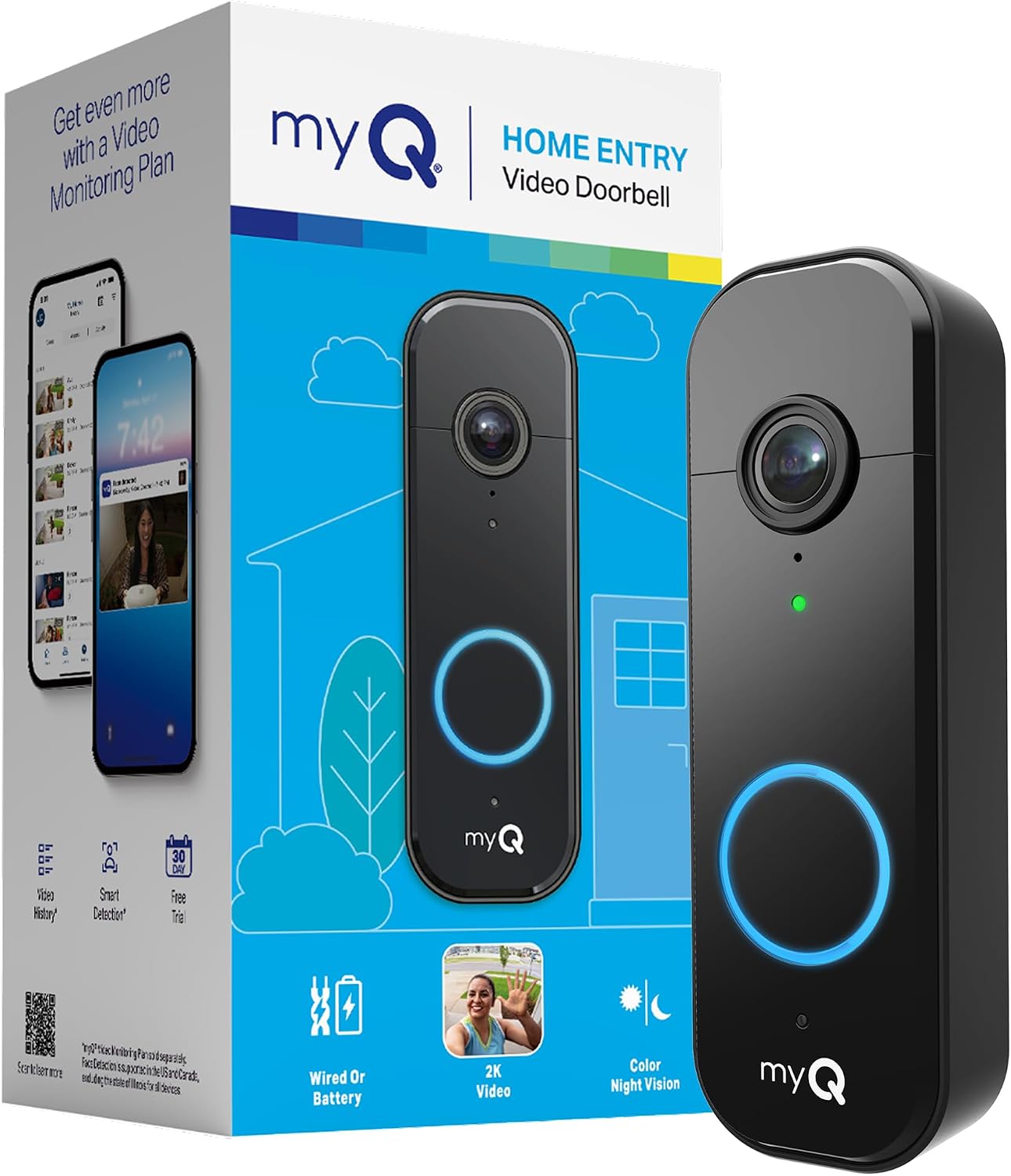
Pros
- Easy switch between battery and wired power options
- Provides clear images even at night with color vision
- Sends instant alerts for any detected movement nearby
- Fits most homes with flexible install choices
Cons
- Advanced person detection needs an extra paid plan
- Recharging the battery requires removing the unit periodically
- Wireless chime accessory is not yet available
The Chamberlain myQ Video Doorbell gives homeowners a practical way to watch the front entry from anywhere. It delivers steady video that helps track daily comings and goings without added complexity.
Motion alerts prove useful for package deliveries on the porch or spotting visitors during the day. The wide angle covers the full doorway area in most standard setups.
Worth noting before buying: full AI alerts for faces require a separate plan. Basic motion detection works without it but offers fewer details.
This model suits renters and homeowners who want straightforward video monitoring on a front door or porch.
Place the doorbell at eye level on the door frame or siding for the best view of approaching visitors and packages. This height works on both wood and metal doors common in many homes.
Key placement tips include these scenarios:
- Apartments with narrow entries benefit from centering the unit to avoid wall obstructions
- Wood-frame homes allow easy wired connection to existing chimes
- Driveway views improve when angled slightly toward the path
- Avoid direct sun exposure that can wash out images at certain times

Pros
- Flexible wired or battery power options suit different home setups without major rewiring
- Head-to-toe video view captures packages on the ground and taller visitors
- Basic live viewing and alerts work without any subscription after setup
- Weather-resistant build handles rain and temperature changes for outdoor reliability
- Integrates with common voice assistants for hands-free notifications
Cons
- Full smart detection and longer video storage require a paid subscription after the trial
- Battery version needs periodic recharging which interrupts continuous use
- Setup can take extra time if existing wiring is not already present
This doorbell camera helps homeowners keep an eye on the front porch where packages often get left during the day. The wide view shows the entire entry area so you can confirm deliveries or see who is approaching without leaving the house.
Two-way audio lets you speak directly to visitors or delivery people from your phone. Night vision keeps the same clear picture after dark when most unexpected activity might occur around the door.
Custom activity zones focus alerts on the porch or walkway while ignoring passing cars. This setup gives peace of mind for families who want to know when kids return home or when someone is at the gate without constant false notifications.
The device works as a standalone unit with basic features even if no subscription is active. It pairs with common smart home systems to trigger lights or send simple alerts when motion is detected near the entry.
Place the unit at standard doorbell height on a flat surface facing the main approach to the door. This position captures both faces and ground level items such as packages.
- Avoid direct sunlight on the lens to reduce glare during daytime recordings.
- Keep the view clear of bushes or railings that could block the lower portion of the image.
- Test the motion zones after mounting to confirm the porch area is covered while street traffic is filtered out.
The rechargeable battery version provides several months of use depending on how often motion events occur. Hardwiring to existing doorbell power keeps the unit topped up without manual charging.
- Basic motion alerts and live view remain available without any plan.
- Cloud storage for video history needs a subscription after the first month trial ends.
- Local options are limited so most users rely on cloud access for past recordings of porch activity.
Buying Guide for Best Doorbell Cameras With Monitor
A doorbell camera with a monitor does two jobs at once, letting you see and hear the front door from a dedicated spot in your home. The right choice depends on how you want to be alerted and where you will place the screen.
Monitor type and placement
Some systems include a simple plug-in chime that sounds an alert, while others offer a small screen that shows the live feed. A chime is useful for kitchens or hallways where you need an audible alert, but a screen is better for a home office or living room where you can glance at a visual.
Consider where you spend most of your time indoors. A system with a separate monitor gives you a fixed reference point that does not depend on your phone, which is helpful for households with multiple people or when phones are often on silent.
Wired versus wireless power
Hardwired doorbells connect to your existing doorbell wiring for continuous power, which is reliable but requires compatible wiring at your entrance. Battery-powered models offer easier installation anywhere, but need recharging every few months.
If your front door already has doorbell wires, a wired model removes battery maintenance from your routine. For renters or homes without that wiring, a battery model with a long life and clear low-battery alerts prevents you from missing visitors because the camera died overnight.
Field of view and video clarity
A wide field of view shows more of your porch, steps, and package drop area, reducing blind spots where someone could stand unseen. Head-to-toe coverage is particularly useful for seeing packages left directly below the camera.
Higher resolution video makes it easier to identify faces and read details like delivery labels on a monitor screen. Compared to 2K security cameras, 4K models hold detail at longer range, but for most doorstep distances, a clear 2K feed is sufficient to recognize a visitor.
Local storage and privacy
Systems that store video locally on a memory card or a home base keep your recordings in your physical control, without a monthly fee. This is a practical choice if you want to review footage without an ongoing subscription.
Local storage also means your video is not transmitted to a cloud server, which addresses privacy concerns for footage of your family and home entrance. Look for models that encrypt the data on the device for an added layer of security.
Smart detection and alerts
Advanced detection that distinguishes between people, packages, and vehicles cuts down on false alerts from passing cars or animals. This means the monitor chimes or shows a screen alert only when it matters, so you pay attention.
For homes with frequent deliveries, package-specific alerts can notify you via the monitor the moment something is left at your door, which is more reliable than a general motion alert that could be anything.
Weather resistance and durability
Your doorbell camera faces sun, rain, and temperature swings year-round. A weather-resistant rating ensures it continues working through seasonal changes without fogging, cracking, or failing in a storm.
This is especially important if your entrance gets direct afternoon sun or driving rain. A robust build protects the electronics and lens, so the video feed to your monitor remains clear in all conditions.
Once you know where you will place the monitor, how you will power the camera, and what you need to see, the right option becomes clear. The goal is a system that feels integrated into your home, not an extra device to manage.
Why You Should Trust Us
Our recommendations are based on deep market research and analysis of manufacturer specifications, cross-referenced with independent certifications from bodies like UL and ANSI. We evaluate each product using our SHU Score system, which aggregates verified performance data, user-reported reliability patterns, and feature alignment with real home security needs.
We do not accept payment for placements and focus solely on which products offer practical protection for everyday situations. Our process is designed to cut through marketing claims and identify the models that deliver on their promises.
Final Thoughts
Choosing a doorbell camera with a monitor comes down to reliable alerts and clear video where you need it most. The best system is the one you will actually use because it fits naturally into your home layout and daily routine.
Our Editor’s Pick for the best overall doorbell camera with monitor is the Tapo 2K+ Wired or Battery Powered Smart Video Doorbell with Chime. Its included modular chime provides flexible placement for audible alerts, and the option for wired power or long battery life suits most installation scenarios. For households focused on smart security integration, the proven Best Seller is the Arlo Video Doorbell 2K (2nd Gen, Latest Release). It works seamlessly with major smart home platforms, offering reliable person and package detection that keeps alerts relevant.
If you prefer a system that stores video locally without any fees, models with built-in storage or a microSD slot remove the worry of monthly costs. This approach to security cameras prioritizes self-reliance and data control.
The right choice removes the uncertainty of not knowing who is at your door, giving you clear visibility and peace of mind from a dedicated spot in your home.
FAQs
Can you use a doorbell camera without a smartphone?
Many doorbell cameras with monitors are designed to work independently. The included chime or screen provides audible alerts and sometimes live video viewing, so you can see and hear visitors without needing a phone app open.
Do you need wiring for a doorbell camera with a monitor?
Wiring is optional for most modern models. Battery-powered doorbells install anywhere, while wired versions connect to existing doorbell wires for continuous power. The monitor itself typically plugs into a standard wall outlet inside your home.
How far away does the monitor work from the doorbell?
The wireless range between the doorbell and its monitor usually covers a typical single-family home. Walls and interference can reduce the signal, so placing the monitor within a direct line of sight to the front door area ensures the most reliable connection.
What is the advantage of a dedicated monitor over a phone?
A dedicated monitor is always in place and ready, so you do not miss an alert because your phone is on silent, in another room, or out of battery. It gives multiple household members a fixed, shared point to check who is at the door.
Can doorbell cameras with monitors work at night?
Yes, models with infrared or color night vision provide a clear view after dark. The monitor will display the night vision feed, allowing you to identify visitors and see packages left on your porch in low-light conditions.


Write Your Review
No reviews yet. Be the first to share your experience!