

A bedroom without a reliable lock is a bedroom without real privacy. Whether you are trying to keep kids out of a home office, protect valuables in a master suite, or give a family member their own secure space, a standard doorknob with a twist lock does not really cut it and losing the key is a recurring headache.
Smart locks for bedrooms solve this by replacing that flimsy knob with fingerprint or keypad access that actually works on demand. We went through the top models designed for interior doors to find ones that fit standard knob holes, hold up with daily use, and do not require a locksmith to install.
If you want one recommendation for best smart locks for bedroom, go with the KLLOQUE Fingerprint Door Knob. It reads your thumbprint and unlocks instantly, so anyone you set up gets in without fumbling for a key or remembering a code. See the full list below to find the right option for your property.
Our Top Picks

Pros
- Multiple unlock methods reduce hassle for daily front or bedroom door use
- Customizable modes fit routines like auto-locking after leaving the house
- Rechargeable battery lasts a year with app alerts for timely charging
- Simple screwdriver install suits renters updating apartment security
- Access logs in app track who enters home doors for added accountability
Cons
- Fingerprint recognition fails with wet or dirty fingers, requiring app or key backup
- App works only in Bluetooth range; remote control needs separate gateway purchase
- Not compatible with doors having weather strips, limiting exterior front door use
This fingerprint smart door knob from KLLOQUE replaces standard knobs on interior doors like bedrooms or apartment entries, offering thumbprint, app, or key access. For front doors inside homes, it eliminates key searches during busy mornings, while auto-locking after 5 seconds ensures security when you head to work. Bedroom use benefits from privacy mode, which prevents hallway access, keeping valuables or sleeping kids safe without constant manual locking.
Daily operation centers on reliable thumbprint scans for hands-free entry, ideal for monitoring deliveries by quickly checking the door. The app tracks entries, helping spot unusual activity around home entrances. Four modes—passage for open houses, normal for auto-secure, privacy for locked isolation, and silent for quiet nights—adapt to scenarios like Airbnb guests or family gatherings, providing control without complexity.
Battery life supports a full year of use, with low-power alerts via app to avoid surprises. Backup keys handle any glitches, ensuring you never get locked out of garage-adjacent doors or office spaces. Overall, it strengthens everyday property protection for renters and homeowners focused on simple, effective door security.
Installation aligns knobs by the UP mark and secures with a screwdriver, fitting most standard doors but skipping those with weather strips. This setup delivers peace of mind for securing back hallway doors or kid's rooms without ongoing maintenance worries.
Most homeowners install this knob in under 30 minutes using a basic screwdriver on standard interior doors. Focus on flat surfaces without weather strips for proper fit.
- Align both interior and exterior knobs with the UP mark facing upward.
- Insert the spindle bar vertically before tightening screws.
- Charge battery for 3 hours pre-install; use USB-C for emergencies.
- Test all modes post-install: rotate thumb turn to select passage, normal, privacy, or silent.
- Avoid thick door jambs; measure door thickness (1.4-1.8 inches) beforehand.
The app connects via Bluetooth for local control, perfect for managing doors inside your home. Enable Bluetooth and location permissions, then touch the sensor to pair.
- Add fingerprints or share access with family for bedroom or front doors.
- View entry logs to monitor who unlocks apartment entries.
- Get low battery warnings below 20% to charge before issues.
- Remote unlock requires buying a separate gateway; otherwise, stay within Bluetooth range.
- New members sign up independently to receive shared access codes.

Pros
- Multiple unlock options reduce time spent searching for keys at busy front doors
- Privacy and passage modes fit bedroom or apartment door needs without complexity
- Rechargeable battery with low-power alert avoids surprise lockouts
- Stores up to 20 fingerprints for family members and frequent visitors
Cons
- Fingerprint scan fails with wet or dirty fingers, triggering a 2-minute lockout after 5 tries
- App works only in Bluetooth range; remote control needs a separate gateway purchase
- Not compatible with doors that have weather stripping, limiting exterior use
This fingerprint door knob offers a straightforward way to secure interior doors like bedrooms or apartment entries. You touch the center with a clean, dry finger for quick access, which beats fumbling with keys when carrying packages inside or heading to bed. For front doors, the 5-second auto-lock adds protection after you step out, giving peace of mind about deliveries left on the porch.
Three modes let you adapt to daily needs: passage for open traffic areas, entrance for standard locking, and privacy to block kids or guests from your bedroom. The app tracks who enters and lets you manage access nearby, useful for sharing entry with family without physical keys. Fingerprints stay stored locally, keeping your home data private during routine use.
Installation fits most standard doors with basic tools, aligning knobs properly for smooth operation. The rechargeable battery lasts through regular family comings and goings, with a USB port for easy top-ups and backup keys for reliability. It strengthens door security in apartments or homes where simple, keyless entry prevents unauthorized access to private spaces.
Overall, it handles everyday scenarios like monitoring kid access to rooms or securing against casual intruders, though it shines best on interior setups without weather seals.
Check your door fits standard US dimensions and lacks weather stripping for proper seal. Use a screwdriver and align both knobs with the 'UP' mark facing up, spindle vertical.
- Charge battery 3+ hours before setup to avoid low power issues.
- Interior thumb turn arrow points to center dot before inserting upward.
- Test modes after install: passage for open doors, normal for auto-locking front entries.
- Works on bedroom or apartment doors; skip if thick seals block the mechanism.
App pairs via Bluetooth for nearby control on phones; enable location and touch sensor to activate. View entry logs and add fingerprints for family doors.
- Share access with guests for apartments without keys.
- Remote unlock limited to Bluetooth range; buy gateway separately for Wi-Fi from anywhere.
- Manage privacy modes remotely when home, like locking bedroom from living room.
- No cloud upload keeps data local for porch or front door privacy.

Pros
- Fast fingerprint recognition gets you inside without fumbling for keys in the rain
- Easy knob replacement fits most wooden doors without tools or wiring
- Multiple entry options cover family, guests, and emergencies reliably
- App battery monitoring avoids getting locked out from dead batteries
- Auto-lock and failed attempt lockout add layers of everyday security
Cons
- Any fingerprint unlocks the door until you set an administrator during initial setup
- Remote app control and voice assistants require a separate gateway purchase
- Uses standard AAA batteries that need regular checking to prevent lockouts
This Evanshow smart door knob brings keyless entry to front doors, apartments, or bedrooms, making it simpler to manage who comes and goes without keys. Fingerprint recognition works in under a second, ideal for busy mornings when hands are full carrying groceries from the driveway. For families, set unique passcodes or swipe cards for kids or guests, reducing the hassle of key handoffs that often lead to lost spares.
The auto-lock feature ensures doors stay secure after you step out to check the porch for packages, preventing accidental leaves-open mistakes. On apartments or shared homes, the anti-peep keypad hides codes from nosy neighbors, while failed attempt lockout stops casual break-in tries. Backup keys handle rare glitches, giving peace of mind without overcomplicating daily routines.
Tracking entry logs via the app helps monitor deliveries or service visits when you're away, though full remote needs extra hardware. Overall, it fits straightforward security for wooden doors up to nearly 2 inches thick, focusing on practical access control rather than high-tech complexity. Homeowners gain reliable control over front or interior entries, cutting down on forgotten keys and unauthorized access worries.
Installation swaps in minutes like any knob, suiting renters or quick upgrades. Battery alerts prompt changes before issues arise, keeping operations smooth for watching over property day-to-day.
This knob replaces standard ones on wooden doors 1.18 to 1.97 inches thick that swing left or right, common on bedrooms, apartments, or front entries. No drilling or wiring needed, so it works for renters avoiding landlord issues.
- Measure door thickness first to confirm fit.
- Turn off power if near electrical but usually not required.
- Remove old knob, align new one, and tighten by hand in under 10 minutes.
- Test all functions immediately after setup.
- Register administrator fingerprint right away to secure against any-fingerprint default.
The Tuya app handles basic local control like passcodes and logs, but remote unlocking or voice commands need a separate gateway. This setup suits local use on interior doors but limits full smart home integration without extra cost.
- Pair via Bluetooth for fingerprint management and battery checks.
- Gateway enables app remote passcode sharing for deliveries when away.
- Supports Alexa or Google only with gateway for voice entry commands.
- Monitor battery levels to avoid lockouts from front door use.
- No built-in WiFi, so gateway bridges for broader home system ties.

Pros
- Fast fingerprint scan unlocks in under a second for smooth daily routines
- Multiple access options fit families with kids, guests, and cleaners
- No-drill install works on standard interior doors without tools or help
- Auto-lock and failed-attempt lockout add layers to room security
- Emergency USB power from a bank opens doors when batteries die
Cons
- Not suited for exterior doors exposed to rain or weather
- Unlocks with any fingerprint until admin is registered at first setup
- Relies on replaceable AAA batteries needing periodic checks
This fingerprint door knob fits interior doors in homes, apartments, or offices, offering a straightforward way to control access to bedrooms or private spaces. Parents can scan their finger to enter a child's room quietly at night, avoiding the noise of keys, while the auto-lock feature ensures the door secures itself after closing for peace of mind when stepping out. Multiple family members add their prints, so everyone gets in fast without hunting for keys during morning rushes.
For home offices or apartment closets, set unique codes for cleaners or guests, keeping personal documents or valuables protected from casual entry. The anti-peep keypad randomizes numbers to block shoulder-surfers watching codes near shared spaces, and IC cards provide another quick option for frequent visitors. Backup keys handle rare battery issues, maintaining access without stress.
Security lockout after wrong code tries stops intruders testing combinations on bedroom or office doors. While designed for indoor use, it strengthens daily routines by reducing forgotten locks or lost keys, letting homeowners focus on family time rather than door worries. The setup starts simple but requires registering an admin print first to prevent open access.
Overall, this lock suits renters or owners upgrading interior security without complex wiring, delivering reliable control over who enters private areas like kids' rooms or home workspaces.
This door knob installs on wooden interior doors without drilling or wiring, taking minutes with included tools and video guides. It fits most home setups for bedrooms, offices, or closets.
- Door thickness: 1.18 to 1.97 inches
- Door type: Left or right swing, interior only
- No professional help needed: Replaces standard knobs directly
- Avoid exterior doors: Lacks weather protection for rain exposure
Use four AAA alkaline batteries, not rechargeable ones, for reliable power in daily home use. Replace them when low to avoid lockouts on bedroom or office doors.
- Battery type: Four AAA alkaline only; skip rechargeables
- Emergency power: USB-C port for power bank if dead, not for charging internals
- Avoid USB charging: Risks damaging the lock's circuits
- Factory reset: Hold reset button 10 seconds for green light and beep
Pros
- Multiple entry ways fit different family needs without relying on one method
- Quick recognition speeds up daily routines like getting kids to bed
- Simple screwdriver install works on standard interior doors
- Low battery warning prevents lockouts during busy days
Cons
- Fingerprint scanner can fail with wet or dirty fingers after yard work
- App control needs a smartphone nearby and stable Wi-Fi connection
- Best for interior doors only, not suited for outdoor exposure
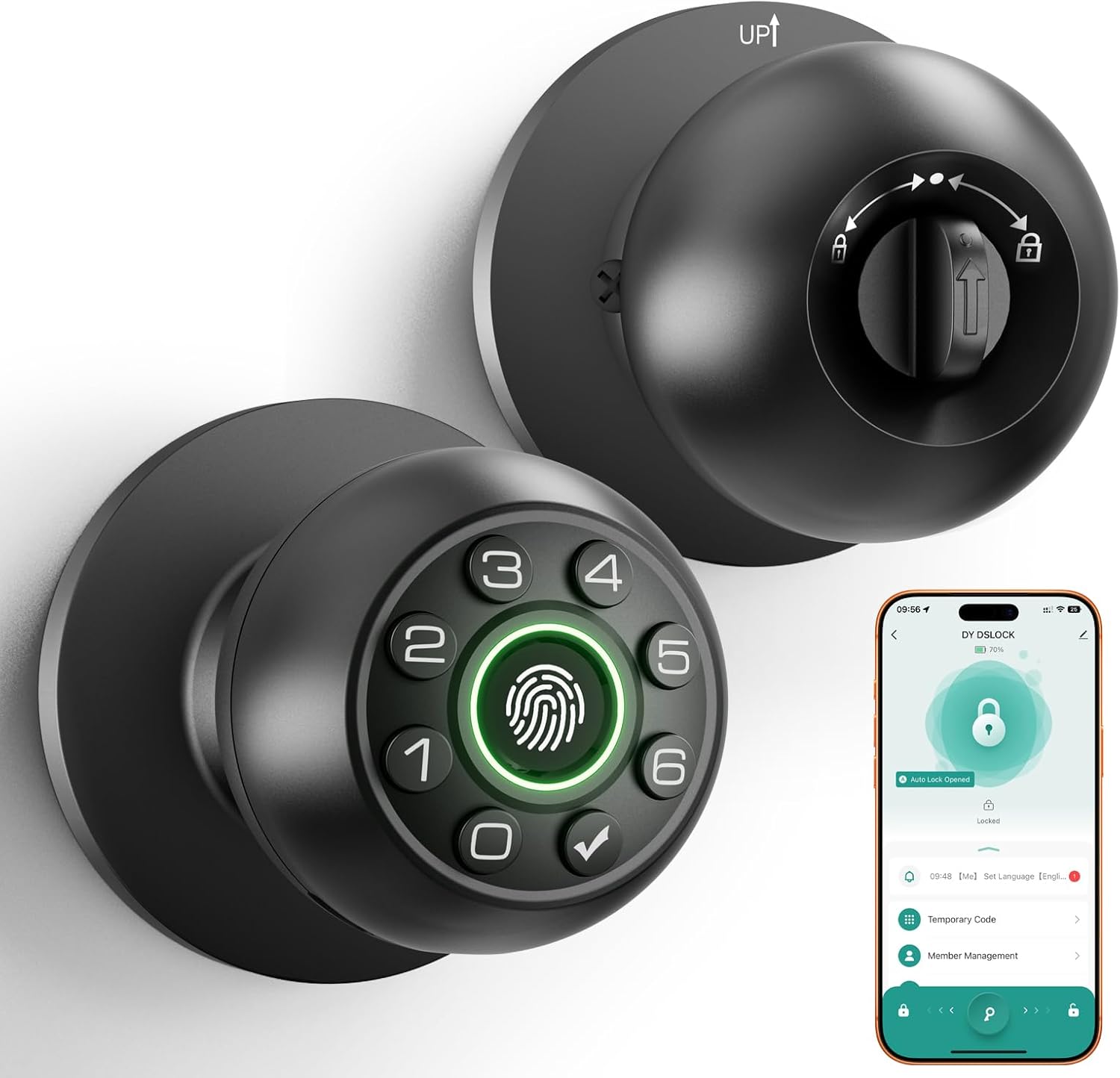
This fingerprint door knob replaces standard interior locks on bedroom or office doors, offering fingerprint, code, app, or key access to fit everyday family routines. Fast fingerprint recognition lets parents enter quietly at night without waking kids, while code options allow temporary access for cleaners or family visitors who come and go. It adds a layer of control to keep pets out of private spaces or monitor who enters shared areas like home offices during work hours.
For homeowners tired of lost keys or noisy deadbolts, the silent mode and automatic locking provide peace of mind without disturbances. Features like anti-peep codes hide real passwords from onlookers, useful when kids or guests punch in numbers near the front interior door. The rechargeable battery holds charge for up to a year, reducing hassle compared to disposable ones that fail unexpectedly.
Installation takes about 15 minutes with a screwdriver on standard US doors, making it practical for renters or DIY homeowners securing apartments. Backup mechanical keys handle emergencies, ensuring no one gets locked out during family gatherings or late nights. Overall, it strengthens interior door security in ways that match real home needs without complexity.
While not for exterior use, it excels at protecting personal spaces like bedrooms from unauthorized entry, giving families reliable control over who goes where inside the home.
This lock fits US standard interior doors with these specs to ensure a smooth setup:
- Door thickness: 1-1/8 to 2-1/8 inches, common for bedroom and office doors
- Backplate sizes: 2-3/8 inches or 2-1/8 inches to match existing holes
- Only a screwdriver needed for 15-minute install on flat interior doors
- Check your door beforehand to avoid mismatches on non-standard frames
Ideal for renters swapping out basic knobs without permanent changes.
Four ways to unlock address common home access needs:
- Fingerprint: Stores multiple prints for family members, unlocks in 1 second for quick bedroom entry
- Keypad code: Set permanent, one-time, or anti-peep passwords for guests or kids
- App control: Remote unlock via phone for letting in deliveries when away
- Mechanical keys: Two included as backup if power fails
Passage mode keeps doors unlocked during parties; silent mode avoids noise at night.
Buying Guide for Smart Locks For Bedroom
A smart lock for a bedroom door serves a very different purpose than one on a front entrance. The priority shifts from weather resistance and deadbolt strength to quiet operation, discreet sizing, and access control within the home. Here are the key things worth checking before you buy.
Lock Type and Door Compatibility
Most smart locks on the market are built for exterior doors with a standard deadbolt prep, and many will not fit an interior bedroom door at all. Bedroom doors typically use a passage or privacy latch, not a deadbolt, so you need to confirm the lock type before ordering.
Look for smart locks designed specifically for interior use, including those that work with a passage latch or a simple turn-button privacy mechanism. Checking your door’s backset measurement and bore hole size beforehand will save you a return.
Entry Method and Household Dynamics
A keypad or app-based unlock works well for adults, but the right entry method depends on who else needs access. Fingerprint smart locks are a practical option for bedroom doors because they allow fast, keyless access without sharing codes that could be passed along or forgotten.
Think through how many people need regular access and whether any of them are young children or elderly family members who may struggle with certain entry methods. The most secure option is not always the most practical one for everyone who uses the room.
Motor Noise and Locking Mechanism
An exterior lock that clicks and whirs loudly is easy to tolerate. The same noise from a bedroom lock at midnight is a different matter entirely. Many smart locks use motors that produce a noticeable mechanical sound on every lock and unlock cycle.
Check user reviews specifically for noise complaints before committing to a model. Worm gear and clutch-based mechanisms tend to run quieter than direct-drive motors, and some manufacturers list decibel ratings in their product specs.
Power Source and Maintenance
A bedroom lock that goes dead and traps someone inside is a serious problem. Unlike front door locks where a physical key backup is standard, some interior smart locks skip the key override entirely to keep the profile slim.
Smart locks with long battery life reduce how often you need to think about maintenance, which matters more for an interior lock that rarely gets checked. Confirm the lock has either a low-battery alert or a physical key bypass before purchasing.
Installation and Door Prep
Interior doors are often thinner and lighter than exterior ones, and over-tightening a heavy smart lock can warp the door over time. Locks designed for simple DIY installation tend to use lighter hardware and fewer complex components, which makes them a better fit for the typical interior door build.
Measure your door thickness before buying, since most smart locks list a supported range. A lock that sits flush and mounts cleanly will also cause less stress on the door frame over years of daily use.
With these factors in mind, the shortlist of realistic options becomes much smaller and easier to evaluate. The right bedroom smart lock is one that fits the door, suits everyone who uses the room, and stays out of the way the rest of the time.
Why You Should Trust Us
Our reviews at Safe Home Upgrade rely on deep research into manufacturer specs, independent lab certifications like ANSI and BHMA, and aggregated performance data from verified sources. We developed the SHU Score to rate objectively on factors such as build integrity, usability in standard home environments, and verified security claims.
This data-driven approach ensures recommendations prioritize practical protection for U.S. homeowners and renters, focusing on what holds up in real daily scenarios without unsubstantiated promises.
Final Thoughts
Most of the options on this list are reliable enough that you really cannot go wrong. If your main need is basic privacy — keeping a door locked without dealing with keys any fingerprint knob on this list will handle that cleanly. Where the decision gets more specific is if you need multiple user profiles, a backup entry method, or a lock that fits an unusually sized door.
The KLLOQUE Fingerprint Door Knob is the pick for straightforward bedroom security. It fits standard knob holes, setup takes minutes, and fingerprint recognition means the right people always get in while everyone else stays out.
FAQs
Do smart locks for bedroom doors work without Wi-Fi?
Yes, most operate offline using fingerprint or keypad entry, with app features needing Wi-Fi only for remote access. Local functions like thumbprint scans and passcodes function fully without internet, suitable for spotty home networks. Battery-powered designs avoid wiring hassles.
How fast do fingerprint door knobs unlock?
Quality models unlock in 0.3 to 0.5 seconds after registering your print. This speed handles quick bedroom access for parents checking on kids at night. Test multiple fingers for reliability if one gets worn.
Can renters install these keyless bedroom locks?
Yes, they replace existing knobs without permanent changes to the door. Screw-in installation takes minutes and reverses easily for move-out. Features like temporary codes fit shared housing without key duplication risks. Verify door thickness fits 1-3/8 to 1-3/4 inches.
What’s the battery life on best smart locks for bedroom door?
Batteries last 6 to 12 months with average use of 10 entries daily. Low-power modes extend life in low-traffic bedrooms. Always have spare AA batteries ready and use the key backup if needed. Alerts via app prevent surprises.
Are these biometric locks secure for home use?
They meet ANSI Grade 2 standards for residential security, resisting picking and force. Combining fingerprints with passcodes and keys layers protection effectively. In apartments, app logs track entries for added peace of mind. Avoid cheap unrated models.
Write Your Review
No reviews yet. Be the first to share your experience!