

Your front door is the one entry point that cannot have a weak link. A flimsy deadbolt, a spare key under the mat, or a lock you cannot check on while traveling all create the same problem, you never quite know if your home is actually secure until something goes wrong.
Smart deadbolt locks fix this by replacing the mechanical weak points with keypad access, remote locking, and real-time alerts, so you stay in control of your front door whether you are home or not. We went through the top models on the market to find ones built solidly enough for daily front door use.
Our top pick for best smart deadbolt locks for front door is the Schlage Encode WiFi Deadbolt. It handles deliveries and family access through app control and access codes, so you can let the right people in from anywhere without handing out physical keys. Check out our top picks below to find the right fit for your setup.
Our Top Picks

Pros
- Multiple unlock methods fit different family members and situations
- Built-in WiFi enables control from anywhere without extra devices
- Real-time notifications track who enters your home
- Simple setup works on most standard doors
- Custom passcodes manage guest access easily
Cons
- Batteries not included, so purchase 4 or 8 AA alkaline separately
- No door sensor means auto-lock works only if door is fully closed
- Requires stable home WiFi nearby for reliable remote access
This Philips WiFi deadbolt offers straightforward keyless entry for your front door, replacing traditional locks with options like fingerprint scans, app control, or passcodes. For busy mornings rushing kids to school, a quick finger touch opens the door without fumbling for keys, while remote unlocking from your phone handles package deliveries when you're at work. Entry notifications keep you informed about who's coming and going, providing peace of mind during the day.
Auto-locking after a set time ensures your home stays secure even if you forget in the rush out the door, and away mode disables most access methods except a master code when you're on vacation. Family members each get their preferred method, from voice commands via smart speakers to physical keys as backup. This setup reduces daily hassles around the front entry while maintaining solid protection.
Custom passcodes let you grant temporary access to service providers without being home, tracking exactly when they arrive and leave through the app history. Though it lacks a door sensor, the flexible unlock variety covers most household needs, making it a practical upgrade for monitoring porches and securing against unauthorized entry.
Overall, it delivers reliable control for everyday home defense, focusing on convenience in real scenarios like watching over pets inside or gates near driveways.
Check your door thickness first, as this lock fits standard sizes from 1-3/8 to 2 inches thick. Most front doors match this without issues.
- Use just a screwdriver for a 10-minute DIY install on right or left-handed doors.
- Provide 4 or 8 AA alkaline batteries, as none come included.
- Ensure your door has a standard deadbolt hole setup; measure beforehand to avoid returns.
- Available in black or nickel finish, so confirm color preference.
The app connects directly via your home WiFi for remote locking, unlocking, and alerts without any hub. Keep the lock within range of your router for steady performance.
- Works with common home networks; update the app for voice control with Alexa or Google Assistant.
- View entry history and manage up to 100 passcodes or fingerprints for family and guests.
- Real-time notifications arrive on your phone for door activity.
- Away mode adds protection by restricting access remotely.
Pros
- Remote app control works from anywhere to manage front door access
- Built-in alarm detects door tampering for added break-in protection
- Fits most standard doors and installs with just a screwdriver
- Up to 100 access codes simplify sharing for cleaners or neighbors
- Voice control with Alexa or Google for hands-free locking
Cons
- Requires reliable WiFi signal at the door for remote features to work
- Batteries need replacement every few months depending on use
- Touchscreen can smudge over time and needs occasional cleaning
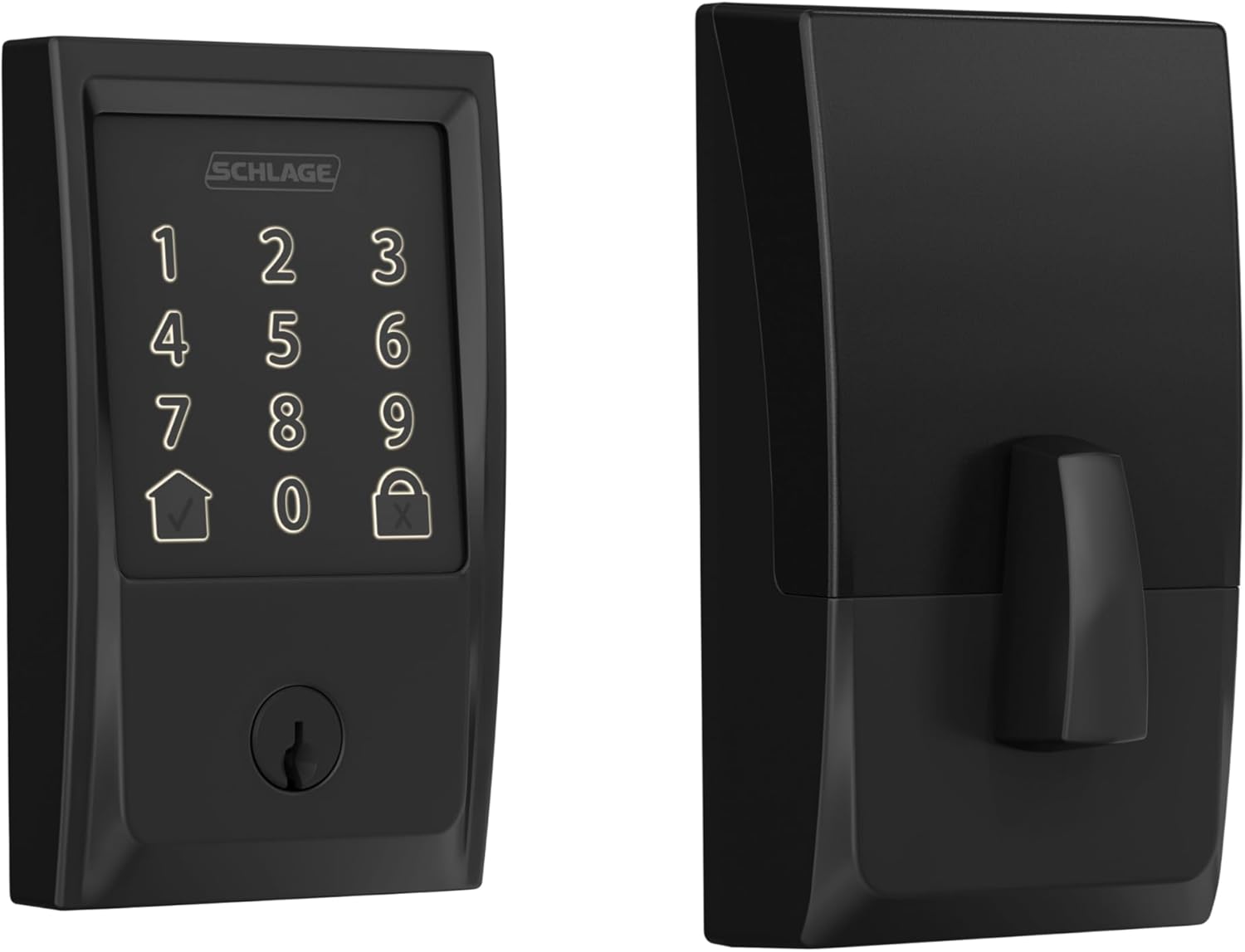
This Schlage Encode deadbolt replaces your standard front door lock with keyless entry via touchscreen or app. It connects directly to your home WiFi, so you can lock or unlock from anywhere, which gives peace of mind when deliveries sit on the porch or family arrives while you're out. The built-in alarm sounds if someone pries at the door, alerting you to potential break-ins before they happen.
For everyday routines, set auto-lock to relock the door minutes after it opens, preventing forgotten locks when kids head to school or guests use the backyard gate. Track who entered and when through the app, helping you verify if the dog walker came by or if packages were safe. One-touch locking from outside makes leaving for work quick and secure without fumbling keys.
With a backup physical key and long-lasting batteries, it handles outages or low power without leaving you locked out. The fingerprint-resistant touchscreen stays readable for repeated use, and it pairs with voice assistants for hands-free control near the driveway. Overall, it strengthens front door security for homeowners focused on family safety and property monitoring.
Durability holds up to daily wear, fitting standard doors without modifications. This setup reduces reliance on spare keys hidden outside, cutting risks from theft while enabling flexible access for trusted visitors.
Most homeowners complete setup in under 30 minutes with basic tools. It fits doors 1-3/8 to 1-3/4 inches thick and standard backsets of 2-3/8 or 2-3/4 inches, covering typical front or side entry doors.
- Just a screwdriver needed; no wiring or drilling extras required
- Includes mounting plate, strike plate, screws, and four AA batteries to start immediately
- Snap-and-stay design holds parts in place during install for easier solo work
- Remove old deadbolt first; test on interior doors if unsure about fit
Backup key works right away post-install for front porch security testing.
The Schlage Home app connects via your home WiFi for control without extra hubs. Use it to manage front door access from your phone anywhere with internet.
- Lock or unlock remotely to secure deliveries or let in repair workers
- Create and schedule up to 100 codes for family, guests, or cleaners
- View entry history and get alerts for low battery or door activity
- Customize auto-lock timing to fit your routine, like after kids enter
- Works with Alexa or Google for voice commands near the driveway
Needs steady WiFi at the door; app notifications help monitor vacation home entry.

Pros
- Fingerprint recognition works fast for daily use, reducing fumbling with keys at the front door.
- Multiple code options fit family routines and occasional visitors without compromising security.
- Built-in handle set simplifies upgrading your entire front door lock in one installation.
- App provides real-time alerts and history, helping track access around deliveries or family schedules.
- Backup mechanical keys ensure entry during power outages or WiFi issues.
Cons
- Requires 8 AA alkaline batteries, which are not included and need regular replacement.
- Best suited for standard door thicknesses of 1-3/8 to 1-3/4 inches; measure first to avoid fit issues.
- Keypad lighting helps at night but may need extra home lighting for low-visibility conditions.
This Philips WiFi keypad door lock replaces your standard front door deadbolt with options like fingerprint, app control, voice commands, or codes, making entry smooth for family members carrying packages or kids' gear. You gain peace of mind from real-time notifications about who unlocks the door and when, whether checking on deliveries left at the porch or ensuring teens get home safely after school. The auto-lock feature kicks in customizable seconds after closing, preventing forgetful exits that leave your home exposed during daily routines.
For guest access, create one-time or scheduled codes via the app, ideal for letting in repair workers or dog walkers without being present. Vacation mode disables the keypad entirely, securing your property while you're away and reducing risks from unknown visitors approaching the driveway. Soft lighting on the keypad aids nighttime use, and silent mode keeps operations quiet to avoid waking sleeping children inside.
Backup keys provide manual access if power fails or WiFi drops, ensuring reliability for everyday front door security. Activity logs in the app let you review entries over time, spotting patterns like frequent late-night unlocks that might signal issues with shared codes. Overall, it fits standard doors and handles common household scenarios without complexity.
Verify your door fits before buying: works on thicknesses from 1-3/8 to 1-3/4 inches (38mm to 50mm). Use only a screwdriver for a quick DIY setup, following the provided video guide.
- Supply 8 AA alkaline batteries (not included) for power.
- Press and hold reset button for 5 seconds to activate after install.
- Test mechanical keys and keypad right away to confirm fit on your front door.
- Connects directly to home WiFi; no extra hub needed for app setup.
The Philips Home Access app handles remote control without hubs, linking to your home WiFi for front door management from anywhere. Get instant alerts on unlocks to monitor deliveries or family arrivals.
- Manage fingerprints, codes, and schedules for users like kids or guests.
- View full access history to track entries over days or weeks.
- Works with Alexa or Google Assistant for voice commands when hands are full.
- Set auto-lock timing and vacation mode for hands-off security.
Pros
- Built-in WiFi connects directly to your home network for app control without extra devices
- Physical buttons on keypad resist wear better than touchscreens for daily family use
- Multiple unlock methods including codes, app, voice, and keys cover all family needs
- Auto-lock feature prevents forgetting to secure the door after shopping trips
- Durable build handles outdoor temperatures and moisture on side or back doors
Cons
- AA batteries not included, so buy them upfront to avoid lockout during setup
- Keypad buttons lack backlighting, making nighttime entry harder without a phone light
- App pairing needs steady WiFi signal, which can frustrate in spotty coverage areas
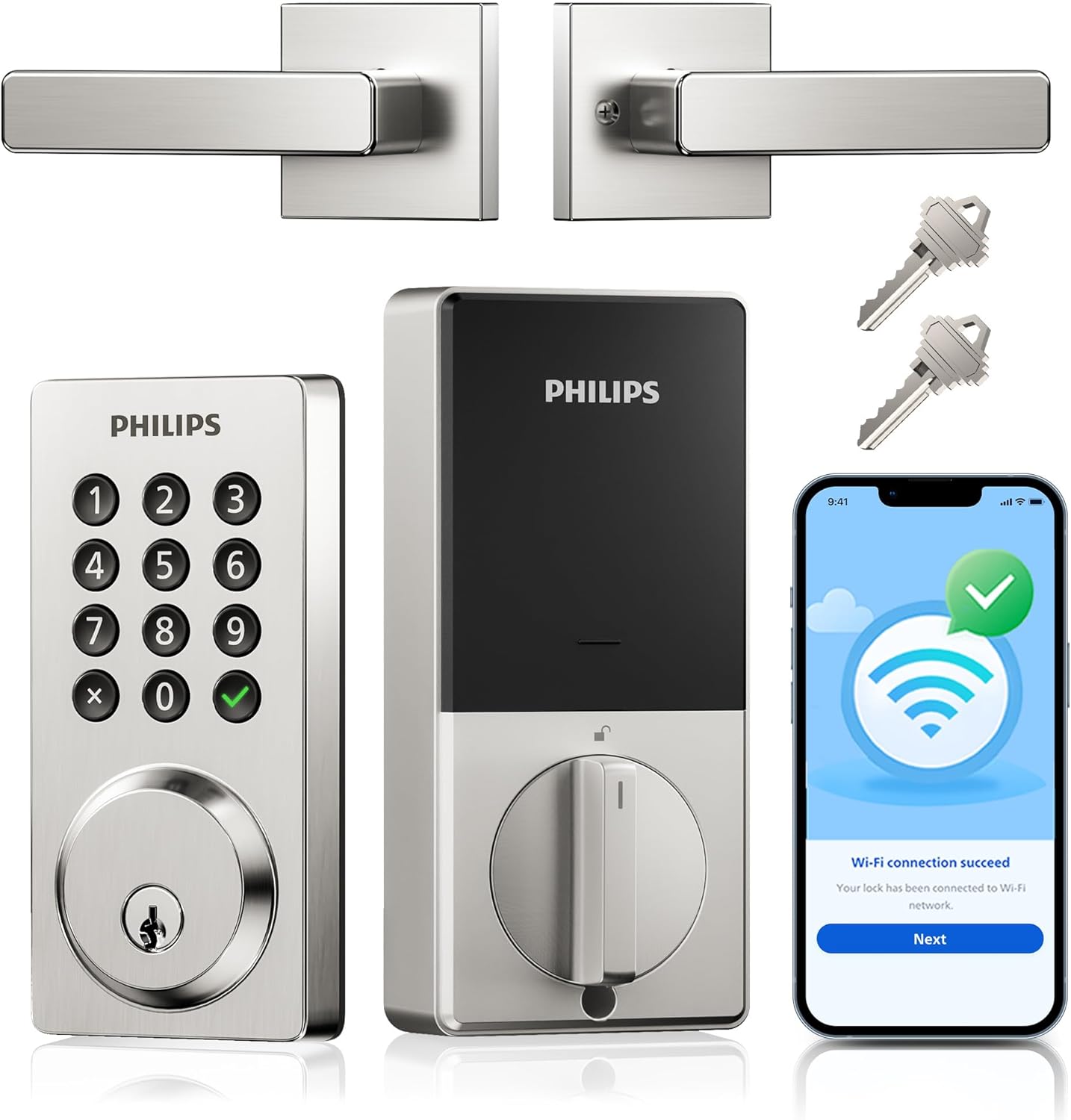
This Philips smart door lock installs in place of a standard deadbolt on front or side doors, giving you control over entry when watching deliveries or ensuring the house stays locked during family outings. With the app, you check who entered the home and get instant alerts, so you know if a package sitter used their code or if kids came back from playing outside safely. The auto-lock kicks in seconds after closing the door, eliminating worries about rushing out for work and forgetting to secure the property.
Physical buttons for passcodes provide a reliable way to let in guests or service people without sharing keys, and you can set one-time codes that expire after use. For vacation mode, it restricts access to only your app or backup keys, adding peace of mind when leaving the backyard gate or storage door as a secondary layer. Voice control through Alexa or Google works hands-free when unloading groceries, keeping routines smooth.
Built to handle rain and extreme temperatures, it fits most homes without issues on exterior doors exposed to weather. Wrong code attempts trigger alarms, deterring casual break-in tries at the front porch. Battery alerts via app remind you to swap them before they die, ensuring reliable performance for monitoring daily entries and exits.
Overall, it simplifies securing doors in everyday scenarios like managing tenant access or pet sitters, focusing on practical control rather than complexity.
This lock fits standard U.S. doors for straightforward replacement of existing deadbolts. Check your door setup first to ensure compatibility.
- Door thickness: 1-3/8 to 2 inches (common for front and back doors)
- Bore hole size: 1-1/2 or 2-1/8 inches (standard drill holes)
- Tools needed: Screwdriver only; no special equipment
- Time: 15 minutes for most homeowners swapping a basic deadbolt
- Best for: Exterior doors like front entrances or garage sides; test fit on interior first if unsure
Remove old lock, align new parts, and tighten; app setup follows power-up for full remote function.
The Philips Home Access app connects directly via your home WiFi for control without hubs. It handles daily security needs like alerts for front door entries.
- Remote lock/unlock: Secure the house from work when deliveries arrive
- Real-time notifications: Phone buzz for every code use or key turn
- Access logs: Review who entered the side door over the past week
- Custom codes: Up to 100 permanent, timed, or one-time for family and guests
- Auto-lock timer: Set 10-180 seconds after closing for forgetful exits
- Low battery alerts: Warning before power drops, avoiding lockouts
Pros
- Built-in WiFi removes need for extra hubs during daily use
- Complete handle set simplifies matching existing door hardware
- Multiple unlock methods reduce reliance on physical keys for the whole household
- Weather tolerance covers typical seasonal swings without extra covers
Cons
- Door thickness must be verified before purchase or installation fails
- Battery changes require periodic checks on a busy front door
- App setup involves initial network connection that takes some time
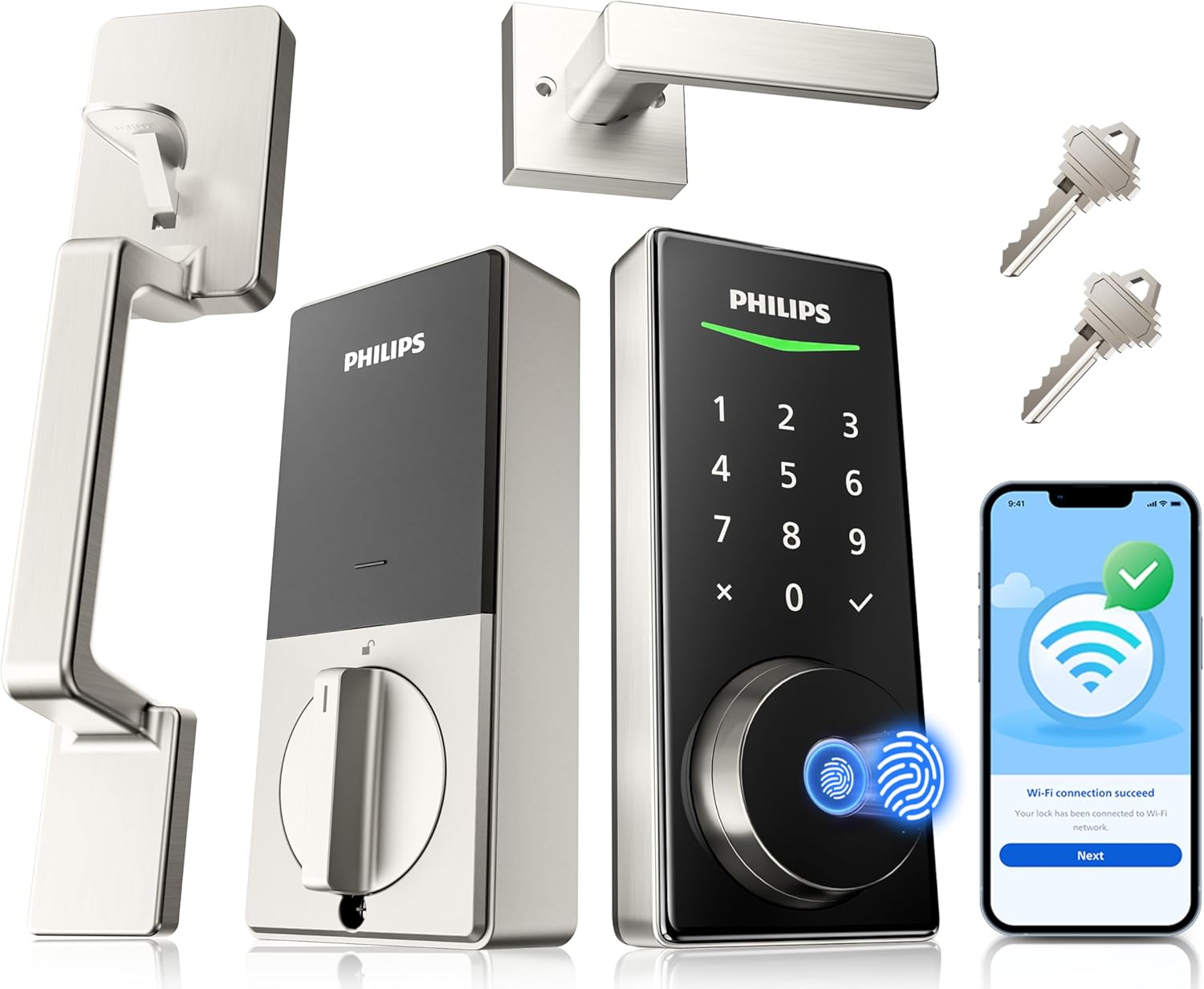
This smart lock replaces a standard front door setup and adds remote control plus fingerprint access for everyday arrivals. Homeowners can receive alerts for each unlock event and share passcodes for deliveries or short visits without handing out keys.
The included handle set fits most common doors and pairs with auto-lock timing so the entry stays secured after family members come through with groceries or after school. Fingerprint recognition works quickly for repeated daily use and the backlit keypad helps in low light near the porch.
Real-time notifications let owners track activity while away such as checking on a contractor or confirming the door locked after leaving. All records stay stored locally to keep household entry history private.
Voice commands through Alexa or Google Assistant add hands-free status checks from inside the home. The design handles temperature changes common in most regions without extra protection.
Measure door thickness first since the lock fits only 1-3/8 to 1-3/4 inch doors. Confirm the existing hole pattern matches standard deadbolt and handle spacing before starting.
Installation uses a screwdriver and takes minutes once the door size is verified. Eight AA alkaline batteries power the unit and should be installed after mounting.
- Watch the provided video for step-by-step guidance on alignment
- Test the handle and deadbolt movement before final tightening
- Ensure WiFi reaches the door location for full app features
The built-in WiFi connects directly to home networks so remote lock and unlock works without extra devices. Owners manage passcodes and view activity logs from the phone app at any time.
Alerts arrive for every lock or unlock event to track who enters during the day. Permission settings allow permanent codes for family or one-time codes for visitors.
- Share access quickly for service appointments without physical keys
- Switch between lock modes like auto or vacation from the app
- Check status remotely before heading home

Pros
- Multiple entry options reduce the chance of being locked out during daily activities.
- Fingerprint access works without needing to pull out a phone or keys at the door.
- Auto-lock feature helps prevent leaving the home unsecured after coming and going.
- Installation uses basic tools and fits most common door thicknesses.
- Unlimited one-time codes simplify managing short-term visitors like delivery personnel.
Cons
- Remote app control and voice features require buying a separate WiFi gateway.
- Auto-lock only engages if the door closes completely which may need checking in some setups.
- Fingerprint reader can fail if fingers are wet or dirty after outdoor tasks.
This lock set replaces a standard front door setup with handles and multiple access methods that fit common household needs. It handles daily comings and goings by letting residents use a fingerprint or PIN instead of searching for keys.
Homeowners can set codes for regular visitors such as cleaners or relatives who stop by while others are away. The auto-lock engages after the door shuts fully which adds security without extra steps during busy mornings or evenings.
When paired with the optional gateway the system tracks who enters and leaves through the main door. This helps monitor activity around deliveries or family schedules without constant checking.
The design suits renters or owners updating an older entry point as long as the door thickness matches standard sizes. It focuses on straightforward use rather than advanced networking for everyday property protection.
This lock fits doors between 1-3/8 and 1-3/4 inches thick using only a screwdriver for most setups. Check the existing hole pattern on the door before starting to avoid extra drilling.
- Standard doors work without major modifications in most cases.
- An optional screw adds strength on weaker or warped doors but requires a specific 19/32 inch hole.
- Follow the included video or manual for handle and deadbolt alignment during the process.
The built-in Bluetooth connects directly to a phone within about 30 feet for local control and code management. Full remote features need the separate Philips WiFi gateway to link the lock to the internet.
- Users can share timed codes or view entry logs once the gateway is added.
- Voice commands through Alexa or Google Assistant also depend on that extra gateway purchase.
- Without it the app still handles basic fingerprint and PIN setup from close range.
Buying Guide for Smart Deadbolt Locks For Front Door
A smart deadbolt for the front door handles more daily cycles, faces more weather exposure, and carries more security responsibility than any other lock in your home. That combination means the spec decisions that feel minor on paper have a direct impact on how reliably the lock performs over years of real use. Here are the key things worth checking before you buy.
Security Grade and Build Quality
Most smart deadbolt listings skip over ANSI grading entirely, which leaves a lot of room for low-quality hardware to look credible on a product page. ANSI Grade 1 is the standard for residential deadbolts that face genuine security demands, and it covers bolt strength, cycle testing, and resistance to forced entry attempts.
Check that any lock you are considering carries an ANSI Grade 1 or BHMA Grade 1 certification rather than taking build quality on faith. A smart deadbolt with app control that fails a kick-in attempt because the bolt is underbuilt defeats the purpose of installing it in the first place.
Connectivity and Hub Requirements
Wi-Fi, Bluetooth, Zigbee, and Z-Wave are all common in this category, and they are not interchangeable. A Bluetooth-only smart deadbolt gives you app control only when your phone is within range, which means no remote locking, no activity log updates, and no notifications when you are away from home.
A Wi-Fi smart deadbolt connects directly to your router and handles remote access without a separate hub, which is the simpler setup for most households. Zigbee and Z-Wave locks offer strong reliability but require a compatible hub to function, so factor that cost and dependency in before choosing either protocol.
Entry Method and Household Access
The front door sees the widest range of people who need entry regular household members, occasional guests, delivery handoffs, and service visits. A keypad code handles most of those situations without needing a phone nearby, but fingerprint smart locks add a faster and more secure layer for daily household use that removes the risk of a shared code being passed along.
Think through how many people need standing access versus occasional access, and whether the lock supports temporary or time-limited codes for visitors. A lock that makes guest access management straightforward is worth more on a front door than one that handles it as an afterthought.
Weather Resistance and Outdoor Rating
Front door hardware lives outdoors year-round, and many smart deadbolts are not rated for full exterior exposure. A lock with no IP rating or weatherproofing can develop connectivity problems, corroded contacts, or stiff mechanisms after a single wet winter.
Look for a lock rated at least IP65 for outdoor use, which covers dust ingress and direct water spray from any direction. If your door faces direct rain or strong sun, checking whether the finish is rated for UV exposure is also worth doing, since fading and warping affect the keypad and sensor performance over time.
Installation and Door Fit
Front doors vary more than interior doors in thickness, backset, and existing hardware, and a smart deadbolt that does not fit the existing prep requires modifications that go beyond a basic DIY install. Locks built for straightforward DIY installation list supported door thicknesses and backset measurements clearly, which makes it easier to confirm fit before the lock arrives.
Apple Home Key smart locks and other platform-specific models sometimes have narrower door compatibility than standard deadbolts, so checking the physical specs alongside the feature list is a step worth taking for any front door replacement.
With security grade, connectivity, and door fit confirmed, the remaining decisions come down to which access features match how your household actually uses the front entrance. Getting those three fundamentals right narrows the field considerably.
Why You Should Trust Us
Our team applies the SHU Score system to evaluate locks through manufacturer specifications, cross-checked safety certifications such as UL and BHMA, and aggregated verified performance data. This research-based approach prioritizes objective criteria like build quality and daily usability without physical product testing. We update evaluations regularly to reflect current models and homeowner priorities.
Final Thoughts
Picking the right smart deadbolt for your front door comes down to what you actually need it to do. If your main concern is keyless entry and occasional remote access, most options on this list will cover that without overcomplicating things. Where it gets worth looking more carefully is if you need to manage frequent visitor codes, integrate with a broader smart home system, or want a lock rated for heavy daily use.
The Schlage Encode WiFi Deadbolt is a strong fit for front doors that see a lot of coming and going. Built-in WiFi means no hub required, access codes are easy to create and revoke remotely, and the build quality holds up to the wear a front door takes every day.
FAQs
Do smart deadbolt locks require a WiFi connection for basic operation?
Smart deadbolt locks operate manually with a key or keypad at all times. The WiFi feature supports remote app control and notifications only when connected to a network.
Can these locks work during a power outage?
Battery-powered models continue normal keypad and key functions during outages. Remote app features stop until power returns to the router and lock batteries remain charged.
How many access codes can most models store?
Many units store up to 100 custom codes for family members and guests. One-time or scheduled codes allow temporary access without permanent changes.
Is fingerprint unlocking reliable in cold weather?
Fingerprint sensors on these locks maintain function down to typical winter temperatures when the device stays within listed operating ranges. Dry skin or gloves may require a backup code or key instead.
Do you need a separate hub for Alexa integration?
Models with built-in WiFi connect directly to Alexa without an extra hub. Voice commands then control lock status through the compatible app.
Write Your Review
No reviews yet. Be the first to share your experience!