

A security camera should be a simple answer to a simple question: what happened while you were away. When a package goes missing from your porch or a family pet acts strangely, the frustration comes from not knowing, not from a lack of high-end technology.
We looked at the best home security cameras under $100 to identify models that provide reliable video evidence and timely alerts without requiring a monthly subscription or complex installation.
Our overall pick for best home security cameras under $100 is the Tapo 1080P Indoor Pan/Tilt Wired Security Camera. It offers comprehensive room coverage and person detection, making it a versatile and dependable choice for indoor monitoring. Our top picks are just below.
Our Top Picks

TP-Link Tapo C100 Indoor Camera: Monitor Babies, Pets and Home Interiors
Pros
- Clear video captures details like toys or pet movements inside rooms
- Motion zones cut alerts from irrelevant areas like fans or hallways
- Two-way audio lets you speak to family or pets from anywhere
- Simple app setup works for multiple rooms at once
- Night vision ensures full room coverage without lights
Cons
- Needs a power outlet nearby since it plugs in directly
- MicroSD card sold separately and requires compatibility check
- Fixed lens position limits coverage to one static view per spot
The TP-Link Tapo C100 serves as a straightforward indoor camera for everyday home monitoring, such as keeping watch over a nursery or living room where kids play or pets roam. Its 1080p video delivers sharp enough images to see what a child holds or if a dog chews furniture, while motion detection with customizable zones sends phone alerts only for activity that counts, ignoring drafts from doors or shadows from outside lights. This setup gives homeowners quick awareness without constant checking.
At night, the 30-foot night vision fills rooms with clear black-and-white views, ideal for spotting movement in a dark bedroom or hallway without waking anyone. Two-way audio allows direct talk to soothe a fussy baby or scare off a prowler, adding a layer of control from your phone. The built-in siren provides an extra deterrent for unexpected indoor intrusions.
Integration with voice assistants pulls the live feed to larger screens like Echo Show devices, making it easier to glance at the front entryway or pet zone during family time. Local storage on a microSD card keeps recordings handy without ongoing costs, though cloud options add playback scheduling for busy routines. Overall, it addresses common indoor blind spots reliably for renters and owners alike.
For homes with multiple areas to cover, the app supports viewing several cameras together, helping track kids across rooms or ensure pets stay safe throughout the house. This practical approach fits standard Wi-Fi setups without complications.
Position the Tapo C100 in spots with a clear view of key indoor areas like nurseries or living rooms, ensuring it points toward activity zones such as cribs or pet beds. Keep it 6-10 feet high to avoid tampering and cover up to 117 degrees of space effectively.
- Nursery or kid's room: Mount near ceiling facing crib for full night coverage.
- Living room: Angle toward couch or entry to watch pets or guests.
- Kitchen: Place overlooking play area but away from steam or direct water.
- Avoid direct sunlight or heat sources to prevent glare or overheating.
- Needs power outlet within cord reach; use extension if needed securely.
Record footage locally with a microSD card up to 512GB for continuous saving without subscriptions, perfect for reviewing baby sleep patterns or pet behavior over days. Cloud storage via Tapo Care adds 30-day history and extras like scheduled checks.
- Local microSD: No fees, holds hours of video; check TP-Link site for compatible cards.
- Cloud subscription: Enables clip sharing and auto-saves on motion for easy access.
- App playback lets you scrub timelines or view multiple cameras side-by-side.
- Set recording schedules to capture only evenings or specific hours.

Tapo C201 Indoor Camera for Monitoring Pets Kids and Home Rooms
Pros
- Follows movement to keep subjects in view
- Sends motion alerts with no added fees
- Stores video on a card for later review
- Fits voice commands on compatible speakers
Cons
- Needs a nearby outlet for the power cord
- Requires a separate card for local recording
- Works only indoors with no weather protection
This camera covers indoor spaces well with its ability to pan and tilt across a room from a single spot. It gives clear views day or night for checking on family activity.
Motion alerts help track kids or pets in common areas like living rooms. Two-way audio lets you speak directly through the device when needed.
The main trade-off is the wired power requirement that limits where you can mount it. Local storage also needs a card bought separately.
I recommend it for apartments or small homes where indoor monitoring fits daily routines.
Place the camera high in a corner to sweep across the full room width. This setup works well in living rooms or hallways for broad indoor views.
- Corner mount captures entry points in apartments
- Shelf placement suits wood-frame homes without drilling
- Living room angle tracks kids during playtime
- Bedroom corner checks pets at night from one view
- Avoid direct lights to reduce glare in footage
Adjust the tilt for doorways in rentals where permanent installs are not allowed.

Vision Well Wireless Battery Camera for Front Door Package Monitoring
Pros
- Battery lasts months on one charge for low maintenance
- Installs anywhere without running cables or outlets
- Sends instant alerts with siren and light options
- Works in rain or snow due to waterproof build
Cons
- Requires periodic recharging in high-use areas
- Limited to 2.4GHz WiFi networks only
- SD card storage needs manual retrieval for playback
This battery-powered camera offers reliable wireless monitoring for everyday home protection without needing power outlets nearby. It handles basic coverage at entry points where motion events occur most often.
Front door monitoring catches deliveries and visitors while the color night vision keeps images clear after dark. Driveway placement similarly tracks vehicle activity or gate access with simple alerts.
The main trade-off is the battery drain from frequent triggers in busy spots, which means recharging every one to three months instead of longer stretches. Worth noting before buying: it performs best with moderate activity levels rather than constant foot traffic.
It suits renters and homeowners seeking straightforward added coverage at doors and driveways.
Position the camera to cover the full approach path rather than just the door itself. This setup catches package drops on porches and movement along walkways before anyone reaches the house.
- Front door areas benefit from mounting six to eight feet high for wide downward views without blind spots near steps.
- Driveway edges work well for vehicle detection when angled to include gates and parking spots in one frame.
- Backyard corners help watch pet zones or play areas when installed on a fence post facing inward.
- Avoid direct sun glare on the lens by choosing shaded sides of the structure for consistent day and night performance.

Pros
- Covers an entire room with pan and tilt controls
- Sends alerts right away when motion occurs
- Powers on continuously through a standard outlet
- Lets multiple family members view feeds at once
Cons
- Requires a nearby power outlet for each camera
- Only works on 2.4 GHz Wi-Fi networks
- SD card must be purchased separately for recording
This four-pack of indoor cameras gives reliable room views for everyday monitoring of pets and children.
The pan and tilt function lets me cover corners in a living room or nursery without moving the unit. Alerts arrive on the phone when someone walks through a hallway or a pet jumps on furniture.
The main trade-off is the need for a power outlet near each camera and a 2.4 GHz Wi-Fi connection. Two-way talk works for quick check-ins but the siren stays basic.
Homeowners who want simple indoor coverage without complex wiring will find these cameras practical.
Place one camera high in the living room to watch both the sofa and doorway at once. This setup catches pet movement and unexpected visitors in the same view.
- Corner mounting in a nursery covers the crib and changing table without blind spots.
- Entry hallway placement shows packages left inside after deliveries arrive.
- Kitchen counter angle lets you check on cooking activity from another room.
- Avoid direct window placement to reduce glare on the lens during daylight.

Pros
- Clear 1080P video and night vision provide reliable views up to 33 feet in low light for indoor spaces
- Motion alerts and two-way audio let you respond quickly to activity around kids or pets
- App supports multiple cameras and sharing with family for whole-home coverage
- Free 30-day cloud trial plus SD card option keeps recordings safe without ongoing costs
- Compact design fits easily on shelves or walls in living areas
Cons
- Requires a nearby power outlet for each camera, limiting placement in large rooms
- Works only with 2.4GHz home WiFi networks, which may need router checks for compatibility
- 1080P resolution is solid for indoors but lacks zoom for detailed views from afar
These LaView indoor cameras deliver straightforward monitoring for everyday home situations like watching the living room where kids play or the kitchen during meal prep. The 1080P video captures clear details day or night, with night vision extending up to 33 feet to spot movement in dim hallways. Motion detection sends phone alerts right when activity starts, helping you check on pets knocking over plants without constant watching.
Two-way audio works cleanly for talking to family members or scaring off intruders near entry points, adding a layer of direct response. You access live feeds through the app from anywhere, supporting up to nine views at once for covering multiple rooms like a home office and bedrooms. Sharing with up to 20 people means relatives can peek in on elders or kids too, keeping everyone connected.
Storage options include a 30-day free cloud trial on secure US servers and SD cards up to 128GB for local recordings, so you hold onto clips of deliveries or pet antics without worry. While wired power keeps them running steadily, placement stays practical near outlets in common areas. Overall, this four-pack suits homeowners needing reliable indoor eyes without complexity.
For renters or families in apartments, they mount simply and blend into spaces, providing peace of mind for daily routines like securing against package theft inside or monitoring playtime.
Position these cameras in high-traffic indoor spots for maximum coverage of home activities. Focus on areas like living rooms for kid-watching or kitchens for pet monitoring.
- Living room shelves or walls overlooking play areas and entryways
- Kitchen counters facing doors to catch deliveries or guests
- Hallways near bedrooms for night movement alerts
- Avoid direct sunlight or heat sources to maintain clear video
- Mount at eye level, about 6-8 feet high, for broad views without blind spots
Recordings stay accessible through cloud or local storage, fitting needs for reviewing home events like pet incidents or visitor arrivals.
- 30-day free US cloud trial on AWS servers encrypts clips securely
- MicroSD cards up to 128GB for continuous loop recording
- App playback from phone or web for easy review of motion events
- Share stored videos with family members directly
- No subscription needed after trial; SD handles ongoing needs

Pros
- Pan and tilt covers entire rooms, reducing blind spots for better monitoring of play areas or pet zones
- Motion and person detection cuts down on unnecessary alerts from everyday home activity
- Clear night vision up to 30 feet lets you see details in dark bedrooms or hallways
- Two-way audio works well for quick check-ins with kids or calming pets remotely
- Device sharing allows both parents to view feeds without extra setup
Cons
- Power cord requires an outlet nearby, limiting placement in larger rooms without extension
- MicroSD card for local storage sold separately, adding to initial setup cost
- Indoor use only, so it won't cover garages or patios exposed to weather
This two-pack of Tapo C210 cameras provides straightforward indoor monitoring for everyday home needs. Place one in the nursery to watch over sleeping kids with cry detection that sends phone alerts, so you know right away if they stir. The pan and tilt movement follows activity across the room, keeping pets or toddlers in view without you needing to adjust manually.
In living areas or near entry doors, the motion tracking catches movement like a package being dropped off inside or someone entering, notifying you instantly to check your phone feed. Night vision ensures you see clear details up to 30 feet away, even in pitch-black hallways, giving peace of mind after dark. Two-way audio lets you speak to family members or use the siren to deter anyone suspicious.
Setup connects quickly to your phone app, and you can share access with a spouse for joint viewing of kids in playrooms or pets in kitchens. Local storage on a microSD card keeps recordings without fees, though cloud options add scheduled checks or clip saves. Overall, these cameras fit well for renters or homeowners wanting reliable room coverage without complexity.
For multi-room setups, view up to four feeds at once, making it practical to oversee the whole house from one screen. The focus stays on real alerts that matter, like distinguishing pet play from actual entry, reducing phone buzz from minor motions.
Position these cameras high on walls or shelves in key indoor spots for best coverage. Aim for corners to maximize the 360-degree pan and tilt range over rooms like nurseries or living areas.
- Nursery: Mount 6-8 feet up, facing crib for cry detection and night views.
- Living room: Corner shelf overlooking play space and entry door.
- Kitchen/hallway: Near outlets to watch pets or deliveries without cord stretch.
- Avoid direct light sources to prevent glare on night vision.
Keep within 30 feet of activity for sharp tracking, and test pan/tilt via app before final spot.
Record footage locally or via cloud to review home activity like kid play or pet movements. No subscription needed for basics, but extras enhance usability.
- Local storage: Up to 512GB microSD card (not included) for continuous recording; check TP-Link site for compatible cards.
- Cloud with Tapo Care: 30-day history, auto-clip saves on motion, and sharing for family review.
- App playback: Search by date, schedule recordings, or save preset angles for quick checks.
- Supports up to 32 cameras for multi-room setups.
Schedule recordings for peak times, like after-school hours, to capture relevant events without full-time storage use.
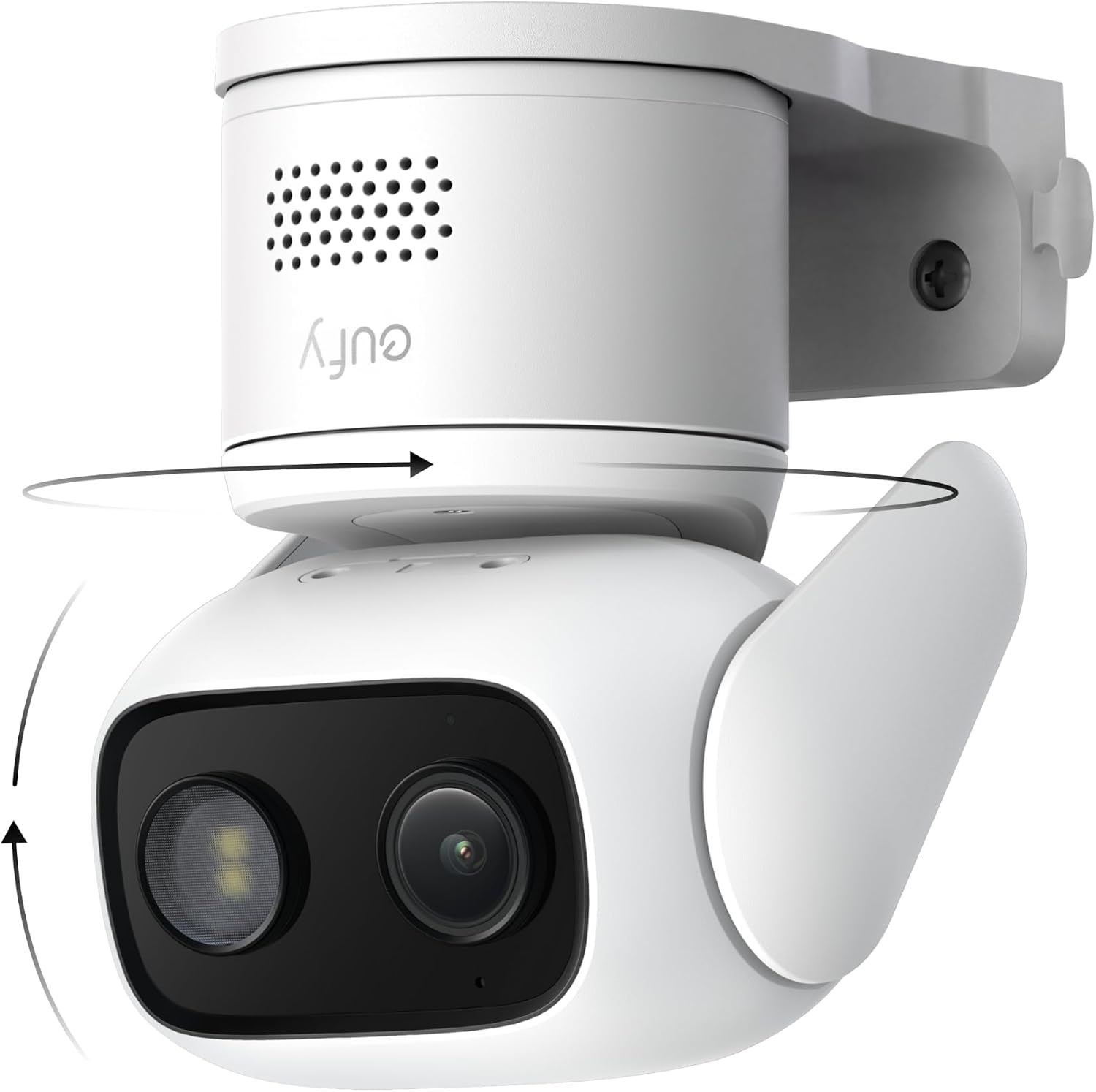
Pros
- One unit covers full indoor rooms or outdoor yards
- Shows color images at night without extra lights
- Stores all video locally with no fees required
- Holds signal steady even farther from router
Cons
- Needs separate microSD card for any recording
- Requires constant wired power source
- Does not work with HomeKit systems
The eufy C31 gives homeowners straightforward 360-degree coverage for entry areas and yards with simple local storage options.
I see strong value when placed near a front door where it tracks packages and visitors while sending clear alerts for people or vehicles. It also handles outdoor spots like driveways without needing extra lights at night.
The main trade-off is the need for a separate microSD card and constant power wiring, which limits flexibility in some older homes. It also skips HomeKit support and older base stations.
This camera suits renters or owners seeking basic continuous monitoring without subscriptions.
Position the camera high on a wall or eave to scan full driveways and porches in one sweep. Mount it upright for standard views or invert it under overhangs for weather protection.
- Place near front doors to catch deliveries and foot traffic across the whole porch.
- Angle toward side yards or gates to follow pets and kids without blind spots.
- Use for garage entries where it tracks vehicles pulling in and out.
- Avoid low spots near sprinklers to keep the lens clear year round.
Buying Guide for Best Home Security Cameras Under $100
Choosing a security camera under $49.99 means focusing on the core features that actually matter for daily oversight. You need a clear picture, reliable alerts, and a design that works where you need it. Here is what to prioritize to get a camera that does its job without creating new problems.
Resolution and field of view
Resolution determines whether you see a blurry shape or a recognizable face. For monitoring a front porch or a living room, 1080p is the practical minimum, providing enough detail to identify a person or a vehicle at a reasonable distance. A wider field of view covers more area with a single camera, reducing blind spots in corners or along a driveway.
Pan and tilt functionality, often found on indoor models, effectively expands that view by letting you remotely scan an entire room. This is useful for keeping an eye on pets or checking different areas without needing multiple fixed cameras. For outdoor spots like a garage door, a fixed wide-angle lens is often more reliable and weather-resistant.
Alert accuracy and notification types
The value of a camera collapses if it cries wolf over every passing shadow. Basic motion detection is easily triggered by headlights or moving branches, leading to alert fatigue where you start ignoring the notifications. Look for models with person, vehicle, or pet detection, which use simple AI to filter out irrelevant movement and only notify you when it matters.
Consider what triggers an alert and how you receive it. A camera that sends a snapshot with the notification saves you from opening the app for false alarms. Compared to basic motion sensors, this intelligent filtering is what makes a camera a useful tool instead of a constant distraction.
Power source and placement flexibility
How a camera gets power dictates where you can put it and how often you must interact with it. Wired cameras offer continuous recording and never need a battery change, but you are tethered to an outlet. Battery-powered cameras offer true wireless placement, ideal for a shed or a spot far from power, but require recharging every few months.
Your placement decision also dictates whether you need weatherproofing. An IP65 or IP66 rating is essential for any outdoor location, even under an eave, to withstand rain and dust. For purely indoor use, like a nanny cam or pet monitor, this is less critical, but consider if the camera will be near a kitchen or bathroom where humidity is higher.
Storage options and data privacy
Where your video is stored affects both cost and control. Local storage to a microSD card keeps your footage in your possession with no monthly fees, but a card can fail or be stolen if the camera is tampered with. Cloud storage offers off-site backup and easy access from anywhere, but often requires a subscription after a trial period.
Some cameras offer both, letting you use an SD card for continuous recording and the cloud for important event clips. For those concerned with data privacy, local storage or encrypted cloud options, like those discussed in our guide to the best encrypted security cameras, provide an added layer of security for your personal footage.
Night vision quality
Most incidents happen after dark, making night vision non-negotiable. Standard infrared night vision renders a scene in black and white, which is sufficient for detecting movement and general shapes. Color night vision, which uses a small ambient light source or a spotlight, provides more detail, like the color of clothing or a vehicle, but can be more noticeable.
The effective range is the key spec. Thirty feet is adequate for a typical driveway or backyard, but if you are monitoring a long alley or a large property, you will need a camera with a longer range to avoid having a dark void at the edge of your frame where details are lost.
Two-way audio and deterrents
A speaker and microphone turn a passive observer into an active tool. You can tell a delivery person where to leave a package, soothe a pet, or ask a family member a question without calling. The audio quality varies; some models have significant lag or echo, making conversation difficult.
For outdoor security, a built-in siren or spotlight adds an active deterrent. The ability to trigger a loud alarm or a bright light from your phone can scare off a prowler before they attempt a break-in. This feature bridges the gap between simple surveillance and active home defense.
Once you match these core functions to your specific spots—a front door, a nursery, a detached garage—the right camera becomes clear. The goal is to install it and then forget it, confident it will work when needed.
Why You Should Trust Us
Our recommendations are based on deep market research and analysis, not hands-on testing. We evaluate each camera against a consistent set of criteria in our SHU Score system, which weighs factors like video quality, alert reliability, ease of use, and value. We cross-reference manufacturer specifications with independent certifications and aggregate data from verified sources to assess real-world performance and limitations, ensuring our advice is grounded and practical for your home.
Final Thoughts
The most effective security camera is the one you install and that works reliably without demanding constant attention. Focus on clear video, accurate alerts, and a power source that fits your location.
For a versatile indoor camera that covers all the basics well, our Editor’s Pick is the Tapo 1080P Indoor Pan/Tilt Wired Security Camera. Its full room coverage and person detection make it an excellent choice for monitoring common areas, offering substantial utility without complexity. If you prefer a set for multi-room coverage, the proven and popular choice is the Tapo 2K Pan/Tilt Security Camera 2-Pack, which provides sharper 2K resolution across multiple cameras, ideal for watching over both a living room and a nursery.
For monitoring a side yard or garage without easy power access, a battery-powered model like the VISION WELL Wireless Outdoor Camera provides the placement freedom you need. Choosing the right camera from our security cameras category removes the guesswork from protecting your property, letting you see what matters and rest easier.
FAQs
Can security cameras work without Wi-Fi?
Most consumer security cameras require a Wi-Fi connection to send alerts and live video to your phone. Some models can record locally to an SD card without Wi-Fi, but you lose remote access and instant notifications, which are primary reasons for having a connected camera.
Do you need a subscription for security cameras?
No, a subscription is not mandatory. Many cameras offer free basic features like live view, motion alerts, and local SD card storage. Subscriptions typically unlock advanced features like longer cloud video history, intelligent detection filters, or extended warranty support. You can use a camera effectively without ongoing fees.
Is it better to have a wired or wireless security camera?
The better choice depends on your installation spot. Wired cameras are reliable for permanent, high-traffic locations like a front door where constant power is available. Wireless battery cameras are superior for temporary placements, rental properties, or areas like a garden shed where running a wire is impractical.
How do you stop false alerts from security cameras?
Adjust the camera’s motion sensitivity and detection zones in its app to ignore areas with frequent irrelevant movement, like a busy street or tree branches. Cameras with person or vehicle detection are far better at filtering out animals and shifting shadows, significantly reducing false alerts compared to basic motion sensors.
What is the difference between 1080p and 2K resolution?
2K resolution provides more pixels than 1080p, resulting in a sharper image where details like a license plate number or a face are clearer at a greater distance. For most indoor uses or watching a porch, 1080p is perfectly adequate. The extra detail of 2K becomes more valuable for identifying specifics across a longer driveway or a larger backyard.


Write Your Review
No reviews yet. Be the first to share your experience!