

Your front door lock is the first piece of hardware guests see, and a bulky black box can clash with your home’s character. Many smart locks prioritize function over form, leaving you with a security upgrade that feels out of place on a carefully maintained entryway.
Stylish smart locks bridge that gap by integrating modern access control with finishes and profiles that complement your door’s hardware. We looked at the Best Stylish Smart Locks to find models that deliver reliable security without looking like an afterthought.
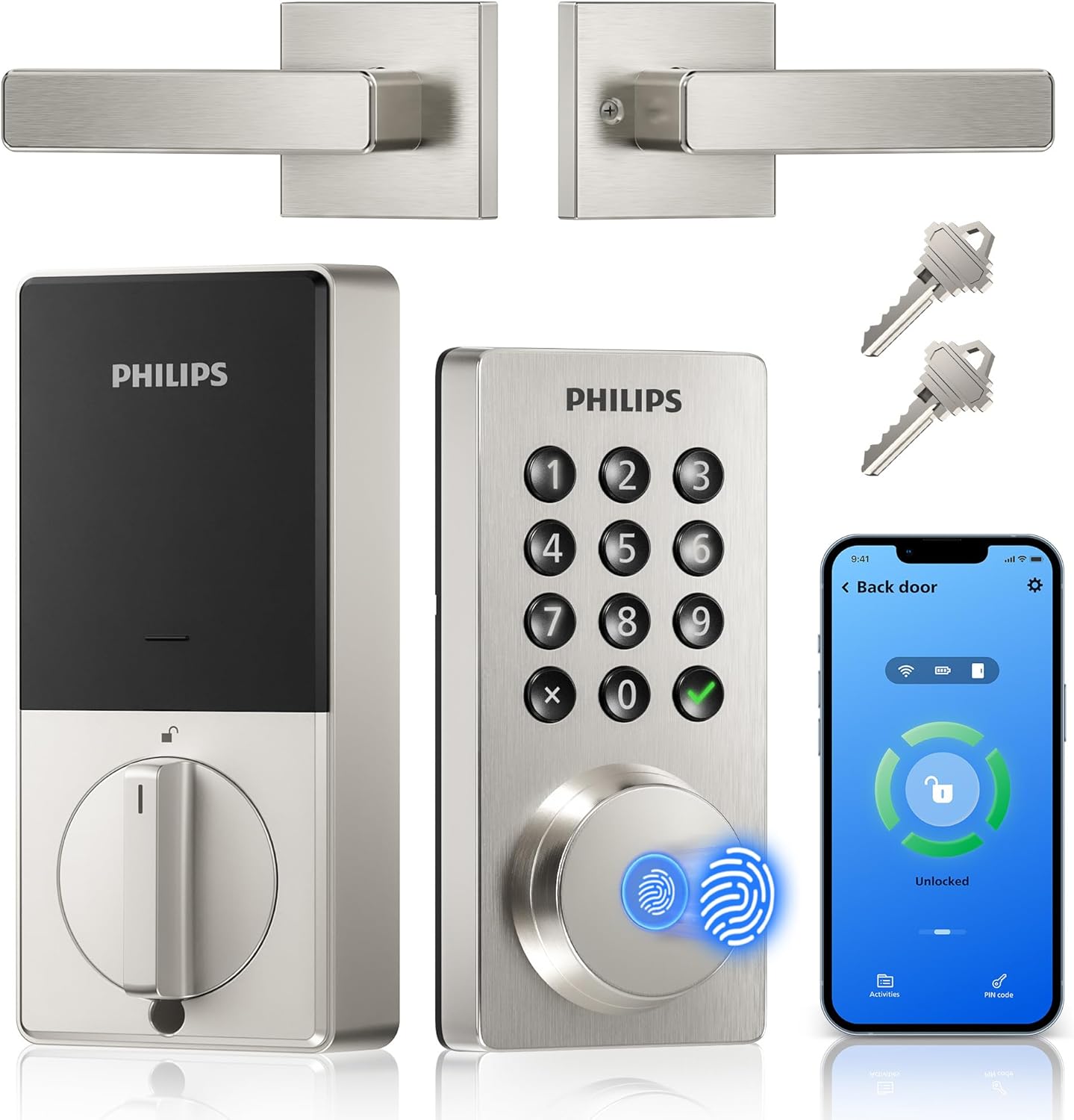
Our overall pick is the Philips WiFi Keypad Door Lock with Handle. It combines a built-in handle for a complete look with fingerprint access that works without fumbling for keys. Our top picks are just below.
Our Top Picks
Pros
- No extra hub needed for direct phone control.
- Multiple unlock options reduce reliance on physical keys.
- Includes matching handle for full front door replacement.
- Auto-lock timer prevents leaving the door unsecured.
Cons
- Requires eight AA batteries that are not included.
- Door thickness must match 1-3/8 to 1-3/4 inches.
- Voice features need separate Alexa or Google devices.
This Philips WiFi keypad lock gives homeowners reliable remote access to the front door through a simple app connection.
It supports quick fingerprint entry for family returns and allows temporary codes for visitors during deliveries or service calls. The auto-lock option helps secure the house after everyone leaves without extra effort.
The main trade-off here is the need for regular battery changes to maintain operation at all times.
This product suits households that want straightforward keyless entry without complex add-ons.
Measure your door thickness first since this lock fits only 1-3/8 to 1-3/4 inch doors. Replacement installs work best on standard wood or metal front doors with existing deadbolt holes.
New installs may need extra drilling for the handle set. I advise watching the provided video before starting because alignment affects smooth operation.
- Use a screwdriver only and avoid power tools that could damage the frame.
- Test the latch direction during setup to match your door swing.
- Install on a flat surface to ensure the keypad sits evenly.
- Check battery compartment access after mounting for future changes.

Philips WiFi Smart Lock for Front Door Keyless Entry and Remote Monitoring
Pros
- Multiple access methods reduce dependence on physical keys during daily routines.
- App notifications provide alerts for door activity while away at work.
- Auto-lock feature prevents accidental unsecured doors after quick exits.
- Fingerprint option speeds up entry for frequent users.
Cons
- Extra security screws require drilling a specific hole in the door.
- WiFi dependency means loss of remote features during internet outages.
- Door thickness must be verified before purchase to avoid fit issues.
This smart lock set combines a handle with deadbolt functions to secure the main entry of a typical home. Homeowners can lock or unlock the front door from their phone while checking on package deliveries left outside.
Fingerprint and PIN options allow quick access for household members returning from work or school without searching for keys. Temporary codes help manage entry for service visits or short-term guests arriving at the back gate area.
The auto-lock setting ensures the door secures itself after a set period, which helps when leaving in a hurry with pets or children. Access logs show who entered and when, supporting oversight of daily comings and goings around the property.
Overall it provides straightforward control over a primary doorway without requiring constant physical key management.
Confirm door thickness falls between 1-3/8 and 2 inches before starting. Most standard front doors meet this range for direct fit.
- Use a screwdriver for basic assembly that takes only a few minutes on compatible doors.
- Optional reinforcement screws need a 19/32 inch hole drilled if the door feels weak or warped.
- Verify handle alignment with the existing strike plate to maintain smooth operation.
The app allows locking, unlocking, and status checks from any location with internet access. Real-time alerts notify of door activity such as entries or failed attempts.
- Share codes or permissions with family members or temporary visitors through the phone interface.
- Review access history to track usage patterns around the home.
- Voice commands work with common assistants for hands-free operation at the doorway.

Pros
- Supports remote locking from any location
- Fingerprint entry speeds up daily access
- Auto lock feature prevents unsecured doors
- Multiple methods reduce lost key problems
Cons
- Needs steady WiFi for remote functions
- Install may be complex on older doors
- Requires regular battery monitoring
This smart lock provides remote access to monitor and control the front door from any location. It supports fingerprint unlocking and app alerts tied directly to daily home routines like checking on deliveries.
Remote monitoring helps track door activity while at work. Fingerprint recognition allows quick entry for family members without fumbling for keys during busy mornings.
The main trade-off here is dependence on a reliable internet connection for full remote features. Without it the lock still works locally but loses alerts and app control.
This product suits homeowners in stable WiFi homes seeking straightforward keyless options for front door security.
Check your door thickness and frame type before purchase. Wood-frame doors often need extra reinforcement for a secure fit while metal doors may require different screws.
New installations demand precise hole alignment. Replacement jobs on existing deadbolts are simpler but verify the backset matches your current setup.
- Apartments with thin doors may need additional brackets for stability
- Wood doors benefit from pilot holes to avoid splitting
- Always confirm the lock fits standard 1-3/8 to 2 inch thicknesses
- Renters should get landlord approval before drilling

Pros
- Built-in WiFi removes the need for extra hubs when setting up remote control from anywhere
- Physical keypad works reliably even if phones are unavailable during power issues
- Auto-lock feature reduces the chance of forgetting to secure the door after leaving
- Multiple access options including keys provide backup if the app or batteries fail
Cons
- Requires eight AA batteries that need periodic replacement every few months
- Setup involves aligning the lock components precisely on thicker or nonstandard doors
- App notifications can arrive with slight delays depending on home WiFi strength
This smart deadbolt fits most standard front doors and lets homeowners check entry activity through the app while at work or running errands. It supports multiple unlock methods so family can use codes or keys when returning from school or activities. The auto-lock setting engages after a set time to secure the door even during busy evenings with packages or pets coming in.
Real-time alerts notify when someone uses a code or the app at the main entrance, which helps track deliveries or visitors without constant monitoring. Vacation mode limits access to only essential users, keeping the property secure during extended trips away from home. The keypad design avoids touchscreens that can fail in cold or wet conditions common in many regions.
Physical key backup ensures entry remains possible if batteries run low or connectivity drops. Temperature range covers typical outdoor conditions from freezing winters to hot summers for reliable operation year-round. Overall the lock addresses daily entry routines by combining remote oversight with simple mechanical reliability.
Confirm door thickness falls between 1 3/8 and 2 inches and that the existing bore holes match standard sizes before purchase. The process typically takes under 15 minutes with basic tools for most U.S. doors.
- Align the deadbolt and handle components carefully to avoid binding during operation
- Test the latch and strike plate fit after mounting to ensure smooth locking
- Insert batteries last to complete the setup and connect to WiFi
The built-in WiFi connects directly to home networks for remote locking and alerts without additional devices. This setup supports checking status from work or while traveling.
- Create and manage up to 100 codes including permanent or one-time options for regular users
- Receive notifications for each access event at the front or side door
- Adjust auto-lock timing and activate vacation restrictions through the app menu
Buying Guide for Best Stylish Smart Locks
A lock that looks good should also work quietly in the background, securing your door without demanding attention. The right choice blends into your routine while standing firm when needed. These are the practical details that separate a lasting upgrade from a temporary fix.
Finish and integration with existing hardware
Matching a new lock to your door’s existing handle or deadbolt plate prevents a patchwork look. A model with a coordinated handle set presents a unified front, which matters for curb appeal and daily use.
Consider whether the lock’s profile sits flush or protrudes. A sleeker design catches less on bags and coats, and a finish that resists fingerprints keeps it looking clean with less maintenance. For a cohesive smart home, the visual style should extend to other entry points like a smart door knob on an interior door.
Built-in connectivity versus hub requirements
Direct Wi-Fi connection simplifies setup by removing an extra device from your network. This is practical for renters or anyone avoiding additional hubs, but it relies on your home Wi-Fi’s stability at the door.
A hub-based system can offer a more reliable, low-power connection for the lock itself, which may extend battery life. The trade-off is another plug and another app to manage. Your choice depends on whether you value simplicity now or plan to expand to a full system with devices like a coordinated doorbell later.
Primary access method and daily convenience
Fingerprint readers work well for individuals but can struggle with consistently recognizing prints from children or older adults with less defined ridges. A backup keypad is essential for those moments.
Voice control through Alexa or Google Assistant is useful for locking the door hands-free when your arms are full, but check if your system requires a specific phrase that feels natural in your household. The goal is an entry method that feels intuitive, not like a technical hurdle every time you come home.
Battery life and low-power warnings
Headline battery estimates assume average use, but a busy family door cycles far more often. Real endurance depends on how many unlock events happen daily and whether features like instant status updates are enabled.
A clear low-battery alert from the lock itself, backed by a push notification, gives you days to swap batteries. Models that maintain mechanical key access as a final backup prevent a dead lock from becoming a locksmith call, which is a critical fallback for any exterior door.
Guest access and temporary code management
The ability to create one-time or scheduled codes replaces physical spare keys for cleaners, dog walkers, or guests. This control is what makes a smart lock genuinely useful, as you can grant and revoke access remotely.
Look for an app that lets you set codes to expire after a single use or on a specific date. This granular control is more secure than a permanent code you never change, and it eliminates the worry of who still has a copy of a key.
Auto-lock timing and peace of mind
An auto-lock feature that engages after a set delay solves the problem of forgetting to lock up. The right timing balances security with convenience, allowing you to step outside briefly without immediately locking yourself out.
Adjustable timing lets you match the lock to your habits. A shorter delay suits a front door in a busy area, while a longer one is better for a side door you use frequently for gardening or taking out trash. This feature works silently to close the security gap left by human memory.
Once you weigh how the lock looks, how it connects, and who needs to use it, the option that fits your home becomes clear. The goal is a lock you stop noticing because it works so well with your life.
Why You Should Trust Us
Our recommendations are based on deep market research and analysis of manufacturer specifications, not physical product testing. We cross-reference features against independent security certifications and build standards to assess real-world reliability.
Each product receives an SHU Score, a proprietary rating that balances security features, design integration, connectivity, and user management. This system allows us to compare locks objectively, focusing on how they perform in actual home scenarios rather than on paper.
Final Thoughts
Choosing a stylish smart lock comes down to matching its form to your door and its functions to your daily patterns. The best lock is one you use consistently because it feels natural and looks like it belongs.
For most homes, the Philips WiFi Keypad Door Lock with Handle is the right choice. Its integrated handle provides a complete, polished look, and the built-in Wi-Fi offers remote management without extra hardware. The fingerprint reader adds quick access for household members, making it a practical centerpiece for a modern entryway.
If you prefer a minimalist keypad design without a handle, the Philips WiFi Smart Door Lock offers a lower-profile option with the same core remote access features. It’s a straightforward way to add keyless entry to a door that already has a handle you want to keep.
The right lock removes the daily friction of keys while giving you clear control over who enters your home. It is a single upgrade that makes your door both smarter and more welcoming.
FAQs
Can stylish smart locks work on any door?
Most stylish smart locks are designed for standard residential doors with typical bore holes and thickness. Always verify the lock’s specified door thickness and backset measurements against your own door before purchasing to ensure a proper fit.
Do you need a separate hub for Wi-Fi smart locks?
Many modern stylish smart locks have built-in Wi-Fi, eliminating the need for a separate bridge or hub. This simplifies setup, though a dedicated smart home hub can sometimes provide a more stable connection for other devices on your network.
Is fingerprint access reliable for the whole family?
Advanced fingerprint sensors work well for most adults but can be less consistent with children’s smaller or changing fingerprints. A reliable model should store multiple prints per person and offer a keypad or physical key as a dependable backup for all users.
How do you manage access for guests or service people?
You create temporary or scheduled passcodes through the lock’s companion app, which you can share digitally. These codes can be set to expire after a single use or on a specific date, providing secure, trackable access without handing out physical keys.
What happens if the power fails or the batteries die?
A well-designed smart lock will provide clear low-battery warnings and continue to operate on the remaining charge for a period. All models should include a physical key override as a final backup, ensuring you are never locked out due to a dead battery.


Write Your Review
No reviews yet. Be the first to share your experience!