

Waiting for a delivery or letting in a guest often means scrambling to a window or peering through a peephole, a routine that leaves you guessing who is on the other side of the door. A standard doorbell tells you someone is there, but nothing more.
A video doorbell intercom solves that by putting a live view and a two-way conversation in your hand, whether on a dedicated monitor or your phone. It turns a blind interaction into a controlled entry point. We evaluated the Best Video Doorbell Intercoms to find systems that deliver clear communication without monthly fees.
Our overall pick for best video doorbell intercoms is the ACEBELL Wireless Smart Video Doorbell Intercom System. It offers true wireless installation and reliable local storage, making it a practical choice for renters or anyone avoiding complex wiring. Our top picks are just below.
Our Top Picks

Pros
- Uses existing wires to avoid new cable runs.
- Shows clear views on a fixed indoor screen for all ages.
- Stores recordings locally with no subscription required.
- Supports keycard entry for family members at gates.
Cons
- Needs wires run between door and indoor unit.
- Basic functions stop if power to the system fails.
- Indoor monitor stays fixed in one location.
This wired doorbell system offers steady front door monitoring that does not depend on home WiFi signals.
It helps track deliveries by showing live porch views and letting you speak to couriers through the indoor screen. The setup also works for watching kids return from school or checking on gate activity at night.
The main trade-off is the need to connect units with wires which may require added effort during install on some homes. Worth noting before buying: it provides no remote viewing if internet is unavailable.
I recommend this for homeowners who want simple wired security without extra fees.
Place the outdoor camera at eye level on the door frame to cover the main porch steps and any nearby package drop spots.
- Mount on wood doors with screws for quick replacement of old units.
- Angle toward driveways to catch cars or visitors approaching from the side.
- Check brick walls for stable holes that avoid weather exposure.
- Test views from the indoor monitor to confirm full coverage of gates or paths.
Apartment renters may face limits on drilling while single family homes allow flexible corner mounts for wider yard sight lines.
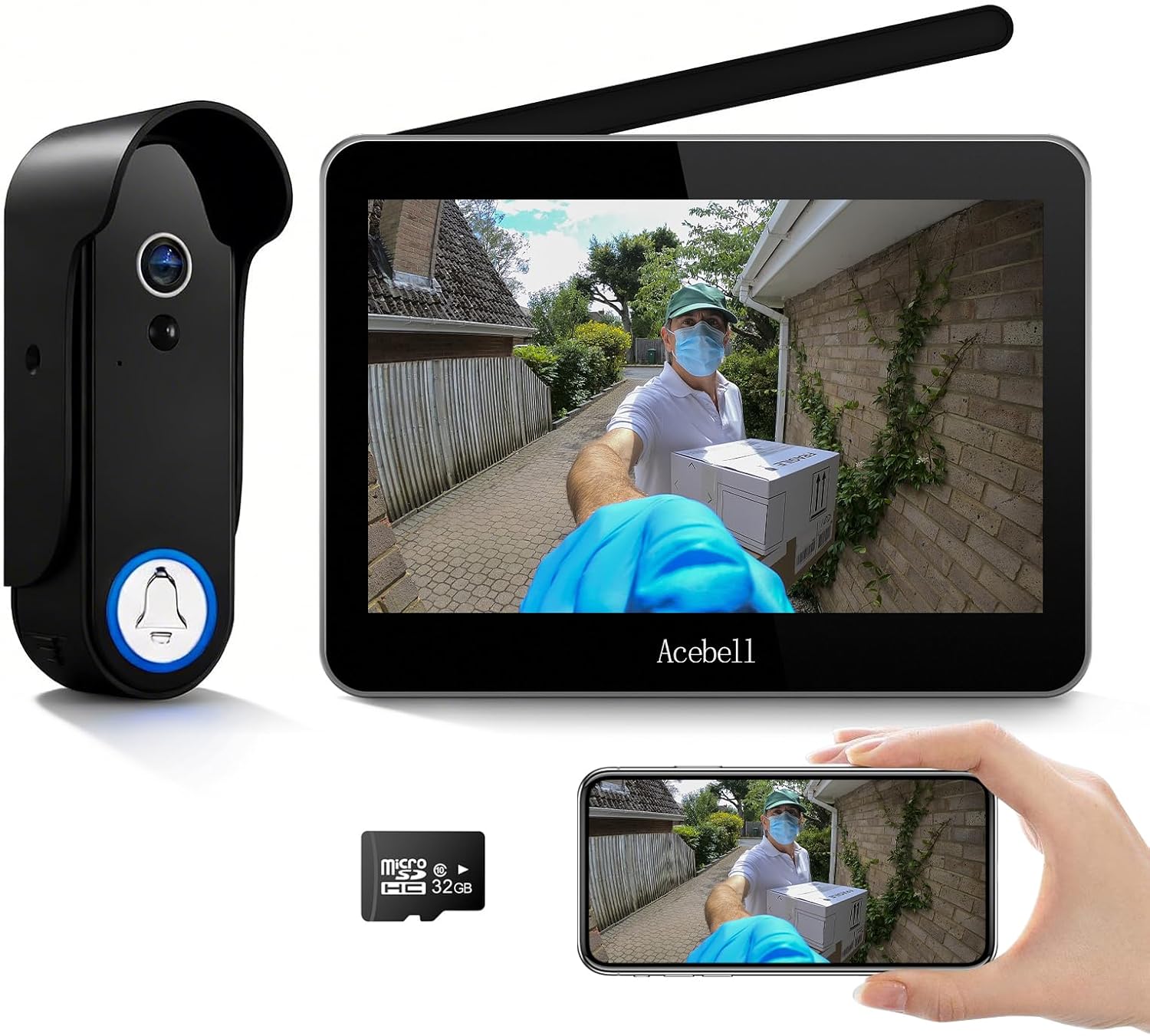
Pros
- Works without existing doorbell wiring
- Stores video locally on included card
- Sends alerts to both monitor and phone
- Battery powers doorbell for weeks between charges
Cons
- Indoor monitor needs frequent recharging
- Signal weakens through thick walls
- Night vision range stays limited outdoors
This wireless video doorbell system gives homeowners a simple way to see and speak with visitors at the front door using a portable indoor monitor. The 1080P camera and motion detection provide clear views of deliveries and arrivals without any subscription costs.
Local storage on the included card keeps footage safe even if the outdoor unit is damaged. Two-way audio works well for quick conversations with delivery drivers or family members returning home.
Worth noting before buying: the indoor monitor battery drains after several hours of use so it needs regular charging. The system suits renters or homeowners who want basic door monitoring without complex wiring or ongoing fees.
Place the doorbell at standard eye level on a wood or vinyl door for best visibility of the porch area. Avoid metal doors since they block the wireless signal between units.
- Front entry placement covers package drop zones directly below the camera.
- Driveway edge mounting extends view to cars and gates in wood-frame homes.
- Apartment units benefit from battery power when no wiring exists.
- Thick brick walls may require moving the monitor closer to maintain connection.

Pros
- Separate screens and buttons for each household
- No monthly fees with included local storage
- Works over existing two-wire doorbell runs
- Weatherproof casing handles outdoor exposure
Cons
- Requires wiring between door unit and screens
- Remote viewing needs a working internet connection
- Only supports up to two families
This intercom setup gives two households independent control over a shared entrance through dedicated screens and call buttons. Each home can answer visitors or unlock remotely without interfering with the other.
It helps monitor front door activity during deliveries or when kids return from school. The app lets you respond even when away, while the indoor screens show clear images day or night.
The main trade-off is its reliance on wired connections between units, which may need new runs in some homes. Remote app features also stop working without internet.
This product suits duplex owners who want simple shared security without subscriptions.
Position the outdoor unit at eye level on the door frame or gate post to capture faces and packages clearly. This covers the main approach area for deliveries and visitors in typical single-story homes.
Consider these placement factors:
- Mount high enough to avoid tampering but low enough for full porch view
- Angle toward the driveway for better gate monitoring in multi-unit setups
- Avoid direct sun or overhang shadows that reduce image clarity
- Test the two-wire run length before final install in older homes

Pros
- Uses existing two wires in many older homes.
- Stores video locally without monthly charges.
- Offers several unlock options at the door.
- Shows clear local view on the indoor monitor.
Cons
- Needs wiring if no prior doorbell lines exist.
- Remote app view requires home internet access.
- Placement limited by wire length to the monitor.
This wired doorbell camera gives homeowners a straightforward way to monitor the front entrance with an indoor screen and app alerts.
It handles daily situations like spotting deliveries on the porch or letting family inside without extra trips to the door. The indoor monitor and multiple unlock methods keep things simple for regular use.
The main trade-off is the need for proper wiring between units which can restrict where the outdoor camera sits in some layouts. Remote features also stop working if internet drops.
This setup fits best in homes that already have doorbell wiring and want local control plus basic app access.
Position the outdoor unit at average eye level on the door frame to capture the full porch area. This angle helps see packages left on the step and visitors clearly.
The indoor monitor works best near the main entry for quick checks. Consider these points for your home:
- Measure wire runs first in wood-frame houses to avoid extra drilling.
- Place the camera to cover both door and gate in one view if possible.
- Test the 130 degree angle on your actual porch before final mounting.
- Keep the monitor away from direct sun to maintain screen visibility.

Pros
- Operates without WiFi or smartphone apps
- Includes a dedicated monitor for direct viewing
- Battery supports months of use on one charge
- Waterproof design suits outdoor mounting
Cons
- Signal weakens through walls or metal doors
- Recording needs a separate memory card
- Monitor requires periodic recharging
This doorbell camera system offers a straightforward option for homeowners who want porch visibility without internet or app dependencies.
The included monitor makes it easy to check on deliveries or greet visitors from inside. Two-way talk works well for quick exchanges at the door while the wide view covers the main approach area.
Signal strength drops when walls or metal doors stand between the units so placement testing matters. The main trade-off is shorter range compared to wired systems in larger homes.
This setup fits apartments and smaller homes best where a simple dedicated monitor meets daily needs.
Position the doorbell at eye level on a wood or vinyl door frame for best results in apartments. Test the connection first at your chosen spot before drilling.
- Keep the indoor monitor near a window facing the door in wood-frame homes
- Avoid mounting on heavy metal doors that block the signal
- Place the monitor closest to the entry for reliable coverage in single-story houses
- Steer clear of microwaves or large metal objects between units
Buying Guide for Best Video Doorbell Intercoms
Choosing a video doorbell intercom means balancing how it gets power and signal with how you want to use it every day. The right system feels like a natural extension of your door, not a complicated gadget. These are the factors that make the difference.
Wired versus wireless operation
A wired system draws constant power from your home’s electrical system, which means you never think about charging batteries or replacing cells. The connection between the outdoor unit and indoor monitor is also typically a direct wire, eliminating concerns about Wi-Fi signal strength or interference from other devices.
Wireless models use rechargeable batteries and communicate over a private radio frequency or your home Wi-Fi. This makes them ideal for rental properties or doors without existing wiring, as installation involves mounting hardware rather than running cables. Just know that battery life depends on use, and extreme cold can reduce it.
Video quality and field of view
The camera needs to show you who is at the door, not just that someone is there. A 1080p resolution is the practical standard, providing enough detail to recognize a face or read a package label from a few feet away. Higher resolutions are available but often require more bandwidth and storage.
The width of the lens, measured in degrees, determines how much of your porch or entryway you see. A wider angle reduces blind spots beside the door, which is useful for spotting packages left to the side. However, an extremely wide view can introduce a fisheye distortion that makes objects at the edges look stretched.
Local storage and privacy
Systems that save video to a microSD card inside your home keep your recordings offline and under your control. There is no monthly fee, and your data is not uploaded to a company’s cloud server. This approach aligns with a growing preference for subscription-free home security.
The trade-off is that if the SD card fails or is removed, you lose the recording history. Look for a system that supports high-capacity cards and provides clear alerts if the storage is full or encountering errors, so you are not left with gaps in coverage.
Unlock methods and integration
Beyond seeing and talking, many intercoms can trigger an electric door strike or gate lock. This lets you grant access remotely via an app, with a keypad code, or an RFID card. It is a key feature for managing deliveries to a secure building or letting family in without sharing physical keys.
Consider who needs access. A system that supports multiple user codes or shared app access works well for families. For a standalone gate, a simple keypad might be sufficient. Ensure the unlock mechanism is compatible with your existing door hardware or be prepared to install a compatible electric strike.
Monitor placement and usability
The indoor monitor is your home’s command center for the system. A wired monitor must be placed near an outlet and the data cable run, which can limit where you put it. A wireless monitor with a built-in battery can be moved from room to room, or mounted in a central spot like a kitchen counter.
Screen size and interface matter for daily use. A seven-inch touchscreen is large enough for most people to see clearly from across a room. The menu should be simple, allowing anyone in the household to answer a call or check the live view without needing a tutorial.
Weather resistance and durability
The outdoor unit lives in the elements. An IP65 or IP66 rating means it is sealed against dust and protected from water jets, so rain or sprinkler spray will not damage it. This is non-negotiable for any exterior installation.
The housing material also matters. A metal faceplate can feel more substantial but may get very hot or cold to the touch. Plastic composites are common and durable, but check that the button and lens cover are robust enough to withstand repeated use and potential knocks.
Once you match the system’s power needs to your door’s setup and decide how you want to store footage, the choice becomes straightforward. The goal is a front door you can manage without second thought.
Why You Should Trust Us
Our recommendations are based on deep market research and analysis of manufacturer specifications, not hands-on testing. We cross-reference key performance claims against independent certifications and aggregate verified data from technical sources. Each product is evaluated using our SHU Score system, which weights factors like reliability, feature set, and user-oriented design to provide a balanced assessment.
Final Thoughts
The most effective video doorbell intercom is the one that fits your home’s wiring and your daily routine, providing a clear view and reliable communication without adding complexity.
For most homes seeking a balance of features and easy installation, the ACEBELL Wireless Smart Video Doorbell Intercom System is our Editor’s Pick. Its completely wireless design and local storage make it a versatile solution for apartments or houses where running new wires is impractical.
If you prefer the permanence and constant power of a wired setup, the Fromthebrand Wired Video Doorbell Intercom System stands out as a Best Seller. It offers a stable, interference-free connection and supports keyless entry, which is ideal for a frequently used front door or a secured gate. For simpler needs, a basic wireless intercom without Wi-Fi dependency can be a solid, budget-friendly choice that still delivers a live view and two-way talk.
Choosing the right system turns your front door from a point of uncertainty into a managed entryway, letting you see and control who comes to your home.
FAQs
Can a video doorbell intercom work without Wi-Fi?
Yes, many systems operate on a private wireless signal between the doorbell and a dedicated indoor monitor, with no internet connection required. These are often called wireless intercoms and store video locally on an SD card. They are a reliable choice for areas with poor Wi-Fi or for users concerned about smart device privacy.
Do you need an electrician to install a wired system?
Installing a wired video doorbell intercom typically requires running low-voltage cabling from the outdoor unit to the indoor monitor and a power source. If your home has existing doorbell wiring or conduit in place, a confident DIYer can often handle it. For new construction or complex runs through walls, hiring an electrician ensures a clean, safe, and code-compliant installation.
How does two-way audio work on these systems?
Two-way audio uses a built-in microphone and speaker in both the outdoor camera and the indoor monitor or your smartphone. When you answer a call, you can speak and listen simultaneously, allowing for a natural conversation with a delivery person or visitor. Audio quality is clear enough for basic communication at the doorstep.
What is the advantage of a system with a monitor over just a smartphone app?
A dedicated monitor is always on and placed in a fixed location, so anyone at home can answer the door without needing their phone charged and nearby. This is particularly useful for households with children, seniors, or in situations where you might not want to rely on a personal device for answering the front door.
How long do the batteries last in a wireless video doorbell?
Battery life varies by model and usage, but most rechargeable units last between one and three months on a single charge. Frequent doorbell rings, live viewing sessions, and cold weather will drain the battery faster. Systems typically provide a low-battery warning through the monitor or app several days before a complete shutdown.


Write Your Review
No reviews yet. Be the first to share your experience!