

A doorbell camera that drops offline when a delivery person rings is worse than having no camera at all. It creates a blind spot exactly when you need to see who is at your door, turning a security device into a source of frustration.
WiFi extenders solve this by bridging the gap between your router and a distant camera, ensuring the video feed stays live and notifications arrive on time. We looked at the Best WiFi Extenders For Doorbell Cameras to identify which models provide the consistent, low-lag connection a security camera requires.
Our overall pick for best WiFi extenders for doorbell cameras is the TP-Link AX3000 WiFi 6 Range Extender (RE715X). It uses WiFi 6 technology to handle multiple devices without choking, which is key when your doorbell shares the network with phones and laptops. Our top picks are just below.
Our Top Picks

Pros
- Quick app setup works in most homes without extra tools
- Ethernet port allows direct wired link for one device
- Covers up to 1500 square feet for basic signal extension
- Antennas adjust to direct coverage toward needed spots
Cons
- Does not increase overall internet speeds from the provider
- Placement must be tested to avoid weak repeater spots
- Not compatible with all mesh systems like Deco
The TP-Link AC1200 extender extends WiFi reach to support steady operation of security devices in homes with coverage gaps.
It helps maintain connections for cameras watching front doors and package areas. The external antennas allow adjustment toward driveways or yards where signals often weaken.
Worth noting before buying: this unit extends range but does not improve base internet speeds in any scenario. Adaptive path selection switches devices to stronger signals automatically during movement.
Homeowners with larger layouts needing basic camera coverage benefit most from adding this unit.
Position the extender midway between the router and target area such as a back door camera. This setup fills gaps that block video feeds from deliveries or pets.
Test locations using the signal indicator in the app before final mounting.
- Place higher on walls in wood-frame homes to reach upper floor cameras.
- Avoid corners near thick walls that limit reach to driveways.
- Use in apartments to cover hallway spots for entry monitoring.
- Check for interference from appliances before securing in place.

Pros
- App setup takes minutes with clear steps
- Gigabit port supports direct device connection
- Adjustable signal strength fits different home layouts
- Compatible with most routers for simple addition
Cons
- Signal weakens if placed too far from router
- Does not increase internet speeds
- Needs a nearby power outlet for best placement
The TP-Link AX3000 range extender strengthens WiFi to support security devices in homes with dead zones. It delivers consistent connections for cameras and sensors without complex changes.
Beamforming directs signals toward key spots like the front porch for package monitoring. The gigabit port lets users hardwire a device for stable performance on a driveway sensor.
Worth noting before buying: actual speeds stay the same or drop slightly since this only improves coverage. Homes with thick walls may need careful placement to avoid weak spots.
This extender suits owners who need basic signal expansion for existing security setups rather than full network upgrades.
Place the extender halfway between the router and the area needing coverage. This setup helps cameras on a back porch stay linked for delivery alerts.
Key placement tips:
- Test spots with the app signal indicator before final mounting.
- Avoid corners or behind furniture in wood-frame homes.
- Use an outlet near the front door for monitoring packages.
- Position higher up in multi-story houses for better reach to kids rooms.
- Check coverage after moving it to confirm no gaps remain.

Pros
- Expands coverage to reach distant security devices.
- App setup handles additions without extra wiring.
- Automatic updates keep network features current.
- Routes traffic to limit interruptions in video streams.
Cons
- Requires an existing eero network to function.
- Coverage depends on home construction and layout.
- Adds no value as a standalone device.
This extender fills WiFi gaps so security cameras maintain connections in larger properties. It supports steady monitoring of deliveries at the front door and activity around the backyard.
Placement near a porch or side entry helps extend feeds for kids and pets. The system also aids driveway coverage without constant buffering during checks from inside.
It only works with an existing eero network already installed. Worth noting before buying: homes with thick walls may need extra units for full reach.
This product suits owners who already use eero and need broader camera support across their property.
Position the extender midway between your router and weak spots like the back porch. This setup improves camera connections for watching package areas without signal loss.
- Place near a window to reach driveway cameras in wood-frame homes.
- Keep away from thick walls or metal doors that block signals to side entries.
- Test spots in apartments versus single-story houses for best pet monitoring zones.
- Avoid corners to cover multiple floors for kids play areas.
Pros
- Signal light shows good placement quickly
- Ethernet port allows wired connection for fixed devices
- App handles setup and updates from phone
- Works with most existing routers without issues
Cons
- Speeds drop compared to direct router connection
- Requires a power outlet in the right spot
- Not a full mesh system replacement
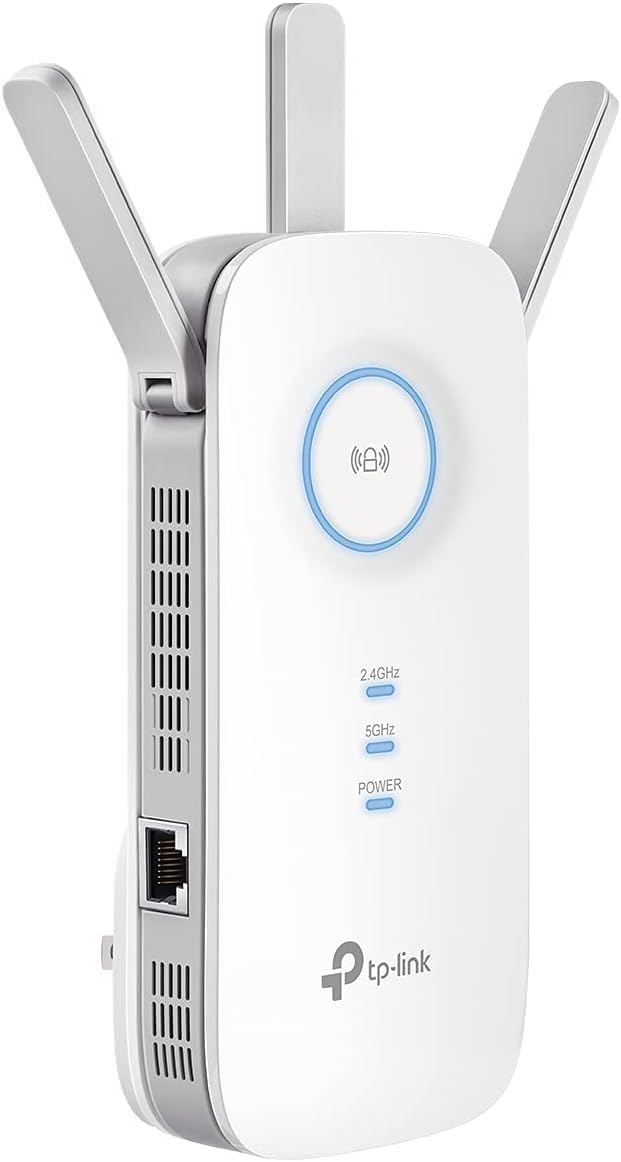
The TP-Link RE550 fills WiFi gaps so security devices reach farther corners of the home. It connects to the main router and pushes the signal where cameras often lose contact.
Front porch cameras stay online for package monitoring. Driveway units keep feeding video without constant drops during family routines.
Worth noting before buying that speeds fall by half or more in extended mode. This limits heavy use but still supports basic camera streams.
I find it suits homeowners needing simple coverage boosts for a few devices rather than whole-home upgrades.
Place the extender midway between the router and the area needing coverage. Test spots near windows or hallways where signals weaken for cameras.
- Check the signal light during setup to confirm strength before final mounting.
- Avoid thick walls between the extender and router in wood-frame homes.
- Use the app to adjust settings after placing it for outdoor camera reach.
- Try different outlets in apartments versus larger houses to find the best balance.

Pros
- Simple button setup works with most existing routers
- Compact size fits outlets without blocking other plugs
- Dual bands reduce interference from household devices
- LED light can be turned off to avoid nighttime distraction
Cons
- Performance drops through thick walls or multiple floors
- Requires a stable original router signal to work well
- May need repositioning to find optimal coverage spot
This extender adds range to an existing router so security devices stay connected across the home. It works best when placed between the router and areas needing stronger signals.
Front door monitoring benefits when cameras or doorbells sit far from the router. The unit helps maintain video feeds for package deliveries or entry points.
Worth noting before buying: thick walls or distance can still limit results even after placement. It suits homes where basic signal extension fills gaps without complex changes.
Position the extender halfway between the router and the spot needing better coverage. This setup helps security cameras maintain steady connections for front porch or driveway views.
- Test signal strength at the camera location first before final placement.
- Avoid outlets behind large furniture that block the signal path.
- Wood frame homes allow easier coverage than brick or concrete structures.
- Place near windows if monitoring outdoor areas like gates or yards.
Buying Guide for Best WiFi Extenders For Doorbell Cameras
A good extender for a doorbell camera has one job: deliver a stable signal to a fixed point outside your home. It is less about raw speed and more about consistent, reliable coverage that does not drop packets. These are the factors that separate a useful booster from one that adds more problems.
Dual-band support and band steering
Dual-band extenders broadcast on both the 2.4GHz and 5GHz frequencies. The 2.4GHz band travels farther through walls, which is often necessary to reach a front door, while 5GHz offers less interference for a clearer signal if the camera is closer. Look for models with band steering that automatically assign your camera to the better band.
This matters because a doorbell camera is a fixed device that cannot roam. If it latches onto a weak 5GHz signal, it will stay there and suffer. Automatic steering helps it find the most reliable connection, reducing video lag and missed alerts. For homes with many smart devices, this feature keeps the network efficient.
Compatibility with your existing router
Most standard extenders work with any router, but some, like mesh network extenders, require you to own the same brand’s base system. Buying an extender that is not compatible with your router is a common and costly mistake. Always verify compatibility before purchase.
If you have a mesh system, adding its native extender is usually the cleanest way to expand coverage. For traditional routers, universal extenders that support standards like EasyMesh or OneMesh offer more flexibility. This is especially important for renters who cannot replace their ISP’s gateway hardware.
Ethernet port for a wired backhaul
An Ethernet port on an extender lets you connect it to your main router with a cable, creating a wired backhaul. This dedicated connection is far more stable than a wireless link and is the best way to ensure a doorbell camera gets a pristine signal, especially over longer distances.
Consider this if your camera is on a detached garage or a far corner of the house where wireless signals struggle. Running a single cable to a central location and plugging in the extender can create a powerful new access point. It is a more involved setup but solves stubborn dead zones that wireless repeaters cannot fix.
Placement and physical design
Extenders need to be placed halfway between your router and the camera, not right next to the door. A model with adjustable external antennas lets you direct the signal toward the blind spot, which is more effective than a sleek, internal antenna design that broadcasts equally in all directions.
Think about where you can plug it in. A discreet, wall-plug design is fine for a hallway outlet, but a unit with a short cord offers more placement options to find the optimal spot. Good placement often matters more than the extender’s maximum rated range on the box.
Security and firmware updates
An extender is another entry point to your home network. Models that receive automatic firmware updates address vulnerabilities and maintain performance over time. Brands that commit to secure-by-design principles, verified by certifications, add a layer of protection for your connected devices.
This is not a visible feature, but it is critical. A doorbell camera stream is sensitive data. An outdated extender with unpatched software could become a weak link. Automatic updates ensure the device protecting your video feed is not itself a security risk. Compared to simpler devices like doorbell cameras without subscription fees, network hardware requires this ongoing support.
Once you map the distance from your router to the camera and check your router’s brand, the right type of extender becomes clear. The goal is to install it and forget it is there, with your doorbell camera working as intended.
Why You Should Trust Us
Our recommendations are based on deep market research and analysis of manufacturer specifications, independent certifications, and aggregated performance data. We do not conduct physical lab tests. Instead, we developed the SHU Score, a proprietary rating system that cross-references key metrics like compatibility, supported standards, security commitments, and real-user reliability patterns to evaluate each product.
This methodology allows us to assess how a WiFi extender will perform in the specific scenario of supporting a doorbell camera, focusing on connection stability and ease of integration over theoretical maximum speeds.
Final Thoughts
Choosing a WiFi extender for a doorbell camera comes down to reliable coverage and seamless compatibility. The best choice removes the worry of missed alerts and frozen video feeds.
Our Editor’s Pick, the TP-Link AX3000 WiFi 6 Range Extender (RE715X), is the best overall choice for future-proofing. Its WiFi 6 efficiency handles multiple smart devices without degrading the camera’s connection, and its strong beamforming antennas target signal directly to your door. It suits a busy household where the network is shared with other high-demand uses.
The Best Seller, the TP-Link AC750 WiFi Extender (RE220), is the proven, popular pick for straightforward coverage extension. Its simplicity and dual-band support make it a reliable, affordable solution for a single camera that is just out of range. It is a sensible choice for a first-time extender setup where advanced features are not a priority.
For users with an existing eero mesh system, the Amazon eero 6 Extender integrates perfectly to expand coverage without managing a separate network. This seamless integration, much like the convenience of modern doorbell cameras, makes network management invisible.
The right extender turns a sporadic camera into a dependable sentry, letting you check your front door from anywhere with confidence.
FAQs
Can a WiFi extender improve my doorbell camera’s video quality?
A WiFi extender will not increase the camera’s maximum resolution, but it can prevent the pixelation and buffering caused by a weak signal. By providing a stronger, more stable connection, it allows the camera to transmit its full video quality reliably to your router and the cloud.
Do I need a WiFi 6 extender for my doorbell camera?
Most current doorbell cameras do not require WiFi 6. A dual-band AC1200 or AC1900 extender is usually sufficient. The main benefit of a WiFi 6 model is future-proofing and better performance if many other devices are active on the same network, reducing congestion for the camera.
Is it better to use an extender or a powerline adapter for a distant camera?
A powerline adapter uses your home’s electrical wiring to carry a network signal and can be more reliable than a wireless extender over long distances or through many walls. If you have an outlet near both the router and the camera’s location, a powerline kit with a WiFi access point is often a more stable solution than trying to repeat a weak wireless signal.
How do I know if my doorbell camera needs a WiFi extender?
Consistent symptoms include delayed motion alerts, frequent disconnections in your security app, or video feeds that fail to load. Check your router’s app for a signal strength indicator for the camera; if it is consistently low or poor, an extender placed between the router and the door will likely solve the issue.
What is the difference between a repeater and an access point mode?
Repeater mode wirelessly rebroadcasts your existing WiFi network. Access point mode requires an Ethernet cable run from your router to the extender, turning it into a new, dedicated source of WiFi. Access point mode provides a faster, more reliable connection for a doorbell camera but requires running a cable.


Write Your Review
No reviews yet. Be the first to share your experience!