

A package left in the rain or a visitor you miss because you are not home feels like a small gap in your awareness. A doorbell camera should close that gap, not just show you a video feed but connect it to the rest of your home so you can see and act from anywhere.
Doorbell cameras for Google Home bring that video right into the same app you use for lights and thermostats, letting you check the front door without switching apps or missing a notification. We looked at the Best Doorbell Cameras For Google Home to find models that pair reliable video with the smart home control you already use.
Our overall pick for best doorbell cameras for Google Home is the Google Nest Doorbell (Wired, 2nd Gen). It gives you intelligent alerts for people and packages without a subscription and a constant live view, so you know what is happening at your door around the clock. Our top picks are just below.
Our Top Picks

Pros
- Installs easily without existing doorbell wiring.
- Shows full view of people and packages on ground.
- Works during outages with local storage backup.
- Sends alerts for specific activity like vehicles.
Cons
- No continuous 24/7 recording even when wired.
- Battery requires occasional recharging after months.
- Needs strong Wi-Fi for consistent video access.
The Google Nest Doorbell (Battery) gives homeowners a simple way to check activity at the entrance without running new wires.
It covers the full height of a person standing at the door plus items placed on the ground. This helps with watching deliveries or seeing who arrives while you are away.
The main trade-off is that it cannot record video nonstop even if you connect it to power. It only saves short clips of detected events.
This doorbell fits homes where basic alerts and easy setup matter more than round-the-clock recording.
Place the doorbell at standard height on the door frame or nearby wall to capture both faces and ground packages. This works on wood or metal doors but avoid spots with heavy overhangs that block the view.
- Front door placement catches regular visitors and deliveries in most single family homes.
- Apartment entries may need angle adjustments if the unit sits flush against shared walls.
- Driveway sightlines improve when mounted slightly offset to cover approach paths.
- Porch areas with bright sun benefit from the built-in image adjustments for clear daytime views.

Pros
- Provides clear day and night door views
- Distinguishes people from objects for fewer alerts
- Supports live talk without opening the door
- Offers simple 24 hour video access
Cons
- Requires existing doorbell wiring for install
- Works only with the Nest app
- Chime must be purchased separately
This wired doorbell offers steady front door coverage that helps track who comes and goes. It shows clear images of people and packages at ground level.
I see real value when monitoring deliveries or checking on kids near the entrance. The person alerts reduce unnecessary notifications from passing cars or animals.
The main trade off is the need for existing wiring which limits placement options on some homes. It also works only through the Nest app rather than other platforms.
This product suits homeowners with wired setups who want straightforward door monitoring without extra subscriptions.
Placement affects how well this doorbell covers your entry area. Proper height shows packages on the ground and full views of visitors.
Consider these scenarios before install:
- Wood frame doors allow easy wiring runs for stable power
- Apartment entries may need a wedge for angled coverage
- Driveway gates benefit from 15 degree adjustment for side views
- Porch roofs can block rain but reduce night visibility
- Replacement installs reuse old holes to avoid new drilling

Pros
- Clear images help identify details in low light rooms
- Activity zones cut down on unnecessary notifications
- Works with Google Home for simple automations
- Green light shows when video is active
Cons
- Subscription required for event search and summaries
- Wired power limits placement to near outlets
- Advanced descriptions need extra paid features
This camera gives solid indoor coverage for standard home spaces like living rooms and hallways. It delivers clear footage that shows movement and details without extra complexity.
Wide views help track family activity in main areas while color night vision makes it easier to check on pets after dark. Activity zones let you limit alerts to spots that matter most such as near doors or play areas.
The main trade-off is that full event search and detailed summaries require a paid subscription. Basic recording works without it but lacks the added context.
It fits best in homes already using Google Home products.
Place the camera high on a shelf or wall to capture full room views. This setup works well in apartments with open living areas or single-story homes.
- Mount near a power outlet to avoid extension cords across floors.
- Angle toward hallways for coverage of multiple connected rooms.
- Avoid direct windows to reduce glare on the lens during daylight.
- Test zones first in the app to focus on doors rather than whole spaces.
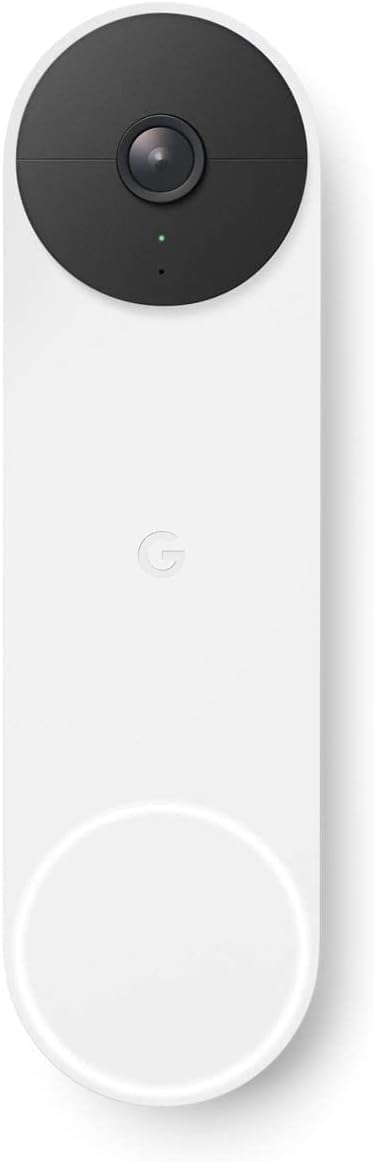
Pros
- Installs easily on any surface without wiring.
- Shows clear porch views in daylight and dark.
- Sends useful alerts for deliveries and visitors.
- Works with existing smart home setups.
Cons
- Battery needs recharging every few months.
- Basic video storage requires a paid plan.
- May miss quick motion in some angles.
This battery doorbell gives homeowners a wire-free way to watch the front entry and respond to activity from anywhere.
It handles common situations like tracking deliveries left on the porch or spotting visitors without opening the door. The motion alerts help keep an eye on kids or pets coming and going through the main entrance.
Battery life requires occasional charging which adds a maintenance step compared to wired models. The free history covers only recent events.
This suits renters or homeowners who want simple added visibility at the main door without complex installation.
Position the unit at eye level on the door frame or nearby wall to capture the full porch area and approaching visitors.
- Mount high enough to avoid tampering but low enough for clear face views on a typical house door.
- Angle slightly downward for better coverage of package drop spots in front of wood or metal entries.
- Test the field in an apartment hallway versus a wide driveway setup to confirm no blind spots near gates.
- Avoid direct sun glare or overhangs that block the view of vehicles pulling up.

Pros
- Provides nonstop power from existing doorbell wiring.
- Includes free event video history for recent activity.
- Distinguishes packages and people for useful alerts.
- Integrates with Google Home app for easy checks.
Cons
- Requires a compatible wired transformer and chime.
- Works only with the Google Home app.
- Not ideal for homes lacking existing doorbell wiring.
The wired Nest Doorbell delivers steady front door coverage suited to everyday homes. It handles package deliveries by sending targeted alerts straight to your phone.
Night vision keeps the porch visible after dark while the tall field of view captures people head to toe. You can speak to visitors from anywhere without stepping outside.
The main trade-off is the need for existing wired doorbell hardware which some homes lack. Setup may require adding a transformer or chime before use.
This product fits homeowners replacing an old wired doorbell who want simple ongoing monitoring.
Mount the doorbell at standard height to capture full views of people and deliveries close to the door. This works well on wood or brick surfaces during replacement installs.
- Front porches gain clear coverage of packages left near the threshold.
- Apartments need a compatible chime inside the unit for alerts.
- Driveway edges benefit from the wide view to spot approaching vehicles.
- New wiring runs may be needed on homes without prior doorbell setups.

Pros
- Runs continuously without any battery recharging needed
- Distinguishes people from packages in daily alerts
- Provides clear views day and night at the door
- Integrates with existing home chime systems
Cons
- Requires compatible transformer and chime for install
- Free video history limited to three hours only
- Works only with Google Home app not Nest
This wired doorbell camera gives steady front door coverage for homeowners who want constant monitoring without battery worries. It sends alerts for people, packages, and animals right to the phone app.
Daily use shows value when tracking deliveries left close to the door or checking on kids arriving home. Night vision keeps the porch visible after dark while two-way talk handles quick chats with visitors.
The main trade-off comes from the wired setup that needs an existing compatible transformer and chime before it works. Some older homes may require extra electrical work upfront.
This option fits best in houses already wired for a doorbell where simple replacement makes sense.
Proper placement starts with the front door area where most visitors and deliveries arrive. The 145-degree view covers people head to toe and items as close as eight inches away.
- Choose a spot above the door for best downward angle on packages.
- Test the field before final mounting to avoid missing driveway edges.
- Replace an old wired unit directly on wood or brick frames without new holes.
- Avoid low positions in apartments that limit the full porch view.
- Confirm wiring access first in older homes before purchase.
Buying Guide for Best Doorbell Cameras For Google Home
A doorbell camera for Google Home has to do two jobs well. It needs to capture clear video of your entryway and then fit seamlessly into your existing smart home routine. A few key differences decide whether it feels like a natural extension of your home or just another gadget to manage.
Wired versus battery power
A wired doorbell gives you a constant live view and never needs a battery change, which is ideal for a busy front door where you want to check in anytime. The tradeoff is a more involved installation that requires existing doorbell wiring.
A battery model works with any door, making it a clear choice for renters or homes without existing wires. You give up the 24/7 live view, relying instead on motion-triggered clips, but you gain the freedom to place it on a side gate or a detached garage without running new cables.
Video quality and field of view
Resolution determines whether you can read a package label or recognize a face from several feet away. A wider field of view shows you more of the porch floor for packages and the steps leading up to the door, which matters more than a high headline number.
Look for a model that balances detail with a tall aspect ratio to see people from head to toe. Compared to 2K security cameras, a doorbell needs to handle direct sunlight and deep shadows at your threshold without washing out or leaving the scene too dark.
Smart alerts and included history
An alert for every passing car or shifting shadow becomes noise you ignore. Useful alerts distinguish between a person, a package, and an animal, so you know when to look and when to let it go.
Most models include a few hours of event history for free, letting you review what triggered an alert or see what happened just before someone rang the bell. For longer retention or continuous recording, a subscription adds more days of history and features like familiar face detection.
Two-way audio and response options
Clear two-way audio lets you give delivery instructions or tell a visitor you will be right there. The microphone needs to filter out wind and street noise, and the speaker should be loud enough to hear from the other side of the door.
Pre-recorded quick responses are useful when you cannot talk, like during a meeting or while putting a child to sleep. They turn a simple notification into an action you can take without stopping what you are doing.
Installation and weather resistance
Installation complexity ranges from sticking a battery unit to a wall to wiring into a low-voltage transformer. For a wired install, checking your existing doorbell system compatibility is the first step, as some older transformers may not provide enough power.
Every outdoor doorbell needs a weather-resistant rating to handle rain, snow, and sun. A good seal around the mounting plate prevents water from getting behind it and into your wall, which is a common point of failure over time.
Google Home integration depth
Basic integration shows a live feed on a smart display when someone rings the bell. Deeper integration lets you create routines, like turning on the porch light when motion is detected after sunset or announcing a package delivery on all your home speakers.
Some models work only with the Google Home app, while older ones may require the legacy Nest app. This decides whether your doorbell lives in the same app as your other smart devices or remains in a separate silo, which affects daily convenience.
Once you know your power source, how smart you want the alerts, and how deep the Google Home integration goes, the right option becomes clear. From there it is just matching the features to your entryway and daily routine.
Why You Should Trust Us
Our recommendations are based on deep market research and analysis of manufacturer specifications, independent certifications, and aggregated performance data. We use a proprietary SHU Score rating system that evaluates products across security, reliability, usability, and integration, cross-referencing verified information to identify models that deliver on their promises for real home scenarios.
Final Thoughts
Choosing a doorbell camera for Google Home comes down to reliable video, useful alerts, and seamless control within the smart home you already have. The right model makes your front door a part of your connected home, not a separate chore to monitor.
Our Editor’s Pick for the best overall choice is the Google Nest Doorbell (Wired, 2nd Gen). Its constant power means a 24/7 live view and intelligent alerts without a subscription, ideal for a main entry where you want to see everything. For the proven, most-popular pick, the Google Nest Doorbell (Battery) offers flexible installation for any door and works wire-free, a strong fit for renters or homes without existing wiring. If you prioritize indoor monitoring and want a camera that works with the same Google Home ecosystem, consider the Google Nest Cam Indoor (Wired, 3rd Gen) to cover entryways from inside.
The right choice removes the uncertainty of not knowing who is at your door or what they left behind, giving you control from anywhere your day takes you.
FAQs
Can you use a Google Nest doorbell without a subscription?
Yes, Google Nest doorbells work without a subscription, providing intelligent person, package, and animal alerts plus three hours of event video history. A subscription adds longer history, familiar face detection, and continuous recording, but the core security features are fully functional without it.
Do you need existing doorbell wires for a wired Nest Doorbell?
A wired Nest Doorbell requires existing low-voltage doorbell wires and a compatible transformer to provide constant power. If your home lacks this wiring, the battery model is designed for surface mounting without any wires, making it suitable for apartments or older homes.
Is it better to get a battery or wired doorbell camera?
A wired doorbell is better for a main entrance where you want 24/7 live view and never want to change batteries. A battery doorbell is better for flexible placement on a side gate, rental property, or any door without existing wires, accepting that live view is only available when the device is awake.
How do Google Nest doorbells handle cold weather?
Google Nest doorbells are rated for outdoor operation in typical weather conditions, but extreme cold can reduce battery life in the wireless models. Wired models are not affected by temperature in the same way, as they draw constant power, making them more reliable for all-season use in very cold climates.
What is the difference between the Google Home and Nest apps for doorbells?
Newer Nest devices use the Google Home app for setup and control, integrating with other Google Home devices. Older models, like the original Nest Hello, require the legacy Nest app and do not work with the Google Home app, which can mean managing your doorbell separately from the rest of your smart home.




Write Your Review
No reviews yet. Be the first to share your experience!