

Walking away from your house and wondering if you locked the door is a small but persistent worry. Keys get lost, spare copies float around, and you can never be sure who still has access to your home. A smart deadbolt solves that by letting you check and control your door from anywhere, replacing guesswork with a simple notification.
We looked at the Best Smart Deadbolts available, focusing on models with straightforward setup and consistent performance for a typical family entrance. Our evaluation prioritized how well each lock handles daily use, from granting temporary access to a dog walker to ensuring it locks behind you automatically.
Our overall pick is the Schlage Encode Smart Wi-Fi Deadbolt. It delivers reliable remote access and a durable touchscreen keypad, making keyless entry practical without needing extra hardware. Our top picks are just below.
Our Top Picks

Pros
- Multiple unlock methods fit different family members and situations
- Built-in WiFi enables control from anywhere without extra devices
- Real-time notifications track who enters your home
- Simple setup works on most standard doors
- Custom passcodes manage guest access easily
Cons
- Batteries not included, so purchase 4 or 8 AA alkaline separately
- No door sensor means auto-lock works only if door is fully closed
- Requires stable home WiFi nearby for reliable remote access
This Philips WiFi deadbolt offers straightforward keyless entry for your front door, replacing traditional locks with options like fingerprint scans, app control, or passcodes. For busy mornings rushing kids to school, a quick finger touch opens the door without fumbling for keys, while remote unlocking from your phone handles package deliveries when you're at work. Entry notifications keep you informed about who's coming and going, providing peace of mind during the day.
Auto-locking after a set time ensures your home stays secure even if you forget in the rush out the door, and away mode disables most access methods except a master code when you're on vacation. Family members each get their preferred method, from voice commands via smart speakers to physical keys as backup. This setup reduces daily hassles around the front entry while maintaining solid protection.
Custom passcodes let you grant temporary access to service providers without being home, tracking exactly when they arrive and leave through the app history. Though it lacks a door sensor, the flexible unlock variety covers most household needs, making it a practical upgrade for monitoring porches and securing against unauthorized entry.
Overall, it delivers reliable control for everyday home defense, focusing on convenience in real scenarios like watching over pets inside or gates near driveways.
Check your door thickness first, as this lock fits standard sizes from 1-3/8 to 2 inches thick. Most front doors match this without issues.
- Use just a screwdriver for a 10-minute DIY install on right or left-handed doors.
- Provide 4 or 8 AA alkaline batteries, as none come included.
- Ensure your door has a standard deadbolt hole setup; measure beforehand to avoid returns.
- Available in black or nickel finish, so confirm color preference.
The app connects directly via your home WiFi for remote locking, unlocking, and alerts without any hub. Keep the lock within range of your router for steady performance.
- Works with common home networks; update the app for voice control with Alexa or Google Assistant.
- View entry history and manage up to 100 passcodes or fingerprints for family and guests.
- Real-time notifications arrive on your phone for door activity.
- Away mode adds protection by restricting access remotely.

Pros
- Remote app control works from anywhere to manage front door access
- Built-in alarm detects door tampering for added break-in protection
- Fits most standard doors and installs with just a screwdriver
- Up to 100 access codes simplify sharing for cleaners or neighbors
- Voice control with Alexa or Google for hands-free locking
Cons
- Requires reliable WiFi signal at the door for remote features to work
- Batteries need replacement every few months depending on use
- Touchscreen can smudge over time and needs occasional cleaning
This Schlage Encode deadbolt replaces your standard front door lock with keyless entry via touchscreen or app. It connects directly to your home WiFi, so you can lock or unlock from anywhere, which gives peace of mind when deliveries sit on the porch or family arrives while you're out. The built-in alarm sounds if someone pries at the door, alerting you to potential break-ins before they happen.
For everyday routines, set auto-lock to relock the door minutes after it opens, preventing forgotten locks when kids head to school or guests use the backyard gate. Track who entered and when through the app, helping you verify if the dog walker came by or if packages were safe. One-touch locking from outside makes leaving for work quick and secure without fumbling keys.
With a backup physical key and long-lasting batteries, it handles outages or low power without leaving you locked out. The fingerprint-resistant touchscreen stays readable for repeated use, and it pairs with voice assistants for hands-free control near the driveway. Overall, it strengthens front door security for homeowners focused on family safety and property monitoring.
Durability holds up to daily wear, fitting standard doors without modifications. This setup reduces reliance on spare keys hidden outside, cutting risks from theft while enabling flexible access for trusted visitors.
Most homeowners complete setup in under 30 minutes with basic tools. It fits doors 1-3/8 to 1-3/4 inches thick and standard backsets of 2-3/8 or 2-3/4 inches, covering typical front or side entry doors.
- Just a screwdriver needed; no wiring or drilling extras required
- Includes mounting plate, strike plate, screws, and four AA batteries to start immediately
- Snap-and-stay design holds parts in place during install for easier solo work
- Remove old deadbolt first; test on interior doors if unsure about fit
Backup key works right away post-install for front porch security testing.
The Schlage Home app connects via your home WiFi for control without extra hubs. Use it to manage front door access from your phone anywhere with internet.
- Lock or unlock remotely to secure deliveries or let in repair workers
- Create and schedule up to 100 codes for family, guests, or cleaners
- View entry history and get alerts for low battery or door activity
- Customize auto-lock timing to fit your routine, like after kids enter
- Works with Alexa or Google for voice commands near the driveway
Needs steady WiFi at the door; app notifications help monitor vacation home entry.
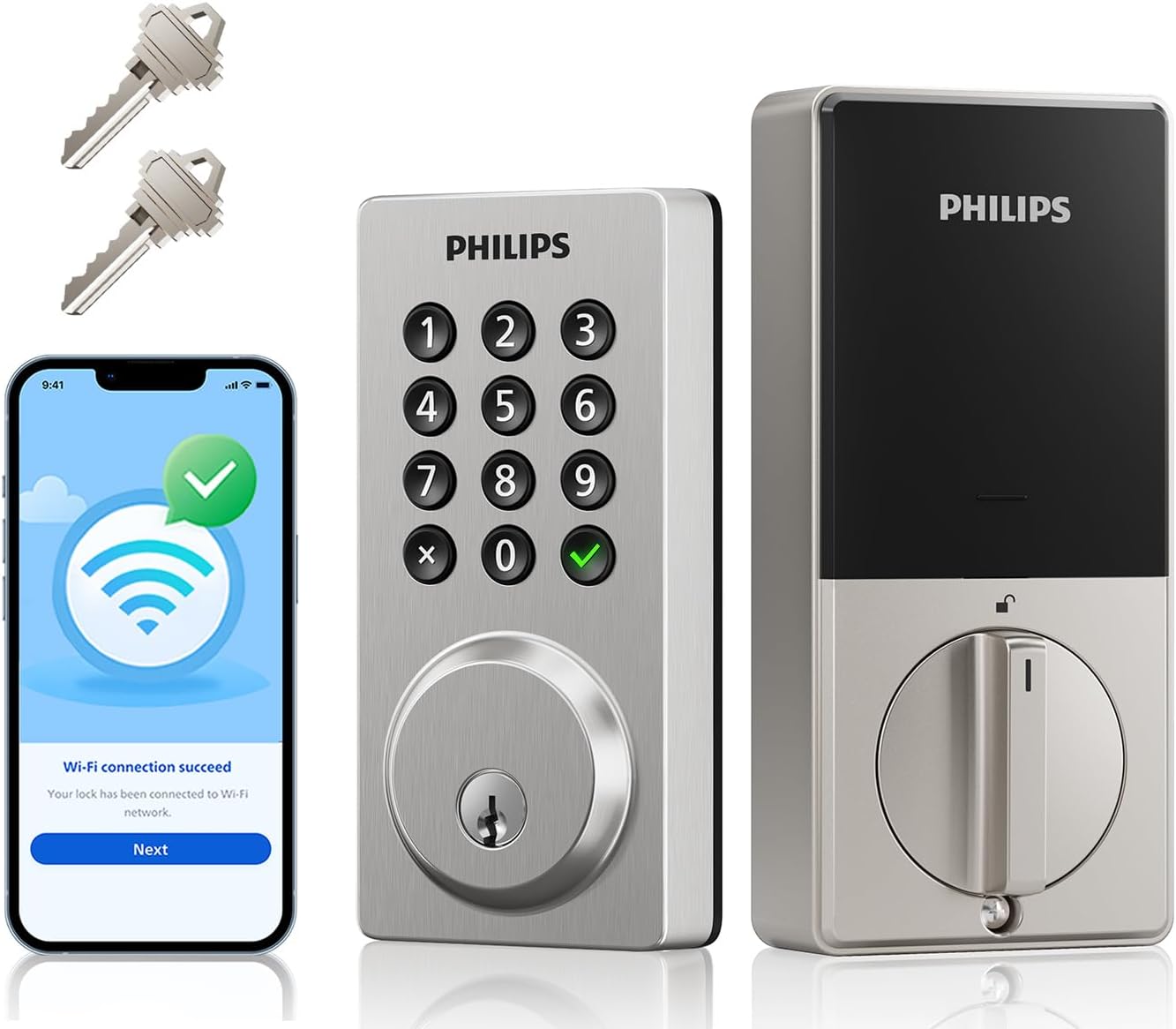
Pros
- Built-in WiFi connects directly to your router for app control without extra hubs
- Multiple passcode types fit family routines, guest stays, and service visits
- Local storage of entry logs keeps your access history private on the device
- Physical buttons stay reliable in bad weather unlike touchscreens
- Auto-lock and low-battery alerts prevent forgotten security lapses
Cons
- AA batteries not included, so plan to buy them for immediate setup
- App pairing relies on steady home WiFi, which can frustrate during outages
- Physical buttons may be hard to see clearly at night without extra lighting
This Philips WiFi smart deadbolt fits standard front doors and gives you control over entry without needing keys every time. You can unlock it remotely via app when a delivery arrives or let in a neighbor watching your house, reducing the stress of forgotten locks. Auto-locking after 10 to 180 seconds handles busy mornings when rushing out the door, while real-time alerts notify you of any access to keep tabs on your property.
For family homes, set permanent codes for trusted members and one-time passcodes for visitors like repair workers, making it simple to manage who comes and goes. The backup physical keys provide reliable access if power fails, and vacation mode disables codes entirely while you're away, securing the driveway gate equivalent on your main entrance. Entry logs stored locally let you review activity later without privacy worries.
Voice control with Alexa or Google works for hands-free locking after grocery runs, and the durable build holds up in rain or cold, fitting everyday porch monitoring needs. Silence mode keeps operations quiet during nap times, ensuring the lock supports your routine without disturbances. Overall, it addresses common gaps in manual locks for better peace of mind around deliveries and family safety.
Most homeowners complete setup in under 30 minutes with basic tools on standard doors. Check your door thickness from 1.38 to 1.75 inches and backset of 2.38 inches for a direct fit.
- Tools needed: Phillips screwdriver and possibly a drill for pilot holes.
- Replace existing deadbolt by unscrewing the old one; no wiring required.
- Works on exterior doors 2 to 3.15 inches thick; test hole alignment first.
- Download Philips Home Access app before starting for guided steps.
The app connects via your home WiFi for remote control, with no extra hub needed. Expect stable performance on common routers, sending instant entry notifications to your phone.
- Supports Alexa and Google for voice unlock during hands-free moments.
- Manage up to 100 passcodes: permanent for family, timed for guests.
- View local logs of all entries without cloud sharing.
- Low-battery warnings appear in-app before power issues arise.
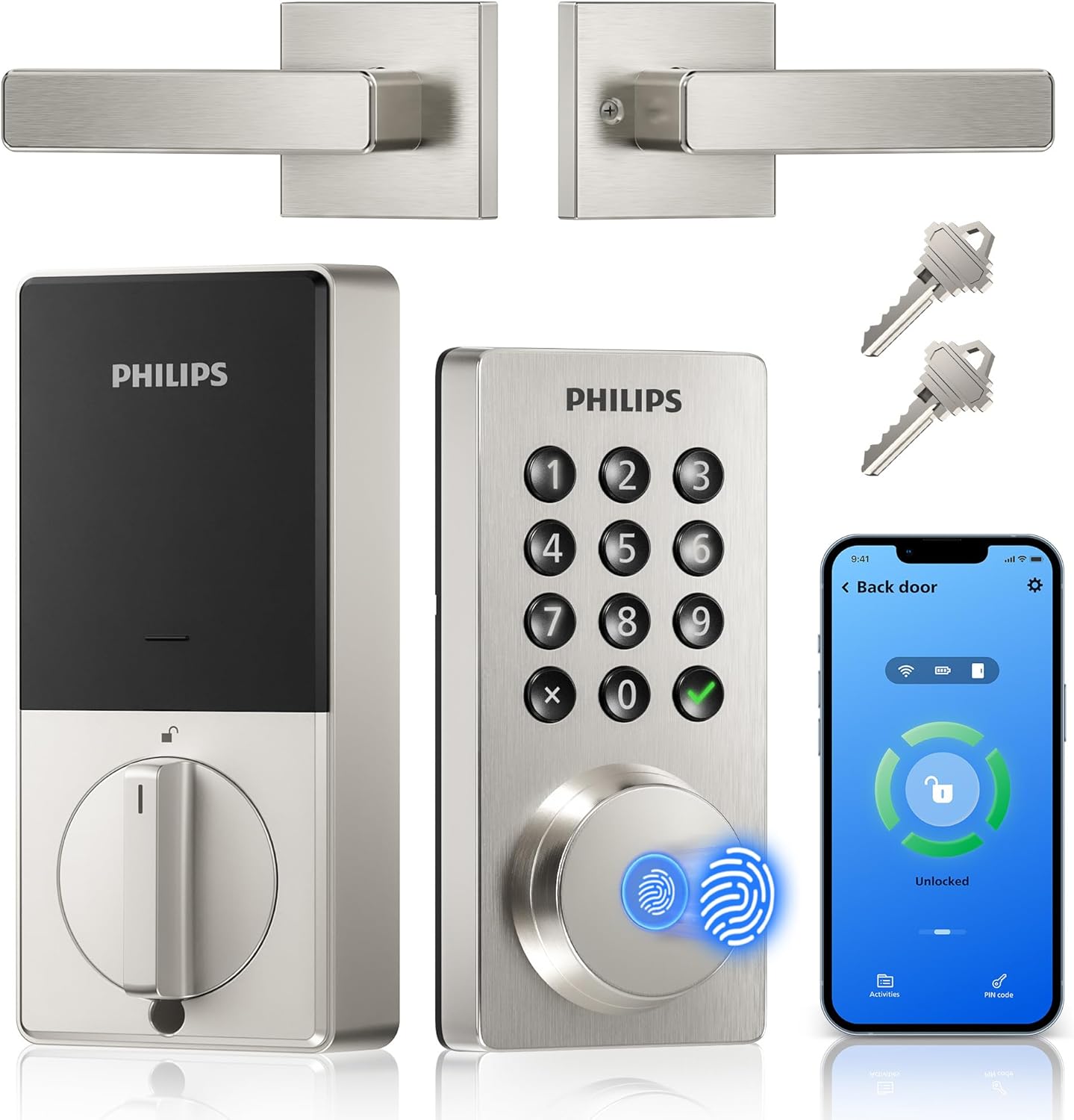
Pros
- No extra hub needed for direct phone control.
- Multiple unlock options reduce reliance on physical keys.
- Includes matching handle for full front door replacement.
- Auto-lock timer prevents leaving the door unsecured.
Cons
- Requires eight AA batteries that are not included.
- Door thickness must match 1-3/8 to 1-3/4 inches.
- Voice features need separate Alexa or Google devices.
This Philips WiFi keypad lock gives homeowners reliable remote access to the front door through a simple app connection.
It supports quick fingerprint entry for family returns and allows temporary codes for visitors during deliveries or service calls. The auto-lock option helps secure the house after everyone leaves without extra effort.
The main trade-off here is the need for regular battery changes to maintain operation at all times.
This product suits households that want straightforward keyless entry without complex add-ons.
Measure your door thickness first since this lock fits only 1-3/8 to 1-3/4 inch doors. Replacement installs work best on standard wood or metal front doors with existing deadbolt holes.
New installs may need extra drilling for the handle set. I advise watching the provided video before starting because alignment affects smooth operation.
- Use a screwdriver only and avoid power tools that could damage the frame.
- Test the latch direction during setup to match your door swing.
- Install on a flat surface to ensure the keypad sits evenly.
- Check battery compartment access after mounting for future changes.

Pros
- Built-in WiFi removes the need for extra hubs when setting up remote control from anywhere
- Physical keypad works reliably even if phones are unavailable during power issues
- Auto-lock feature reduces the chance of forgetting to secure the door after leaving
- Multiple access options including keys provide backup if the app or batteries fail
Cons
- Requires eight AA batteries that need periodic replacement every few months
- Setup involves aligning the lock components precisely on thicker or nonstandard doors
- App notifications can arrive with slight delays depending on home WiFi strength
This smart deadbolt fits most standard front doors and lets homeowners check entry activity through the app while at work or running errands. It supports multiple unlock methods so family can use codes or keys when returning from school or activities. The auto-lock setting engages after a set time to secure the door even during busy evenings with packages or pets coming in.
Real-time alerts notify when someone uses a code or the app at the main entrance, which helps track deliveries or visitors without constant monitoring. Vacation mode limits access to only essential users, keeping the property secure during extended trips away from home. The keypad design avoids touchscreens that can fail in cold or wet conditions common in many regions.
Physical key backup ensures entry remains possible if batteries run low or connectivity drops. Temperature range covers typical outdoor conditions from freezing winters to hot summers for reliable operation year-round. Overall the lock addresses daily entry routines by combining remote oversight with simple mechanical reliability.
Confirm door thickness falls between 1 3/8 and 2 inches and that the existing bore holes match standard sizes before purchase. The process typically takes under 15 minutes with basic tools for most U.S. doors.
- Align the deadbolt and handle components carefully to avoid binding during operation
- Test the latch and strike plate fit after mounting to ensure smooth locking
- Insert batteries last to complete the setup and connect to WiFi
The built-in WiFi connects directly to home networks for remote locking and alerts without additional devices. This setup supports checking status from work or while traveling.
- Create and manage up to 100 codes including permanent or one-time options for regular users
- Receive notifications for each access event at the front or side door
- Adjust auto-lock timing and activate vacation restrictions through the app menu

Pros
- Controls the lock remotely without extra hubs or bridges.
- Installs in minutes using only a screwdriver on standard doors.
- Built-in alarm notifies of door movement or tampering.
- Works with voice assistants for hands-free lock commands.
Cons
- Needs steady home WiFi for remote features to work.
- Battery replacements required several times per year.
- Higher cost than basic non-connected deadbolts.
This deadbolt delivers straightforward remote control over your front door through the app and built-in WiFi.
It handles common situations like monitoring deliveries or granting entry to kids after school without needing to be home. The auto-lock function and entry alerts add reliable coverage for daily routines around the property.
The main trade-off is its full remote use depends on consistent WiFi performance at the house. Worth noting before buying, battery life requires periodic attention in real homes with frequent use.
Homeowners with Apple devices or frequent visitors will find it fits well for practical front door management.
New installs on wood-frame doors go smoothly with the snap design that holds parts in place. Replacement jobs on existing deadbolts typically need only a screwdriver and take under thirty minutes.
- Check door thickness between 1-3/8 and 1-3/4 inches before starting.
- Measure backset to confirm 2-3/8 or 2-3/4 inch fit on your door.
- Apartment renters should verify landlord rules on modifications first.
- Wood doors accept the hardware directly while metal may need extra prep steps.
What to Look for in a Smart Deadbolt
A smart deadbolt needs to be two things: a solid lock for your door and a reliable tool for your daily routine. The right choice makes entry easier for you while keeping it impossible for everyone else. These are the factors that separate a lasting upgrade from a temporary gadget.
Connection type and reliability
Built-in Wi-Fi means you can control the lock from anywhere without buying a separate bridge, which simplifies setup. This direct connection is convenient, but it relies on your home network’s stability. A lock that loses its connection frequently becomes a source of frustration instead of a solution.
For doors farther from your router, like a side entry to a garage, a model designed for a strong signal or one that uses a different protocol might be more dependable. Consider your home’s layout and where you will need to control the lock most often. A consistent connection is what makes remote access genuinely useful, whether you are letting in a guest or checking the status from bed.
Power management and backup access
Smart locks run on batteries, and how they handle a low charge matters more than the advertised lifespan. A clear alert through the app or a beep from the lock itself gives you days to swap batteries before you are locked out. Some models include a USB-C port for emergency power, which is a valuable fail-safe.
Always ensure there is a physical backup, like a traditional keyway, for when technology fails. This is non-negotiable for a primary entry door. For a comprehensive look at locks that excel in this area, our guide to the most secure smart locks details models with robust backup systems.
Access methods and user management
The best smart lock is the one your whole household will use. A keypad is essential for family members who do not carry phones, while fingerprint readers offer quick entry for regular users. Voice control through Alexa or Google Assistant is helpful for hands-free locking when your arms are full.
Look for an app that lets you create temporary codes for guests or recurring schedules for regular visitors like cleaners. The ability to see a log of who entered and when adds a layer of awareness, especially useful for managing a rental property or tracking when kids get home from school.
Physical security and durability
A smart lock must first be a good lock. Look for a deadbolt that meets ANSI/BHMA Grade 2 standards at a minimum, which indicates it has been tested for strength and durability. The exterior face should resist weather and tampering, with a solid construction that does not feel flimsy.
For doors exposed to the elements, like a back porch entry, an IP54 or higher weather resistance rating is important. The lock should operate smoothly in both summer heat and winter cold without the mechanism sticking or the electronics failing. This physical reliability is what protects your home when the smart features are just conveniences.
Installation and door compatibility
Most smart deadbolts are designed as straightforward replacements for existing hardware, requiring only a screwdriver. The critical step is measuring your door’s thickness and the backset, which is the distance from the edge of the door to the center of the deadbolt hole. A mismatch here means the lock will not fit.
If you are replacing a lock on a non-standard door, such as one with a glass panel or an unusual thickness, check the manufacturer’s specifications carefully. For more complex setups, like a sliding patio door, you may need a different type of lock entirely. A proper fit ensures the deadbolt extends fully and the mechanism aligns correctly for secure operation.
Focus on the connection reliability, the backup plan for power, and how your household will actually use it day to day. The right smart deadbolt should make your front door more convenient without making it less secure.
Why You Should Trust Us
Our recommendations are based on deep market research and analysis, not hands-on testing. We evaluate smart locks by aggregating verified manufacturer specifications, cross-referencing independent security certifications from organizations like BHMA and UL, and analyzing performance data from a wide range of professional reviews and user reports.
Each lock is assessed using our SHU Score system, which weighs factors like connection stability, access control features, physical security ratings, and real-world reliability over time. We prioritize products that demonstrate consistent performance in the scenarios where they are most needed, from a busy family’s front door to a rental property’s managed access.
Final Thoughts
Choosing a smart deadbolt comes down to reliable remote access, straightforward daily use, and a design that withstands your local weather. The best lock for you integrates quietly into your routine while adding a clear layer of control over who enters your home.
For most homeowners, the Schlage Encode Smart Wi-Fi Deadbolt is the best overall choice. Its built-in Wi-Fi works without a hub, the touchscreen keypad is durable in all seasons, and Schlage’s long-standing reputation for physical security provides confidence. It handles the core task of keyless entry with proven reliability.
If seamless integration with Apple’s ecosystem is a priority, the Schlage Encode Plus is the established popular pick, offering the convenience of unlocking with an Apple Watch or iPhone. For other smart home setups, exploring Matter-compatible smart locks can provide broader compatibility across different brands and platforms.
The right smart deadbolt removes the nagging doubt about whether your door is locked and replaces it with a simple, verified status you can check from anywhere. That peace of mind is the real upgrade.
Frequently Asked Questions
Can a smart deadbolt work without Wi-Fi?
A smart deadbolt will still function as a physical lock and keypad without an internet connection, but you lose remote access and notifications. You can still unlock it with a code, fingerprint, or key at the door, which makes a local backup method essential for reliability during an outage.
Do smart deadbolts work with existing door frames?
Most smart deadbolts are designed as direct replacements for standard ANSI deadbolts and will fit typical door preparations. You must verify your door’s thickness and the backset measurement, which is the distance from the door edge to the center of the hole, to ensure compatibility before purchase.
How secure are fingerprint readers on smart locks?
Fingerprint readers on residential smart locks offer convenient keyless entry but are not as secure as dedicated biometric systems. They work well for recognizing registered users quickly, though they can struggle with wet or dirty fingers. For maximum security, use them alongside a strong passcode.
What happens if the smart lock’s battery dies completely?
If the batteries die completely, you will need to use the physical key to unlock the door. Many models have a low-battery alert that gives you ample warning, and some include a port for an external battery pack to provide emergency power and regain keypad function.
Is a smart deadbolt a good choice for a rental property?
Smart deadbolts are excellent for rentals because they allow you to issue unique, expiring codes for each tenant without ever needing to change the physical lock or manage key copies. You can grant and revoke access remotely, and the activity log provides a record of entries, simplifying management between occupants.



Write Your Review
No reviews yet. Be the first to share your experience!