

Wondering if you locked the door after leaving for work or needing to let in a contractor while you are still miles away creates unnecessary friction in a day. Traditional locks keep you physically tied to your keys, and smart locks that require separate hubs add another point of failure to your network.
Wi-Fi smart locks cut out the middleman by connecting directly to your home network, giving you remote access from your phone without extra devices. We looked at the Best Wifi Smart Locks to find models that pair this direct connection with the reliability a front door demands.
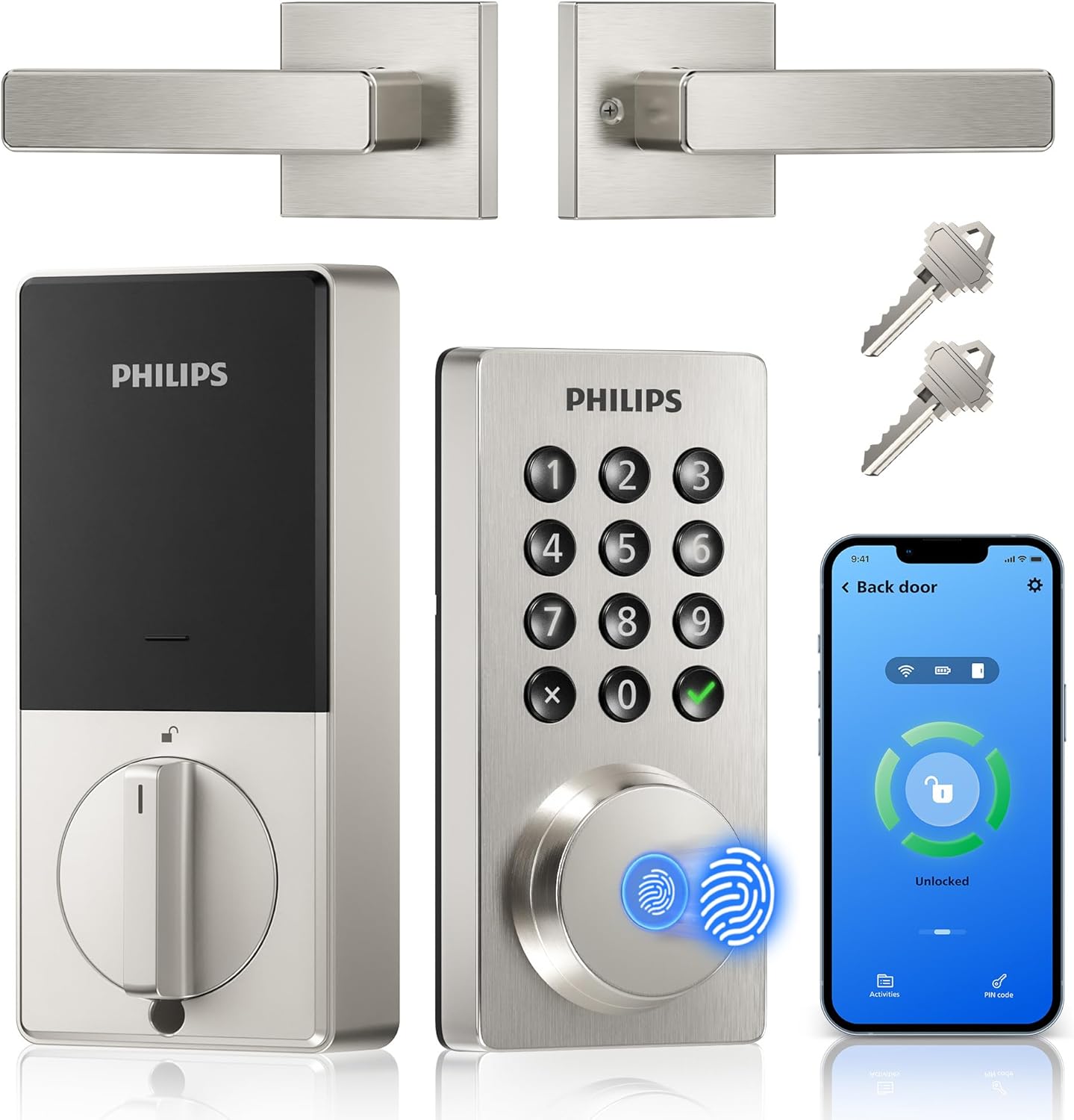
Our overall pick is the Philips Wi-Fi Door Lock. It combines built-in Wi-Fi for remote management with multiple entry methods, offering keyless convenience without sacrificing the deadbolt security your door needs. Our top picks are just below.
Our Top Picks

Pros
- Fingerprint recognition works fast for daily use, reducing fumbling with keys at the front door.
- Multiple code options fit family routines and occasional visitors without compromising security.
- Built-in handle set simplifies upgrading your entire front door lock in one installation.
- App provides real-time alerts and history, helping track access around deliveries or family schedules.
- Backup mechanical keys ensure entry during power outages or WiFi issues.
Cons
- Requires 8 AA alkaline batteries, which are not included and need regular replacement.
- Best suited for standard door thicknesses of 1-3/8 to 1-3/4 inches; measure first to avoid fit issues.
- Keypad lighting helps at night but may need extra home lighting for low-visibility conditions.
This Philips WiFi keypad door lock replaces your standard front door deadbolt with options like fingerprint, app control, voice commands, or codes, making entry smooth for family members carrying packages or kids' gear. You gain peace of mind from real-time notifications about who unlocks the door and when, whether checking on deliveries left at the porch or ensuring teens get home safely after school. The auto-lock feature kicks in customizable seconds after closing, preventing forgetful exits that leave your home exposed during daily routines.
For guest access, create one-time or scheduled codes via the app, ideal for letting in repair workers or dog walkers without being present. Vacation mode disables the keypad entirely, securing your property while you're away and reducing risks from unknown visitors approaching the driveway. Soft lighting on the keypad aids nighttime use, and silent mode keeps operations quiet to avoid waking sleeping children inside.
Backup keys provide manual access if power fails or WiFi drops, ensuring reliability for everyday front door security. Activity logs in the app let you review entries over time, spotting patterns like frequent late-night unlocks that might signal issues with shared codes. Overall, it fits standard doors and handles common household scenarios without complexity.
Verify your door fits before buying: works on thicknesses from 1-3/8 to 1-3/4 inches (38mm to 50mm). Use only a screwdriver for a quick DIY setup, following the provided video guide.
- Supply 8 AA alkaline batteries (not included) for power.
- Press and hold reset button for 5 seconds to activate after install.
- Test mechanical keys and keypad right away to confirm fit on your front door.
- Connects directly to home WiFi; no extra hub needed for app setup.
The Philips Home Access app handles remote control without hubs, linking to your home WiFi for front door management from anywhere. Get instant alerts on unlocks to monitor deliveries or family arrivals.
- Manage fingerprints, codes, and schedules for users like kids or guests.
- View full access history to track entries over days or weeks.
- Works with Alexa or Google Assistant for voice commands when hands are full.
- Set auto-lock timing and vacation mode for hands-off security.
Pros
- No extra hub needed for direct phone control.
- Multiple unlock options reduce reliance on physical keys.
- Includes matching handle for full front door replacement.
- Auto-lock timer prevents leaving the door unsecured.
Cons
- Requires eight AA batteries that are not included.
- Door thickness must match 1-3/8 to 1-3/4 inches.
- Voice features need separate Alexa or Google devices.
This Philips WiFi keypad lock gives homeowners reliable remote access to the front door through a simple app connection.
It supports quick fingerprint entry for family returns and allows temporary codes for visitors during deliveries or service calls. The auto-lock option helps secure the house after everyone leaves without extra effort.
The main trade-off here is the need for regular battery changes to maintain operation at all times.
This product suits households that want straightforward keyless entry without complex add-ons.
Measure your door thickness first since this lock fits only 1-3/8 to 1-3/4 inch doors. Replacement installs work best on standard wood or metal front doors with existing deadbolt holes.
New installs may need extra drilling for the handle set. I advise watching the provided video before starting because alignment affects smooth operation.
- Use a screwdriver only and avoid power tools that could damage the frame.
- Test the latch direction during setup to match your door swing.
- Install on a flat surface to ensure the keypad sits evenly.
- Check battery compartment access after mounting for future changes.

Pros
- Multiple unlock methods fit different family members and situations
- Built-in WiFi enables control from anywhere without extra devices
- Real-time notifications track who enters your home
- Simple setup works on most standard doors
- Custom passcodes manage guest access easily
Cons
- Batteries not included, so purchase 4 or 8 AA alkaline separately
- No door sensor means auto-lock works only if door is fully closed
- Requires stable home WiFi nearby for reliable remote access
This Philips WiFi deadbolt offers straightforward keyless entry for your front door, replacing traditional locks with options like fingerprint scans, app control, or passcodes. For busy mornings rushing kids to school, a quick finger touch opens the door without fumbling for keys, while remote unlocking from your phone handles package deliveries when you're at work. Entry notifications keep you informed about who's coming and going, providing peace of mind during the day.
Auto-locking after a set time ensures your home stays secure even if you forget in the rush out the door, and away mode disables most access methods except a master code when you're on vacation. Family members each get their preferred method, from voice commands via smart speakers to physical keys as backup. This setup reduces daily hassles around the front entry while maintaining solid protection.
Custom passcodes let you grant temporary access to service providers without being home, tracking exactly when they arrive and leave through the app history. Though it lacks a door sensor, the flexible unlock variety covers most household needs, making it a practical upgrade for monitoring porches and securing against unauthorized entry.
Overall, it delivers reliable control for everyday home defense, focusing on convenience in real scenarios like watching over pets inside or gates near driveways.
Check your door thickness first, as this lock fits standard sizes from 1-3/8 to 2 inches thick. Most front doors match this without issues.
- Use just a screwdriver for a 10-minute DIY install on right or left-handed doors.
- Provide 4 or 8 AA alkaline batteries, as none come included.
- Ensure your door has a standard deadbolt hole setup; measure beforehand to avoid returns.
- Available in black or nickel finish, so confirm color preference.
The app connects directly via your home WiFi for remote locking, unlocking, and alerts without any hub. Keep the lock within range of your router for steady performance.
- Works with common home networks; update the app for voice control with Alexa or Google Assistant.
- View entry history and manage up to 100 passcodes or fingerprints for family and guests.
- Real-time notifications arrive on your phone for door activity.
- Away mode adds protection by restricting access remotely.

Pros
- Supports remote locking from any location
- Fingerprint entry speeds up daily access
- Auto lock feature prevents unsecured doors
- Multiple methods reduce lost key problems
Cons
- Needs steady WiFi for remote functions
- Install may be complex on older doors
- Requires regular battery monitoring
This smart lock provides remote access to monitor and control the front door from any location. It supports fingerprint unlocking and app alerts tied directly to daily home routines like checking on deliveries.
Remote monitoring helps track door activity while at work. Fingerprint recognition allows quick entry for family members without fumbling for keys during busy mornings.
The main trade-off here is dependence on a reliable internet connection for full remote features. Without it the lock still works locally but loses alerts and app control.
This product suits homeowners in stable WiFi homes seeking straightforward keyless options for front door security.
Check your door thickness and frame type before purchase. Wood-frame doors often need extra reinforcement for a secure fit while metal doors may require different screws.
New installations demand precise hole alignment. Replacement jobs on existing deadbolts are simpler but verify the backset matches your current setup.
- Apartments with thin doors may need additional brackets for stability
- Wood doors benefit from pilot holes to avoid splitting
- Always confirm the lock fits standard 1-3/8 to 2 inch thicknesses
- Renters should get landlord approval before drilling
What to Look for in a Wi-Fi Smart Lock
A lock that connects directly to your router has to balance network reliability with the physical security of a deadbolt. The right choice removes guesswork from your routine while keeping the door firmly shut. These are the factors that make the difference.
Network stability and range
Built-in Wi-Fi is only useful if the lock maintains a steady connection to your router. A weak signal at your front door leads to delayed notifications and failed remote commands, which defeats the purpose of buying a connected lock.
Look for a model that clearly states its compatibility with 2.4 GHz networks, as most home routers support this band reliably. Consider the distance from your router to your door, and check if the lock has any signal strengthening features, especially for homes with thicker exterior walls.
Battery life and power management
Maintaining a constant Wi-Fi connection uses more power than a Bluetooth-only lock. A model that drains its batteries in a few months creates more maintenance hassle than it saves in convenience.
Effective power management includes clear low-battery alerts through the app and a physical key override for emergencies. Some locks enter a low-power mode when not actively communicating, which extends cell life. Forgetting to change batteries should not lock you out.
Unlock methods and user management
The best smart lock fits how your household actually gets through the door. A family with young children needs different access than a homeowner who frequently hosts short-term renters.
Prioritize locks that offer a mix of entry methods, like a fingerprint reader for daily use, a keypad for guests, and a physical key for backups. The app should let you create temporary codes for service visits or recurring schedules for family members, similar to the access control offered by keypad deadbolts. Easy management prevents access from becoming a chore.
Auto-lock and security alerts
A lock that secures itself adds a layer of protection against forgetfulness. The time delay should be adjustable to match your routine, whether you are stepping out to get the mail or carrying groceries inside.
Instant alerts for lock and unlock events are the core benefit of a connected lock. They tell you when a child arrives home from school or if someone tries an invalid code. Look for a system that sends notifications reliably without flooding your phone with minor status updates.
Physical durability and weather resistance
Your front door faces sun, rain, and temperature swings. The external keypad and fingerprint sensor must read inputs reliably in direct sunlight, light rain, or with cold fingers.
Check for ratings like ANSI Grade 2, which indicates a solid residential security level. The finish should resist fading and the internal mechanism should operate smoothly in both summer heat and winter cold. A lock that fails in bad weather is worse than a simple deadbolt.
Once you know your network strength, who needs access, and your local climate, the choice becomes straightforward. It is about matching a lock’s features to the realities of your doorway.
Why You Should Trust Us
Our recommendations are based on deep market research and analysis, not hands-on testing. We evaluate manufacturer specifications, cross-reference independent security certifications from bodies like ANSI and BHMA, and analyze aggregated performance data. Our SHU Score rating system weighs factors like network reliability, power efficiency, and user management based on verified product data and design principles.
Final Thoughts
Choosing a Wi-Fi smart lock comes down to reliable connectivity and flexible access for your household. The right model turns your phone into a trusted key and removes the nagging doubt about your door’s status.
For most homes, the Philips Wi-Fi Door Lock is the best overall choice. Its built-in Wi-Fi provides direct remote control, and the combination of fingerprint, code, and key access covers nearly every entry scenario without extra hardware.
The Philips Wi-Fi Door Lock (B0FVWQ8R93) stands out as a proven, popular pick with high user adoption, indicating reliable performance for everyday use. For those managing multiple properties or guest access, its detailed user management and temporary codes are particularly useful.
If you need a full handle set for a cohesive look, the keypad handle models integrate the lock and lever into one unit. The right Wi-Fi smart lock secures your home actively, not passively, and ends the ritual of checking the door.
Frequently Asked Questions
Do Wi-Fi smart locks work without a hub?
Models with built-in Wi-Fi connect directly to your home router and do not require a separate hub. This simplifies setup but relies on your home network’s strength and stability at the door’s location.
What happens if the power or Wi-Fi goes out?
A Wi-Fi smart lock continues to operate on battery power for locking and unlocking using the keypad, fingerprint, or physical key. You lose remote access and alerts until the network is restored, but you can still enter your home.
Can you share access with someone temporarily?
Yes, most Wi-Fi smart locks allow you to create temporary passcodes through the app for cleaners, dog walkers, or guests. You can set these codes to expire after a single use or on a specific date, which is a common feature in modern smart locks.
Are fingerprint readers reliable on a front door?
Modern capacitive sensors work well for most conditions, though very wet, dry, or cold fingers can sometimes cause misreads. Most locks store multiple fingerprints per user and offer a keypad or key backup for those occasional failures.
How do you install a Wi-Fi smart lock?
Installation typically involves replacing your existing deadbolt using a screwdriver, following the manufacturer’s template to drill any new holes. Most models are designed for standard door thicknesses, but checking your door’s measurements before purchase prevents a frustrating mismatch.



Write Your Review
No reviews yet. Be the first to share your experience!