

Cloud storage fees have a way of adding up quietly. A camera that costs forty dollars upfront can end up costing ten or fifteen dollars a month just to access your own footage, and if you stop paying, the recordings disappear. For a lot of people, that is not a trade-off they agreed to when they bought the camera.
The best 4K security cameras without subscription store footage locally, so you stay in control of what you recorded and for how long. We went through the current options to find cameras that give you full resolution and reliable access without locking features behind a recurring plan.
Our overall pick for best 4K security cameras without subscription is the eufy Indoor Cam E30. It covers a full room with 360° pan-tilt movement and records in 4K, so you get clear detail from every angle without paying monthly to keep it. Browse our full list below to see which one works best for your situation.
Our Top Picks

Pros
- Local 64GB storage keeps footage private and accessible without ongoing fees
- Solar power with backup batteries runs cameras indefinitely in sunny spots
- AI motion tracking follows movement across cameras for full property awareness
- Clear color night vision spots details like faces or license plates up close
- Base station boosts WiFi signal to cover larger homes reliably
Cons
- Solar panels need direct sunlight for best performance; shaded areas require occasional recharging
- Base station must plug into an indoor outlet, limiting placement flexibility
- Initial app pairing takes a few minutes of stable home WiFi to complete fully
This solar-powered four-camera system connects to a base station for local storage, letting homeowners monitor key areas like front porches and driveways without monthly cloud fees. The 4K clarity captures details such as license plates or faces during deliveries, while color night vision keeps views sharp after dark, reducing guesswork about nighttime visitors. Motion detection sends phone alerts and auto-tracks movement, linking footage from all cameras to show what happened across the property.
For backyard gates or garden spots, the 360-degree pan and tilt eliminates blind areas, following people or pets precisely. Two-way audio allows speaking to anyone at the door from your phone, useful for checking on kids outside or warning off strangers. Weatherproof build handles rain, snow, and down to -14°F cold, so it stays reliable through winter without failing.
Expansion to eight cameras covers larger properties, with the base station extending signal strength to avoid dead zones. Footage saves locally for months, uploading only when you choose, giving control over privacy. Everyday homeowners gain straightforward perimeter protection that fits busy routines.
Position these cameras to cover high-traffic home areas effectively, focusing on entry points and open spaces for maximum deterrence and visibility.
- Front porch or door: Aim at the entrance to watch deliveries and greet visitors via two-way talk.
- Driveway edge: Track vehicles pulling in, zooming on license plates from 30 feet away.
- Backyard gate or patio: Use 360-degree swivel to scan fences and play areas for kids or pets.
- Garden or side yard: Strap to trees or poles with included brackets for flexible, drill-free mounting.
- Avoid fully shaded spots; place solar panels south-facing for steady charging.
Solar charging keeps cameras running with just a few hours of daily sun, backed by batteries that hold power through cloudy days or outages.
- Daily operation: Two hours of sunlight powers nonstop recording and live views indefinitely.
- Offline mode: Records to base station during WiFi drops, auto-syncs later.
- Storage holds: 64GB captures four months of motion-triggered clips, no deletions needed.
- Low-light battery works down to -14°F, but recharge manually in constant shade every few weeks.
- Base station stays powered via outlet; cameras draw from it if solar dips.

Pros
- Sharp 4K daytime video and reliable motion tracking keep full rooms in view
- Local storage option avoids ongoing costs for reviewing indoor footage
- AI separates people and pets to cut down on unnecessary phone alerts
- Simple app controls pan and tilt for quick checks on kids or animals
- Spotlight improves nighttime clarity without waking up the house
Cons
- MicroSD card for storage must be purchased separately
- Tilt range limits coverage when mounted high on far walls
- HomeKit connection drops to lower resolution
The eufy Indoor Cam E30 mounts easily on shelves or walls to watch over indoor spaces like baby rooms or kitchens. Its 360-degree pan and tilt let you scan the full area from your phone, tracking people or pets as they move so you stay aware without blind spots. Two-way audio works for talking to family members or scolding a pet caught in the act, adding control from anywhere.
During the day, 4K clarity captures details like packages left near doors or kids playing in the living room. At night, the built-in spotlight switches on for color views, helping you see clearly in low light without disturbing sleepers. AI detection focuses alerts on real activity, ignoring minor motions to keep notifications useful for actual security needs.
For homes with smart setups, it connects to HomeKit, Alexa, or Google Assistant, though resolution lowers on HomeKit. Local storage keeps footage private on your card, ready for review after spotting unusual entryway traffic or pet mischief. This setup provides steady indoor monitoring that fits everyday routines.
Placement matters for best results; position it centrally to avoid tilt limits on distant walls. Overall, it delivers practical coverage for family safety and property checks inside the home.
Position the eufy Indoor Cam E30 to eliminate blind spots in key home areas. Central spots ensure the pan and tilt cover everything without strain.
- Nursery or kid's room: Shelf at eye level watches crib and play area, tracking sleep or cries.
- Kitchen or living room: High shelf corner views counters and floors for pet monitoring or family activity.
- Entryway or hallway: Wall mount near door catches indoor deliveries or nighttime movement.
- Office or laundry room: Freestanding on desk oversees valuables or appliances when away.
Avoid far-wall high mounts, as tilt may not reach room ends. Test angles in the app for full coverage.
This camera runs without subscriptions by saving footage directly to a microSD card you insert. Expect enough space for days of clips from busy indoor spots like pet areas.
- Card needed: Buy a high-endurance microSD separately; it slots under the lens for easy access.
- Works with HomeBase 3: Connects for expanded storage and better AI if you have one (not HomeBase 2).
- App playback: Review events quickly; cloud optional but not required.
- Alerts stay free: Motion and sound notifications hit your phone instantly over home WiFi.
Update the app and firmware for smooth storage; good WiFi range prevents gaps in recordings.
Pros
- Local 64GB storage holds months of footage without cloud fees or internet reliance
- Solar power eliminates wiring hassles for easy front and back coverage
- AI detection focuses alerts on people, vehicles, or pets to cut false notifications
- Full 360-degree pan and tilt provides complete yard visibility from one spot
- Two-way audio lets you speak to visitors or deter intruders remotely
Cons
- Solar charging depends on sunlight, so shaded spots may need occasional recharging
- Initial app pairing takes 10-15 minutes, longer for those new to wireless setups
- Two cameras cover typical homes but may leave gaps on larger properties
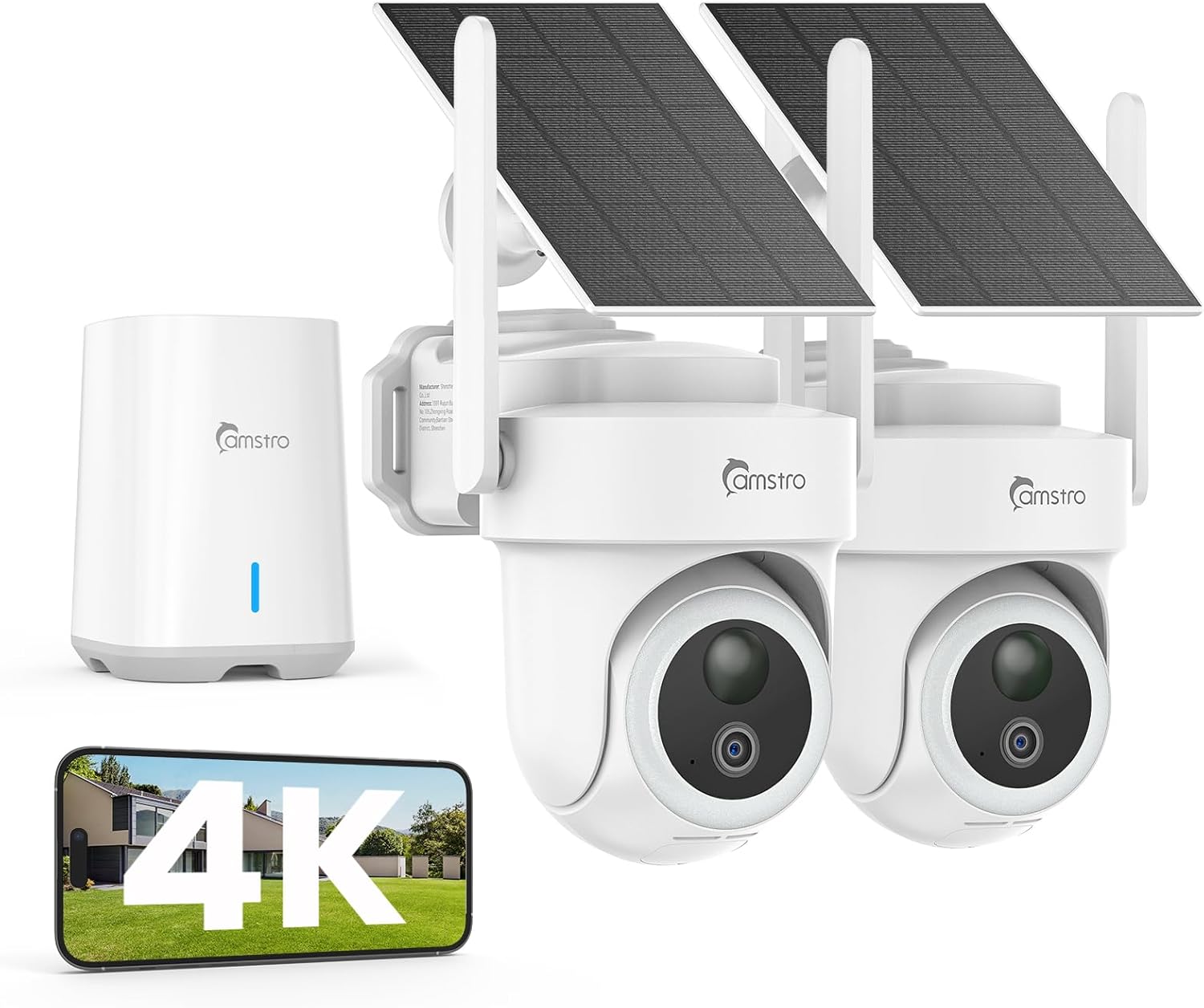
This two-camera kit sets up outdoors to give homeowners a clear, wide view of key areas like the front porch and backyard gate. The 360-degree pan and tilt lets you scan the entire driveway or yard from your phone, eliminating blind spots where packages might sit unnoticed or kids play out of sight. Motion tracking locks onto people or vehicles moving across the scene, so you get a full record of activity without constantly checking the app.
At night, the color night vision activates on motion, showing vivid details of who's approaching your door or lingering near the garage. This works well for spotting delivery drivers after dark or checking on pets in the yard, providing reliable visibility that standard black-and-white cameras lack. The AI smartly ignores wind-blown trees, focusing alerts only on relevant movement like a person walking up the path.
With a built-in home base for local storage, all footage stays secure on-site for months, safe even if a camera gets damaged. Customize detection zones to ignore the street and watch just your porch or side yard, reducing unnecessary notifications during daily routines. Weatherproofing holds up through rain and snow, making it a steady option for ongoing property checks.
Two-way talk connects you directly to the scene, useful for greeting guests or warning off strangers at the gate. Overall, it delivers practical coverage for everyday home defense without ongoing costs, fitting most standard lots focused on entrances and play areas.
Mount these cameras high on eaves or poles for optimal front porch and backyard coverage, aiming to overlap views where possible. Position one over the door to catch deliveries and another toward the gate or driveway for full entry monitoring.
- Front door: 8-10 feet high, angled down to cover steps and walkway
- Backyard: Near patio or fence, panning across play areas for kids and pets
- Driveway: Elevated to track vehicles entering, avoiding direct car glare
- Avoid tree cover that blocks solar panels or WiFi signal to the home base
Solar panels recharge the battery with just a few hours of daily sun, powering continuous operation for porches and yards without plugs. The home base handles 64GB local storage for up to 180 days of looped footage, keeping records safe offline.
- Battery lasts weeks in low sun if fully charged, with app alerts for low power
- Storage overwrites old clips automatically, prioritizing recent motion events
- No cloud needed; data stays secure even during power outages or camera damage
- Multi-user access lets family check backyard or front footage anytime

Pros
- Sharp 4K video and zoom let you see details across a room without getting closer
- AI detection cuts down on unnecessary alerts by focusing on people, pets, or crying
- Full pan and tilt coverage means one camera watches large indoor spaces effectively
- Phone app gives instant access and control from anywhere in your home or away
Cons
- MicroSD cards for local storage are not included, so you need to buy them separately
- Requires a power outlet nearby, limiting spots without extension cords
- App setup can take extra steps if your home WiFi signal is weak in some areas
These Anona indoor cameras deliver clear, detailed video that helps homeowners keep tabs on key indoor areas like nurseries, living rooms, and kitchens. With the ability to pan across 360 degrees and tilt up and down, a single unit covers wide spaces, tracking movement such as a pet wandering or a child playing. This setup gives you confidence when you're in another room or away, reducing the need to physically check on things.
The built-in detection for people, pets, and baby crying sends phone notifications right away, focusing alerts on what matters most. For instance, place one in the baby's room to catch cries early, or near the back door inside to monitor pet access. Night vision keeps views steady in low light, so you see what's happening during evening hours without glare or fuzzy images.
Two-way audio lets you talk through the camera to soothe a restless pet or remind kids to stay put. Footage saves to a cloud service or local card, making it easy to review events like unexpected visitors at the front entryway. Overall, this 4-pack offers practical coverage for multiple rooms, bringing straightforward monitoring to daily home life.
Auto-tracking follows activity smoothly, ensuring nothing slips by in busy family spaces. The design prioritizes ease, helping you maintain oversight on deliveries left inside or family movements without constant phone peeking.
Position these cameras in high-traffic indoor spots for best results, keeping the lens at eye level or slightly higher to avoid obstructions. Aim for corners to maximize the pan and tilt range, covering areas like entryways, playrooms, or pet zones.
- Nursery or kid's room: Mount on a shelf facing the crib to detect crying and track little ones.
- Living room: Place high on a wall to watch pets or guests without blocking views.
- Kitchen or hallway: Angle toward doors for monitoring deliveries or family traffic.
- Avoid direct sunlight or heat sources to keep video clear day and night.
Choose between cloud storage for remote access or local microSD cards up to 512GB for footage that stays on-site. Cloud uses secure encryption, while local saves money long-term but requires buying cards separately.
- Cloud: Automatic backups, view from phone anywhere, ideal for reviewing pet antics or visitor clips on the go.
- Local SD card: No monthly fees, keeps recordings private at home for checking kid safety or door activity.
- Both options loop recordings, overwriting old files to manage space without hassle.
Pros
- Local 64GB storage keeps footage private and accessible without internet or fees
- Solar panels provide ongoing power with minimal maintenance in sunny areas
- Motion tracking follows people or vehicles smoothly across your property
- Base station boosts WiFi signal to cover larger homes reliably
- Weatherproof build handles rain, snow, and cold down to -14°F
Cons
- Base station needs a constant indoor power outlet and good WiFi spot
- Solar charging slows during long cloudy periods or heavy shade
- Pairing multiple cameras via app takes 10-15 minutes initially
This 4K wireless solar camera system connects up to eight units to a base station for straightforward home coverage. Place cameras at your front porch to spot deliveries or visitors clearly, even zooming in on license plates from the driveway. The base station links motion events across views, so you see a visitor approach the door then move to the backyard gate without hunting through separate clips.
Night vision switches to full color under spotlights, making it easy to identify who is near your garage after dark. Auto-tracking follows movement precisely, reducing unnecessary alerts from wind or animals while focusing on people. For families, this means checking on kids playing in the yard or pets near the fence from your phone anywhere.
Local storage on the base station holds months of footage, safe from online hacks or outages. During WiFi drops, cameras keep recording events like someone lingering at the side door. Setup avoids wires, using straps for trees or poles, so you cover irregular spots like gardens without drilling. This setup delivers reliable visibility for everyday property protection.
Two-way audio lets you speak to delivery drivers or warn off strangers at the entrance. Expand as needed to watch both front and back areas fully. Overall, it addresses common gaps in home monitoring with practical, low-maintenance operation.
Position cameras high on eaves, poles, or trees for wide coverage of key areas like porches and gates. Aim for south-facing spots with direct sun for best solar charging, at least 8-10 feet up to avoid tampering.
- Front porch: Mount overlooking door and steps to capture faces and packages clearly up to 30 feet.
- Driveway/garage: Angle toward entry path for license plates and vehicle tracking.
- Backyard gate: Use 360-degree pan to sweep fence line and play areas.
- Avoid thick shade or ground level to prevent blind spots and improve motion detection.
Solar panels recharge built-in batteries with just two hours of daily sun, keeping cameras running through clouds or nights. In low-light winters, expect occasional indoor recharges every few weeks.
- 64GB local storage on base station holds 4 months of motion clips without fees or cloud risks.
- Records offline during outages, auto-uploads when WiFi returns.
- Expandable to 8 cameras, all footage stays encrypted at home base.
- Base station extends signal, ensuring smooth viewing from anywhere indoors.

Pros
- Sharp daytime and nighttime views make it easy to identify details in any room lighting
- Smooth auto-tracking keeps moving subjects like kids or dogs centered in view
- Local storage option with no fees keeps recordings private and accessible
- Simple app controls let you pan, tilt, and zoom from your phone anywhere
- Privacy mode blocks the lens when not needed for family comfort
Cons
- Requires a separate microSD card purchase for local recording since none included
- Occasional Wi-Fi disconnects can delay responses in larger homes
- Needs a nearby outlet as it plugs in rather than running on battery
This indoor camera mounts on walls, ceilings, or stands to sweep 360 degrees across rooms like living areas or hallways, eliminating gaps where kids or pets might go unseen. The dual lenses deliver close-up detail on faces or actions up to 32 feet away, even after dark, so you spot exactly what is happening during evening checks on deliveries left inside or family movements.
Built-in detection focuses alerts on people or animals, cutting down on unnecessary phone buzzes from fans or lights, while the tracking feature follows motion smoothly around corners or furniture. Place it in a nursery to oversee sleep without disturbance, or in a home office to monitor entries when working remotely, providing steady reassurance without cloud dependencies.
For pet owners, it excels at keeping dogs or cats in frame as they roam, helping you review playtime or mischief later through the app. Everyday reliability comes from plug-in power that supports continuous recording, paired with voice control for quick checks via assistants, making it a solid choice for routine indoor protection.
Overall, it strengthens home oversight in shared spaces by prioritizing clear sightlines and smart focus, directly addressing common needs like pet supervision or child safety without ongoing costs.
Position this camera to maximize coverage in high-traffic areas inside your home. Corner mounts overlooking living rooms catch all angles without furniture blocking views, ideal for watching kids or pets from one spot.
- Living room corners for full sweeps of seating and entry points.
- Nursery ceilings to monitor cribs and play areas overhead.
- Hallway walls near stairs for traffic between rooms.
- Basement studs for utility monitoring like water heaters.
- Use the included stickers to test positions before screwing in for stick-up or permanent setups.
The AI handles everyday indoor motion by distinguishing humans and pets from background noise, sending targeted phone notifications that matter. Tracking locks on and follows subjects fluidly, reducing the need to manually adjust views during remote checks.
- Pet detection flags cats jumping or dogs barking without false triggers from TVs.
- Human alerts notify for family returns or unexpected visitors inside.
- App playback skips to events quickly, with two-way talk for calming pets remotely.
- Connects to Wi-Fi for live feeds, but signal strength affects tracking speed in big homes.
- Privacy mode tilts the lens down and stops recording when home for peace of mind.

Pros
- Built-in 1TB storage handles weeks of footage without extra costs
- AI detection cuts down on unnecessary alerts from wind or pets
- Clear night vision covers dark areas around entry points
- Weatherproof design holds up in rain, snow, or wind
- Simple expansion allows adding cameras for larger properties
Cons
- Cameras need power outlets nearby or extension cords run outdoors
- WiFi pairing and initial setup takes about 30-60 minutes
- Remote access requires stable home WiFi signal within 100 feet
This Hiseeu camera system sets up a reliable watch over key areas like your front porch and backyard gate. The four outdoor bullet cameras connect wirelessly to the central recorder, delivering clear daytime views and solid night vision that picks up details up to 100 feet away. You get continuous 24/7 recording stored locally, so you can check back on deliveries or any unusual activity without relying on cloud services or fees.
For everyday homeowners, the real value shows in how it handles common concerns. Smart motion detection focuses on people while ignoring pets or tree branches, sending phone alerts only when it matters, like someone lingering near your driveway. This cuts down on constant notifications, letting you respond quickly to actual threats without frustration. The weatherproof build ensures it stays operational through rain or cold snaps, maintaining coverage for your property's perimeter.
Expanding the system to cover more spots, such as a side entrance or garage, is straightforward with compatible add-ons. One-way audio lets you listen in remotely, useful for verifying noises at the back door. Overall, it delivers straightforward protection that fits most homes, providing peace of mind through dependable footage review and instant access from your phone.
Remote viewing works smoothly on a stable connection, so you can glance at the kids outside or the parked car from work. The setup prioritizes reliability over complexity, making it a solid choice for ongoing property monitoring without ongoing costs.
Position cameras to cover high-traffic spots like driveways, porches, and gates for maximum effect. Aim them 8-10 feet high to avoid tampering while capturing faces clearly.
- Mount front camera over the door to watch deliveries and visitors
- Place backyard units overlooking gates or play areas for kids and pets
- Angle side cameras toward driveways to spot vehicles approaching
- Ensure each has a clear view without trees or walls blocking sightlines
- Keep power cords protected and run along walls or buried conduits
Test views during setup to eliminate blind spots around entry points.
The pre-installed 1TB drive stores over 45 days of continuous footage locally, with no monthly fees required. Choose modes to fit your needs, like full-time recording or motion-only to save space.
- 24/7 continuous mode for complete coverage of porches and yards
- Motion-triggered saves clips when activity happens at gates or doors
- Custom settings prioritize key areas like driveways
- Easy playback via app or connected TV for reviewing incidents
- Optional cloud backup available but not needed for basic use

Pros
- Local storage up to 1TB keeps all footage private without subscription costs
- Solar power runs cameras continuously in most weather without recharging
- AI detection cuts alerts from trees or animals, focusing on people
- Pan-tilt design eliminates gaps when watching large properties
- Multi-camera view streams four feeds at once for quick checks
Cons
- Central aosuBase requires an indoor power outlet for reliable operation
- 1TB storage drive must be purchased separately for full capacity
- Solar panels need direct sunlight and occasional cleaning for best results
For homeowners covering a full property, the aosu T2 Ultra 6-camera kit sets up a wireless system that watches front porches, driveways, and backyard gates without gaps. Each dome camera pans and tilts 360 degrees to follow motion, like someone walking up to your door or a delivery left on the step. Clear color night vision shows details without extra lights, helping you identify visitors or spot issues after sunset.
The central aosuBase connects everything and stores footage locally, so you review events without cloud fees. When motion starts at the backyard gate, AI detection confirms if it's a person before alerting you, reducing checks for passing cars or wind. Multi-camera tracking then pieces together the full path, say from driveway to porch, in one smooth clip instead of jumping between views.
Solar panels on each camera keep them powered through rain or shine, ideal for renters avoiding wiring hassles. Place them high on eaves overlooking kids playing or pets roaming, and share access with family for remote peace of mind. This setup delivers reliable coverage for everyday property protection without ongoing costs.
Overall, it suits larger homes needing all-around monitoring, turning scattered blind spots into a connected watch over deliveries, family activities, and entry points.
Position cameras to cover key areas like front porches, driveways, and backyard gates for maximum protection. Mount the central aosuBase indoors near a window or power outlet with clear Wi-Fi signal to the outdoors.
- Place dome cameras 8-10 feet high on eaves or poles for wide views of porches and deliveries.
- Angle solar panels south-facing for steady power on driveways and side yards.
- Space cameras 20-30 feet apart to overlap coverage without blind spots in backyards.
- Avoid direct tree cover that blocks motion detection or sunlight.
- Test views via app before final mounting to confirm porch steps and gates are clear.
Solar panels provide continuous operation without battery swaps, storing enough power for cloudy days while monitoring porches or yards. The base includes 32GB built-in storage, expandable to 1TB with your own drive for months of footage.
- Solar keeps cameras running 24/7 in sunny spots; supplement with USB if shaded.
- Local encrypted storage holds clips from all six cameras securely on-site.
- No fees mean unlimited reviews of events like gate approaches or pet checks.
- Expansion drive installs easily in the base for longer retention without deleting old footage.

Pros
- Central base simplifies setup by connecting via Ethernet, letting cameras auto-pair for stable signal even far from router
- Solar panels keep cameras charged with just a few hours of sun, minimizing battery worries in most weather
- Motion tracking follows activity smoothly across multiple cameras, focusing alerts on relevant home areas
- Local 32GB storage holds up to two months of footage securely without cloud risks or extra costs
- App allows quick live views and custom alert zones to cut down on unnecessary notifications
Cons
- Limited to four cameras per base station, requiring extra bases for larger setups
- Video clips cap at 60 seconds, which may miss longer events without manual checks
- No built-in zone exclusion means more tweaking to avoid alerts from passing traffic or neighbors
For homeowners covering multiple entry points, the Soliom SH501 4-pack provides full-circle monitoring without the need for subscriptions or wiring runs. Place one camera over the front porch to catch package deliveries with sharp 5MP clarity that lets you zoom in on details like license plates from the driveway, while others handle backyard gates and side yards. The auto-tracking follows movement precisely, so you stay aware of visitors or unexpected activity around the property.
Solar power means these cameras stay reliable through rain or overcast days, as long as panels get some daily sun. This setup suits renters or those avoiding electrical work, mounting easily on eaves or walls with included hardware. Nighttime color vision keeps faces and actions visible up to 60 feet, giving clear sightlines for checking on kids playing late or pets in the yard after dark.
The central base stores everything locally and encrypted, protecting footage even if a camera is tampered with. Multi-camera views let you scan the whole property at once, ideal for larger lots with outbuildings. While clip lengths are short, the system cuts false alerts by focusing on human movement, delivering practical peace of mind for everyday home defense.
Overall, this pack fills common gaps in home security like blind spots near garages or fences, offering straightforward coverage that integrates into daily routines without ongoing costs.
Position these cameras to cover key home vulnerabilities without gaps. Focus on high-traffic areas for maximum value.
- Front porch eaves: Overlooks deliveries and visitors, with 360-degree swivel catching approaches from sidewalk to door.
- Driveway corners: Tracks vehicles pulling in, zooming to read plates up to 50 feet for quick identification.
- Backyard gates: Monitors access points and play areas, following kids or pets across fences.
- Garage or shed sides: Covers outbuildings on larger properties, coordinating with other cameras for seamless tracking.
- Side yard walls: Watches narrow paths or alleys, using solar panels on nearby sunny spots for steady power.
Test signal strength by walking the app during placement to ensure stable connection via the base.
Solar charging handles typical home use reliably, but realistic expectations help avoid surprises. The base's 32GB holds about two months of looped footage.
- Daily sun needs: 2-4 hours keeps batteries full; cloudy stretches may require occasional USB recharge via the base.
- Motion impact: Heavy tracking drains faster, but settings let you pause features overnight or during known quiet times.
- Storage expansion: Upgrade to 128GB for longer retention if your property sees frequent activity.
- Clip limits: 60-second max per event suits quick checks like door knocks, with app playback for reviews.
No subscriptions mean all data stays local and secure, fitting budgets for ongoing monitoring of porches or yards.
Buying Guide for 4K Security Cameras Without Subscription
Going subscription-free does not mean settling for less, it means understanding where your footage lives and how to make sure it is there when you need it. The options in this category handle storage differently, and a few key decisions upfront will determine how reliable and practical your setup actually is. Here are the key things to look at before you buy.
Local Storage Type and Capacity
The biggest gap people do not notice until after setup is how much storage they actually have. A single 4K camera recording continuously can fill a 64GB SD card in under two days, and with no cloud backup, overwritten footage is gone permanently.
For a 4K security camera with local storage covering more than one or two spots, look for systems that support a built-in NVR or DVR with at least 1TB of hard drive space. SD card-only setups work for single-camera situations, but they are not practical for whole-property coverage at full resolution.
Compression Format
Storage capacity numbers only tell part of the story. A camera recording in H.264 will burn through space roughly twice as fast as one using H.265 at the same resolution and frame rate, which means you get half the footage retention for the same drive size.
Always check which compression format a camera uses before buying. 4K PoE security cameras typically support H.265 out of the box since they are designed for continuous recording, making them a stronger fit if retention period matters to you.
Motion Detection and Recording Modes
Continuous recording at 4K fills storage fast. Most no-subscription cameras handle this with motion-triggered recording, which only saves footage when something moves but the quality of that detection varies a lot between models.
Cameras with basic pixel-change detection trigger on shadows, headlights, and blowing leaves constantly, leaving you with hundreds of irrelevant clips. AI-powered security cameras filter those out by distinguishing people and vehicles from background movement, which stretches your storage further and makes reviewing footage far less tedious.
Remote Access Without a Fee
Some manufacturers lock remote viewing, checking your camera from your phone while away behind a paid plan even if local storage is free. That is worth verifying before you commit, because a camera you cannot check remotely is not much use if you travel or spend time away from home.
Look for cameras that offer free remote access through their app with no tiered restrictions. 4K wired security camera systems from established brands typically include full remote viewing at no cost, since the hardware itself is the revenue model rather than an ongoing subscription.
Backup Options for Critical Footage
Local storage means a thief who takes your camera or NVR also takes the evidence. That is a real vulnerability worth thinking through, especially for exterior cameras covering entry points.
Some no-subscription cameras support optional FTP backup to a home NAS drive or periodic SD card snapshots as a redundancy layer. Battery cameras with SD card storage are harder to disable in a power cut and offer a practical middle ground if you want local control without running cables. Setting up even a basic redundancy plan keeps your footage safe without adding a monthly bill.
Getting clear on storage capacity, compression, and remote access before you buy will save you from the most common pitfalls in this category. Once those boxes are checked, finding the right camera becomes a much simpler decision.
Why You Should Trust Us
Our reviews at Safe Home Upgrade rely on deep research into manufacturer specs, independent certifications like UL for electronics safety, and aggregated performance data. We developed the SHU Score to rate build quality, usability, and security features objectively, without physical testing claims.
We cross-reference user-verified details and standards from ANSI or IP ratings to ensure picks hold up in real homes. This data-driven approach helps you select reliable hardware for property protection.
Final Thoughts
TA lot of people assume the no-subscription label means limited features, but that is not always the right way to think about it. What actually matters more is where your footage lives and whether you can access it freely. Several options above handle both without asking for anything extra month to month.
The eufy Indoor Cam E30 is the pick we would hand to anyone covering a baby room, a pet area, or a main living space. The pan-tilt range means one camera handles a full room, and that is enough to make it the practical choice for most indoor setups.
FAQs
Do 4K security cameras without subscription work without internet?
Local storage records footage offline, but app alerts and live view need Wi-Fi. Base stations handle playback anytime. Use for basic recording in remote spots like sheds.
Can 4K security cameras without subscription detect specific motion like people?
AI on most models filters humans from pets or cars to send relevant notifications. Reduces porch alerts from squirrels. Customize zones for streets or garages.
How long does solar power last on outdoor 4K security cameras without subscription?
Solar panels recharge batteries daily with 2 hours of sun, lasting weeks in shade. IP66 builds endure weather. Check panels face south for best results.
Are indoor 4K security cameras without subscription good for pet monitoring?
Pan-tilt with pet detection tracks animals around rooms. Two-way audio soothes or warns. 4K clarity shows behavior clearly day or night. Avoid placing near windows for glare.
What’s the storage limit on 4K security cameras without subscription?
SD cards or bases hold 1-2 months before overwriting, expandable to 512GB or 1TB. Download clips regularly.



Write Your Review
No reviews yet. Be the first to share your experience!