

Picking a smart lock from a brand you do not recognize is a real risk, firmware goes unsupported, apps get abandoned, and you are left with hardware that works until it does not. For a front door deadbolt, brand reliability is not a minor consideration.
Kwikset has been in the lock business long enough that their hardware compatibility, parts availability, and install documentation are genuinely better than most newcomers. The best Kwikset smart locks bring that track record together with modern keypad and app features without overcomplicating the setup. We reviewed the current lineup to find the models worth buying in 2026.
If you want one recommendation for best Kwikset smart locks, go with the Kwikset Powerbolt 250 Keypad Deadbolt. It delivers front door keyless entry in a format that is straightforward to install and simple to live with, so you get reliable daily access without learning a new ecosystem. See the full list below to find the right option for your property.
Our Top Picks
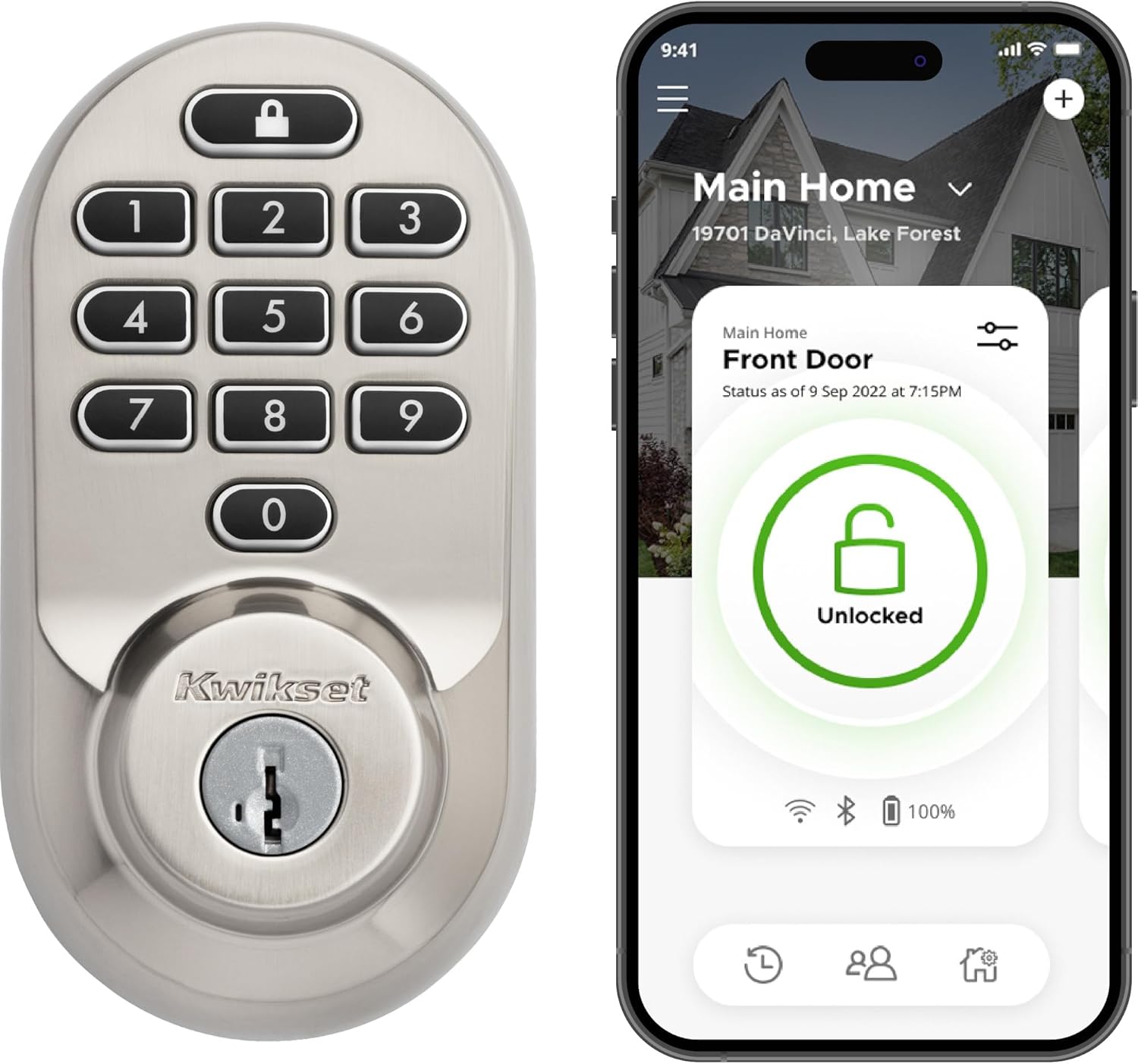
Pros
- Installs quickly with a screwdriver.
- Controls lock from anywhere via Wi-Fi.
- Handles up to 250 access codes easily.
- Re-keys without calling a locksmith.
Cons
- Needs steady Wi-Fi for remote features.
- Batteries require occasional replacement.
- Keypad visibility drops in direct sun.
This smart deadbolt delivers straightforward remote control for everyday front door security. It supports keyless entry and app alerts that fit real situations like checking on package deliveries or securing the house after kids come home from school.
Geofencing unlocks the door as you approach with groceries in hand. The system sends notifications for unusual activity and supports many codes for regular visitors or service workers.
The main trade-off is reliance on a solid Wi-Fi signal. Without it remote functions stop working though the keypad still operates locally.
This lock fits homeowners replacing an existing deadbolt who want app control without added devices.
Measure your door thickness first. This lock fits most standard doors from 1-3/8 to 2 inches thick but confirm the backset matches your current setup before starting.
New installs require drilling for the deadbolt if none exists. Replacement jobs usually finish in minutes with only a screwdriver.
- Check door material. Wood frames accept it readily while metal doors may need extra tools.
- Apartment renters should verify lease rules on modifications before drilling.
- Align the latch carefully during install to avoid binding later.
- Test the keypad and app connection immediately after setup.

Pros
- Keypad works without needing keys for daily entry.
- Auto lock feature secures the door on its own.
- Easy to install with basic tools on most doors.
- Allows multiple codes for different household members.
Cons
- Requires regular battery changes every year.
- Keypad may be hard to use with gloves on.
- Lacks remote control options for added monitoring.
This keypad deadbolt delivers reliable keyless entry for the main entrance of a house. It simplifies daily routines like coming home with bags in both hands.
The auto lock setting secures the door after short delays, which helps when kids head out to play. Multiple user codes let family members come and go independently.
Worth noting before buying, the lock needs four AA batteries replaced yearly and offers no app connectivity for remote checks. The intrusion alert provides basic tampering protection but nothing more advanced.
It suits homeowners who want a simple upgrade from a traditional deadbolt without added complexity.
Replacing an old deadbolt with this model takes only a screwdriver on most standard doors.
Always verify the existing hole sizes match this unit on replacement jobs.
- Measure door thickness to confirm fit before purchase.
- Wood frame doors accept it without extra reinforcement.
- New installs require drilling for the latch and strike plate.
- Apartment renters should check lease rules on modifications first.
- Follow the included guide for alignment of interior and exterior parts.
- Test the mechanism after assembly to ensure smooth operation.

Pros
- Allows remote checks on door status from anywhere.
- Supports easy code sharing for guests without key copies.
- Installs with basic tools on standard doors.
- Connects directly to Wi-Fi without extra devices.
Cons
- Requires a stable Wi-Fi signal near the door.
- Touchscreen may need cleaning in dusty areas.
- Auto-unlock can trigger from nearby locations.
This smart deadbolt delivers solid remote control for everyday front door security without needing extra hubs. It handles basic monitoring and access sharing in a straightforward way that fits most homes.
The geofence feature helps with hands-free entry after work or errands. Real-time alerts notify you if the door stays ajar during package drop-offs or when children head out.
One trade-off is the need for consistent Wi-Fi near the entryway to keep alerts reliable. It also lacks built-in backup power for outages.
This lock suits homeowners replacing existing deadbolts who want simple app-based control over their main entry point.
Measure your current deadbolt hole and door thickness first. This model fits most standard wood or metal front doors with a screwdriver only.
- Check alignment on older doors before starting to avoid extra drilling.
- Use the app guide for step-by-step visuals during the process.
- Replace the entire unit if switching from a non-smart deadbolt.
- Test the latch and strike plate fit on apartment rental doors.
- Confirm Wi-Fi reaches the door area after install for full function.
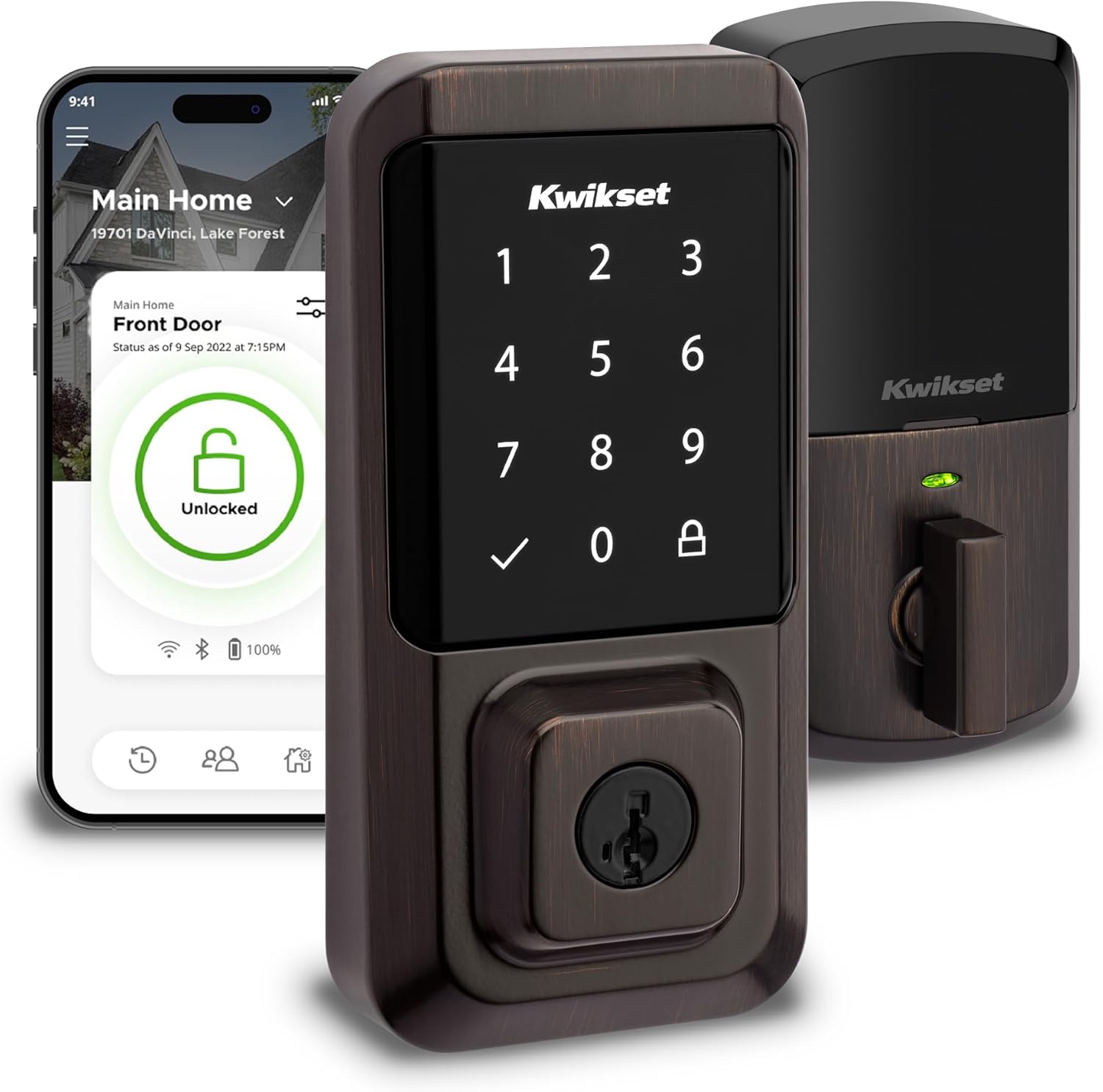
Pros
- Remote app control works without any extra hub needed.
- Installs with a screwdriver on most standard doors.
- Auto-lock feature prevents leaving the door unsecured.
- Multiple codes support easy guest or family access.
- Works with voice assistants for hands-free operation.
Cons
- Needs reliable Wi-Fi for remote features to function.
- Touchscreen can be hard to read in direct sunlight.
- Requires periodic battery replacement for operation.
This smart lock gives direct control over front door access through an app without extra equipment.
It handles common situations like monitoring deliveries or letting family in after school. The auto-lock and alerts tie into daily routines around coming and going from the house.
The main trade-off is reliance on a stable internet connection for alerts and remote use. Without it the basic keypad still works but loses the connected benefits.
This lock suits homeowners who already have good Wi-Fi and want simple app-based entry management.
Replacing an existing deadbolt on a standard wood door takes only a screwdriver and fits most thicknesses from 1 3/8 to 2 inches.
- Measure your current backset before buying to confirm 2 3/8 or 2 3/4 inch match.
- New installations on pre-drilled doors go in quickly with guided app steps.
- Apartment renters should check lease rules before drilling or replacing hardware.
- Older homes with metal doors may need extra alignment checks during setup.

Pros
- Installs with a screwdriver in under 15 minutes on standard doors.
- Works without a separate hub using existing home Wi-Fi.
- Sends real-time alerts for lock activity or attempted entry.
- Allows up to 250 unique codes for different household members.
Cons
- Requires consistent Wi-Fi signal near the front door.
- Batteries need replacement every 6 to 12 months.
- Keypad numbers can wear over years of heavy use.
This smart deadbolt gives homeowners simple control over front door access without carrying keys. It handles everyday needs like letting in family or checking status from work.
Remote alerts help monitor deliveries or when kids return home. Auto-lock features add security after quick exits with pets or groceries in hand.
The main trade-off is dependence on a steady Wi-Fi connection. Without it some remote functions stop working.
I recommend it for owners who want basic smart features on a standard door without complex setup.
Measure your door thickness first. This lock fits doors from 1-3/8 to 2 inches thick and works on both wood and metal frames.
For new installs drill holes if none exist. Replacement jobs usually need only a screwdriver and take minutes with the guided app steps.
- Check backset distance before buying to match 2-3/8 or 2-3/4 inches.
- Apartment renters should confirm landlord rules on drilling.
- Wi-Fi signal strength at the door affects remote features after install.
- Keep a manual key as backup for power outages.
Buying Guide for Best Kwikset Smart Locks
Kwikset makes a wide range of locks, and not every model qualifies as a smart lock in the way most people mean when they go looking for one. Knowing which features matter for your door and daily routine helps you avoid overpaying for connectivity you will not use or underbying and wishing you had more. Here is what to look at.
The SmartKey vs. Standard Cylinder Question
Kwikset locks come in two cylinder types: standard and SmartKey. SmartKey lets you rekey the lock yourself in seconds without removing it from the door, which is genuinely useful if you move into a new home, lose a key, or want to change access after a tenant leaves.
Most people overlook this until they need it, and by then they have already bought the wrong model. If there is any chance you will want to rekey without calling a locksmith, confirm the lock you are buying includes SmartKey before you order.
Keypad and Entry Options
The Kwikset keypad lineup ranges from basic deadbolts with a single access code to models that store dozens of individual codes with scheduling. The right level depends entirely on how many people need access and whether any of them have time-limited needs.
A basic keypad is enough for a household of two or three with no guests to manage. Once you add housekeepers, dog walkers, or short-term rentals, a lock with per-user code scheduling starts to pay for itself. For a broader comparison of what keypad management looks like across brands, keypad smart locks with strong user controls are worth reviewing alongside the Kwikset range.
Smart Home Connectivity
Kwikset covers most of the major protocols Z-Wave, Zigbee, Wi-Fi, and Bluetooth but not every model supports every protocol. A lock with Z-Wave or Zigbee needs a compatible hub to connect to your smart home; a Wi-Fi model connects directly but draws more battery.
Match the connectivity type to what you already have running in your home before buying. If you want to skip the hub entirely and still get remote access, keyless smart locks with direct Wi-Fi give you a useful comparison point for what that looks like across the broader market.
Installation and Door Prep
Kwikset deadbolts are among the more DIY-friendly locks available, and most models install with standard tools in under 30 minutes. That said, door thickness, backset length, and whether your existing prep matches the lock spec still determine whether the install goes smoothly.
Measure your door before ordering and confirm the backset 2-3/8 inches or 2-3/4 inches matches the lock. If a clean self-install matters to you, smart locks built for easy DIY installation cover what to look for, and Kwikset models frequently appear on that list for good reason.
Battery Life and Maintenance
Kwikset smart locks vary in battery life depending on the connectivity type. Basic keypad models with no radio can last a year or more; Wi-Fi models with constant connectivity drain significantly faster. The gap is larger than most people expect.
Check the rated battery life for the specific model and connectivity version you are considering, and confirm it sends a low-battery alert with enough lead time to act. For front doors where a dead lock would be a genuine disruption, smart locks built for longer battery life are worth comparing before you commit to a connectivity type.
Why You Should Trust Us
Our team builds the SHU Score using manufacturer specifications, ANSI and BHMA certification records, and aggregated user data from verified sources. This approach emphasizes objective build quality and usability factors without physical product handling.
We cross-reference safety standards and real-home scenario fit to keep recommendations grounded for typical property needs.
Final Thoughts
At the end of the day, the best Kwikset smart lock is the one that fits your specific setup. The lineup covers enough ground from basic keypad deadbolts to full smart home integration that most front door situations have a clear match. Where you land depends on how much connectivity you actually want and how much install complexity you are comfortable with.
The Kwikset Powerbolt 250 suits anyone who wants dependable keyless entry without subscription fees, hub requirements, or a steep learning curve. It does the core job well, and Kwikset’s hardware reputation means it will keep doing it for years without surprises.
FAQs
Do kwikset smart locks require a hub?
Most best kwikset smart locks models connect directly over Wi-Fi and skip any hub requirement. This keeps setup simple for standard door replacements.
How long do batteries last in these locks?
Batteries typically hold for several months under normal use. Frequent app checks or extreme temperatures shorten that span.
Can you add temporary codes for guests?
Yes, the app supports one-time or scheduled codes for visitors. This feature helps when service workers need access during set hours.
Is it better to choose Wi-Fi or Bluetooth versions?
Wi-Fi versions allow remote control from anywhere while Bluetooth limits range to near the door. Choose based on whether you need away-from-home access.
What is the SHU Score based on?
The SHU Score weighs certification data, build details, and daily usability reports from multiple sources. It avoids subjective opinions in favor of documented specs.
Write Your Review
No reviews yet. Be the first to share your experience!