

Most smart locks are designed around function first, and the finish is an afterthought which is fine until you spend money on matte black door hardware and fixtures and then bolt on a lock that looks like it belongs on a different house. The exterior of your front door is the first thing people see, and a mismatched lock undermines everything around it.
Matte black smart locks solve that without asking you to compromise on features. The best matte black smart locks pair a finish that holds up against fingerprints and UV exposure with the access control and remote management you would expect from any quality smart lock. We went through the current options to find models that deliver on both.
Our overall pick for best matte black smart locks is the Schlage Encode WiFi Deadbolt. It handles remote front door access for deliveries and family with a finish that coordinates cleanly with matte black hardware, so you get a lock that looks right and works right from day one. Check out our top picks below to find the right fit for your setup.
Our Top Picks

Pros
- Built-in WiFi removes the need for an extra hub
- Fingerprint access speeds entry without searching for keys
- Auto-lock option reduces worry about forgetting to secure the door
- Handle set provides a complete matching look for the entryway
Cons
- Limited to wooden doors between 1-3/8 and 2 inches thick
- Requires precise door alignment during setup to avoid friction issues
- Battery changes needed periodically with no wired backup option
This smart lock fits standard front doors and lets homeowners monitor access from a phone app. Real-time alerts show when the door opens for deliveries or family returns, adding peace of mind without constant checking.
Fingerprint entry works well for busy moments like carrying groceries or helping children inside. Temporary passcodes allow service providers or guests to enter on schedule and expire afterward to maintain control.
The auto-lock timer secures the door after use, which helps in households with frequent comings and goings. Voice control through Alexa or Google Assistant offers hands-free locking when leaving the property.
Overall the lock handles daily entry needs while keeping activity records for review later in the day.
Measure the door thickness first to confirm it falls between 1-3/8 and 2 inches and verify the door is wood only.
- Align the door and frame flush before mounting to prevent latch strain.
- Use a screwdriver only and avoid over-tightening screws that could jam the mechanism.
- Follow the provided video to route internal wires correctly and keep debris out of the cylinder.
The app connects directly over home WiFi for remote lock control and access sharing. Set permanent codes for family or one-time codes for visitors through the same interface.
- View activity history to track who entered and at what time.
- Enable vacation mode to limit access while away from the property.
- Adjust auto-lock timing and silence alerts as needed for daily routines.
Pros
- Remote app control works from anywhere to manage front door access
- Built-in alarm detects door tampering for added break-in protection
- Fits most standard doors and installs with just a screwdriver
- Up to 100 access codes simplify sharing for cleaners or neighbors
- Voice control with Alexa or Google for hands-free locking
Cons
- Requires reliable WiFi signal at the door for remote features to work
- Batteries need replacement every few months depending on use
- Touchscreen can smudge over time and needs occasional cleaning
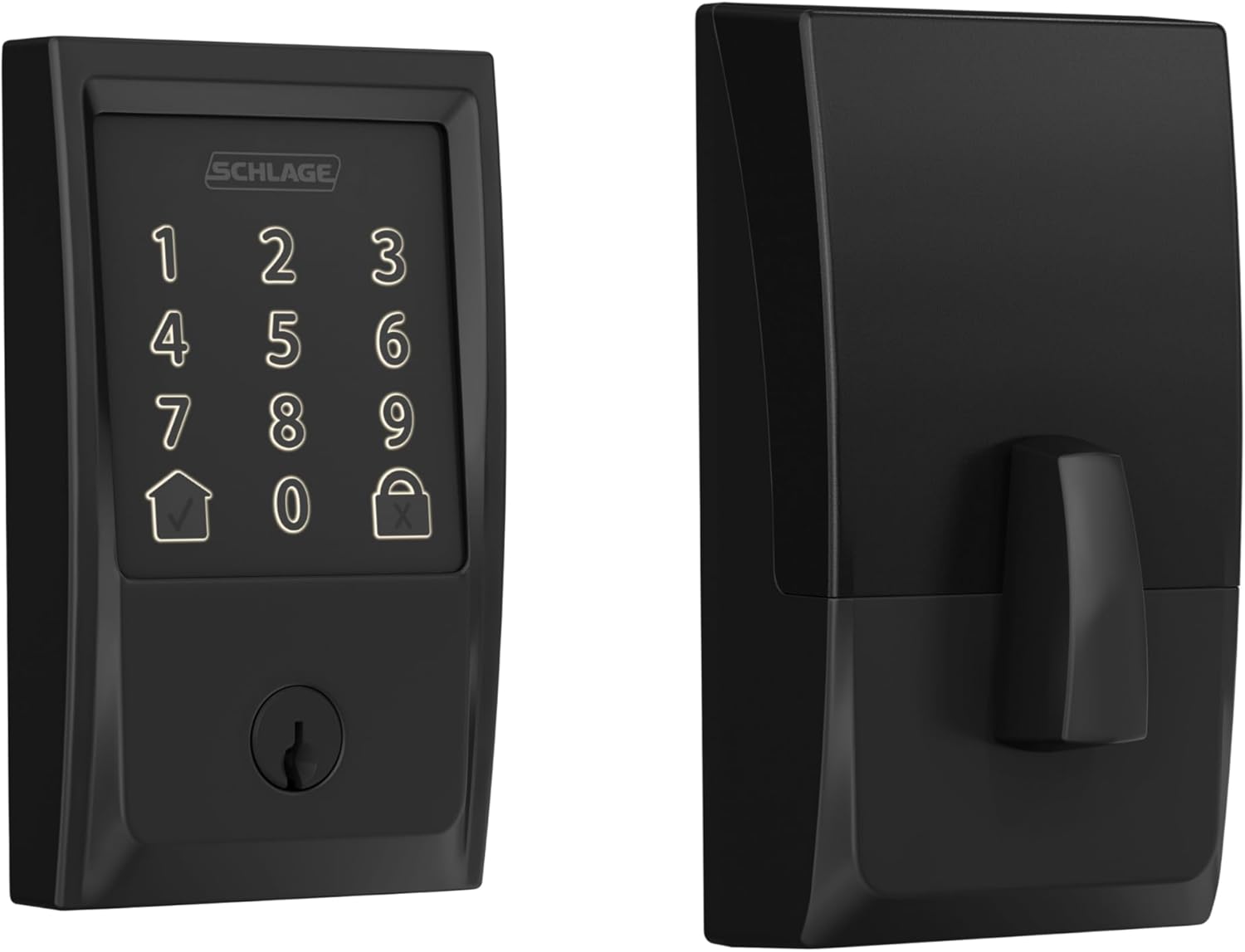
This Schlage Encode deadbolt replaces your standard front door lock with keyless entry via touchscreen or app. It connects directly to your home WiFi, so you can lock or unlock from anywhere, which gives peace of mind when deliveries sit on the porch or family arrives while you're out. The built-in alarm sounds if someone pries at the door, alerting you to potential break-ins before they happen.
For everyday routines, set auto-lock to relock the door minutes after it opens, preventing forgotten locks when kids head to school or guests use the backyard gate. Track who entered and when through the app, helping you verify if the dog walker came by or if packages were safe. One-touch locking from outside makes leaving for work quick and secure without fumbling keys.
With a backup physical key and long-lasting batteries, it handles outages or low power without leaving you locked out. The fingerprint-resistant touchscreen stays readable for repeated use, and it pairs with voice assistants for hands-free control near the driveway. Overall, it strengthens front door security for homeowners focused on family safety and property monitoring.
Durability holds up to daily wear, fitting standard doors without modifications. This setup reduces reliance on spare keys hidden outside, cutting risks from theft while enabling flexible access for trusted visitors.
Most homeowners complete setup in under 30 minutes with basic tools. It fits doors 1-3/8 to 1-3/4 inches thick and standard backsets of 2-3/8 or 2-3/4 inches, covering typical front or side entry doors.
- Just a screwdriver needed; no wiring or drilling extras required
- Includes mounting plate, strike plate, screws, and four AA batteries to start immediately
- Snap-and-stay design holds parts in place during install for easier solo work
- Remove old deadbolt first; test on interior doors if unsure about fit
Backup key works right away post-install for front porch security testing.
The Schlage Home app connects via your home WiFi for control without extra hubs. Use it to manage front door access from your phone anywhere with internet.
- Lock or unlock remotely to secure deliveries or let in repair workers
- Create and schedule up to 100 codes for family, guests, or cleaners
- View entry history and get alerts for low battery or door activity
- Customize auto-lock timing to fit your routine, like after kids enter
- Works with Alexa or Google for voice commands near the driveway
Needs steady WiFi at the door; app notifications help monitor vacation home entry.

Pros
- Built-in WiFi removes the need for extra hubs when setting up remote control from anywhere
- Physical keypad works reliably even if phones are unavailable during power issues
- Auto-lock feature reduces the chance of forgetting to secure the door after leaving
- Multiple access options including keys provide backup if the app or batteries fail
Cons
- Requires eight AA batteries that need periodic replacement every few months
- Setup involves aligning the lock components precisely on thicker or nonstandard doors
- App notifications can arrive with slight delays depending on home WiFi strength
This smart deadbolt fits most standard front doors and lets homeowners check entry activity through the app while at work or running errands. It supports multiple unlock methods so family can use codes or keys when returning from school or activities. The auto-lock setting engages after a set time to secure the door even during busy evenings with packages or pets coming in.
Real-time alerts notify when someone uses a code or the app at the main entrance, which helps track deliveries or visitors without constant monitoring. Vacation mode limits access to only essential users, keeping the property secure during extended trips away from home. The keypad design avoids touchscreens that can fail in cold or wet conditions common in many regions.
Physical key backup ensures entry remains possible if batteries run low or connectivity drops. Temperature range covers typical outdoor conditions from freezing winters to hot summers for reliable operation year-round. Overall the lock addresses daily entry routines by combining remote oversight with simple mechanical reliability.
Confirm door thickness falls between 1 3/8 and 2 inches and that the existing bore holes match standard sizes before purchase. The process typically takes under 15 minutes with basic tools for most U.S. doors.
- Align the deadbolt and handle components carefully to avoid binding during operation
- Test the latch and strike plate fit after mounting to ensure smooth locking
- Insert batteries last to complete the setup and connect to WiFi
The built-in WiFi connects directly to home networks for remote locking and alerts without additional devices. This setup supports checking status from work or while traveling.
- Create and manage up to 100 codes including permanent or one-time options for regular users
- Receive notifications for each access event at the front or side door
- Adjust auto-lock timing and activate vacation restrictions through the app menu

Pros
- Replaces existing deadbolts on most doors easily
- Works with Google Home for voice lock commands
- Offers code, app, and key backup access options
- Fingerprint resistant keypad stays clean daily
Cons
- Remote access requires a separate Matter hub
- Limited to 2.4 GHz networks only
- Battery changes needed every few months
This Yale deadbolt delivers reliable keyless entry for standard front doors in homes with Google setups. It supports remote checks and code sharing without needing physical keys on hand.
The integration lets you confirm door status during package arrivals or when kids return alone. Voice commands via Google Assistant handle locks when carrying items inside.
The main trade-off here is the need for a Matter hub to enable full remote use beyond the home network. Local codes still function without it.
It fits best for homeowners already using Google devices who want simple daily access management.
Measure your current deadbolt hole before buying. Most standard U.S. doors fit without extra work, but smaller 1.5 inch bores need the included adapter.
- Replace an old deadbolt by removing two screws and sliding in the new unit.
- Wood frame doors install the same as metal ones with basic tools.
- New installs require drilling a deadbolt hole if none exists.
- Align the latch properly to avoid binding on the strike plate.
- Apartment renters should check lease rules before swapping hardware.

Pros
- Built-in WiFi eliminates need for extra hubs, simplifying setup for whole-home control
- Multiple unlock methods fit family routines and guest visits without key exchanges
- Fast fingerprint recognition speeds up daily entries for parents and frequent visitors
- Auto-lock feature adds hands-free security when exiting to the driveway or backyard
Cons
- Battery replacement needed every few months depending on usage, though it includes eight to start
- App setup requires stable home WiFi and takes 15-20 minutes for first-time users
- Fingerprint scanner can struggle with wet or dirty hands after outdoor chores
This Philips WiFi smart deadbolt upgrades your front door security by allowing remote locking and unlocking through a smartphone app, so you can check if a package delivery is secure without driving home. The 360-degree fingerprint recognition provides quick access in under a second for family members, reducing the hassle of fumbling for keys when unloading groceries or herding kids inside after school. Multiple entry options like PIN codes and voice commands via Alexa or Google ensure flexibility for everyday scenarios, from granting temporary access to repair workers to hands-free entry while carrying laundry from the car.
Auto-lock activates shortly after closing the door, which is practical for those mornings when you rush out to the driveway and forget to secure the house. This feature works reliably as long as the door fully latches and batteries stay charged, giving peace of mind during short errands or when watching neighborhood activity from afar. The splash-proof design suits exterior doors exposed to weather, like those to a backyard gate or garage, without needing extra covers.
For family homes, the ability to manage user access remotely means setting one-time codes for guests or cleaners, then revoking them instantly if needed. Backup mechanical key access covers rare battery failures, ensuring you never get locked out during power outages. Overall, it delivers straightforward control that fits busy homeowner routines focused on protecting porches, driveways, and entry points.
While dependent on WiFi for remote features, local unlocks keep it functional offline, balancing convenience with reliability for monitoring front doors and securing property against opportunistic entry.
Most standard U.S. front doors fit this deadbolt with minimal adjustments. Check your door thickness (1.38 to 1.97 inches) and bore hole size (2.13 inches diameter) before starting.
- Tools needed: Phillips screwdriver, drill if holes do not align perfectly
- Time: 20-30 minutes for basic replacement of existing deadbolt
- Door prep: Includes template and guide; suits wood or metal doors leading to porches or garages
- No wiring required; batteries power all functions independently
- Professional help optional if uncomfortable with basic lock swaps
The app connects directly via your home WiFi for remote control of front door locks, sending alerts for every unlock attempt during deliveries or family arrivals.
- Real-time notifications for activity on porches or driveways
- Create and delete PINs for guests, scheduled for housekeepers
- Share access with family members for mutual monitoring
- Works with Alexa/Google for voice unlocks when hands are full
- Offline mode: Local fingerprint/PIN still functions without internet
Buying Guide for Best Matte Black Smart Locks
Choosing a matte black smart lock is partly an aesthetic decision and partly a hardware one, and getting both right at the same time takes more than picking whatever matches your door handle. Here is what to think through before you commit.
Finish Quality and Longevity
Not all matte black finishes are the same. Some use a powder coat that holds up well against UV exposure, rain, and daily contact; others use a paint-style coating that chips or fades within a year of outdoor use. The difference is not always obvious from product photos.
Look for locks that specify a corrosion-resistant or UV-stable finish, and check long-term owner reviews specifically for finish wear rather than just first impressions. A finish that looks good on arrival but degrades in a season defeats the purpose of coordinating your hardware.
Smart Features and Remote Access
A matte black finish does not limit your smart feature options, most of the leading platforms and connectivity types are available in this finish. The decision is still about whether you need Wi-Fi for direct remote access or whether Z-Wave or Zigbee through a hub fits your existing setup better.
If deliveries and remote guest access are a priority, a Wi-Fi lock that lets you issue codes from anywhere is the more practical choice. For homes already running Apple ecosystems, HomeKit-compatible smart locks are available in matte black and integrate cleanly with existing automations.
Keypad and Entry Method
Matte black keypads can show wear patterns over time if the coating is soft – the digits you use most often develop a subtle shine that eventually signals your code to anyone looking closely. This is a finish-specific concern that does not come up with chrome or satin nickel hardware.
Look for a keypad with a hard-wearing coating or one that includes a digit-scramble feature to rotate the number positions on each use. If keypad entry is central to how your household operates, keypad smart locks with strong code management give you a broader set of options to compare within the matte black finish range.
Installation and Hardware Coordination
A matte black lock that arrives and does not match your existing hardware finish lever handles, hinges, door knocker is a common disappointment. Matte black varies between manufacturers: some run warm, some run cool, and some have a slight texture difference that reads as a mismatch in direct light.
Order finish samples or compare in-store where possible, and confirm the lock backset matches your door before buying. If you want a clean install without calling a locksmith, smart locks designed for easy DIY installation keep the whole job manageable on a weekend.
Battery Life Under Real Conditions
Exterior locks in cold climates drain batteries faster than indoor use, and a matte black lock sitting in direct sun in summer can run warm in ways that affect electronics over time. Battery life estimates from manufacturers assume moderate conditions.
Check rated battery life and confirm the lock sends low-battery alerts early enough to act on. For front doors that see heavy daily use or extreme temperatures, smart locks with long battery life reduce the chance of a dead lock on a bad day.
With finish quality, smart feature fit, and door compatibility sorted, picking the right matte black lock comes down to which model balances all three without asking you to compromise on any of them.
Why You Should Trust Us
At Safe Home Upgrade, we are a research-based publisher. We do not physically handle or install the products we cover. What we do is go through manufacturer specifications, ANSI and BHMA certification data, and verified buyer feedback across a wide sample of reviews to build an honest picture of how each product performs in real-world home setups.
Every product on our lists is evaluated using the SHU Score, which weighs security ratings, connectivity reliability, ease of installation, finish durability, and long-term usability. The goal is to give you a clear, neutral comparison so you can make the call that fits your specific situation, not the one that sounds best in a product description.
Final Thoughts
There are a lot of solid options in this category, and honestly most of them will get the job done if the finish is your main reason for being here. Where the field separates is in smart feature depth – remote access range, code management flexibility, and how well the app holds up over time.
The Schlage Encode WiFi Deadbolt suits anyone who wants a front door lock that covers deliveries and family access without sacrificing the look of their hardware. The WiFi connection keeps it manageable from anywhere, and Schlage’s build quality means the matte black finish holds its appearance longer than most budget alternatives.
Frequently Asked Questions
Can you install a smart lock on any front door?
Most smart deadbolts fit standard U.S. doors between 1-3/8 and 2 inches thick with a 2-1/8-inch cross bore. Doors outside those dimensions may require an adapter or a different model entirely.
Do you need a hub to use a Wi-Fi smart lock remotely?
Built-in Wi-Fi locks connect directly to your home network without a separate hub. Locks using Z-Wave or Zigbee protocols do require a compatible hub for remote access.
Is it better to choose fingerprint or keypad access?
Keypads are more reliable across temperature extremes and work regardless of skin condition or moisture. Fingerprint access adds speed and convenience, but it works best as a secondary option alongside a PIN code. For a deeper comparison, the fingerprint smart locks guide breaks down real-world reliability differences.
How long do smart lock batteries typically last?
With average daily use of 20 to 30 cycles, most battery-powered smart locks last four to six months per set. Locks with built-in Wi-Fi tend to drain batteries faster than Bluetooth-only models.
Can you share access with someone who does not have the app?
Temporary or one-time PIN codes let you grant access without requiring the other person to download anything. Most app-connected locks in this category support scheduled and recurring codes for regular visitors.
Write Your Review
No reviews yet. Be the first to share your experience!