

Most front door setups have two locks working independently a deadbolt up top and a knob or lever below. Locking one and forgetting the other is an easy habit to fall into, and it leaves your door less secure than it looks from the outside.
Interconnected smart locks solve that by linking both mechanisms so one action secures them together. We went through the current options to find the best interconnected smart locks that combine that mechanical advantage with app control, remote access, and reliable daily use.
If you want one recommendation for best interconnected smart locks, go with the Philips WiFi Smart Lock. It covers front door access and family security in one package, so you get the convenience of a single-action lock without giving up the layered protection of a deadbolt and latch working together. Browse our full list below to see which one works best for your situation.
Our Top Picks

Pros
- Multiple entry methods cover common situations like forgotten keys or full hands
- Remote app control works from anywhere to check status or grant guest access
- Auto-lock and modes adapt to different household routines without extra hardware
- Fits many standard doors with basic measurements and no hub required
Cons
- Only works on doors with exact 2-1/8 inch hole and minimum spacing from deadbolt
- Requires eight AA batteries that need periodic replacement
- Limited to 2.4 GHz WiFi connections which may require router changes
This lock combines a handle with fingerprint reader and keypad to secure a main entry point. Homeowners can use it on the front door to manage daily comings and goings while tracking activity through the app.
Fingerprint recognition supports up to 50 stored prints for fast household entry. PIN codes handle recurring access for cleaners or recurring visitors and one-time codes cover delivery personnel or short-term guests.
Auto-lock activates after a set delay to prevent the door from remaining open after children or pets pass through. Privacy mode limits unlocking to the main code or physical key when the home needs extra quiet periods.
Remote commands allow checking or changing the lock status during travel or while at work. The included mechanical key serves as backup during extended power loss.
Measure the door before purchase to confirm fit. The lock needs a 2-1/8 inch diameter hole and backset of either 2-3/8 or 2-3/4 inches.
- Door thickness must fall between 1-3/8 and 2 inches.
- Center-to-center distance from handle to existing deadbolt requires at least 4.53 inches.
- If spacing is too close the latches interfere and positions may need swapping.
- Eight AA alkaline batteries power the unit and are not included.
The app provides remote lock and unlock plus activity history from any location with internet. Real-time alerts arrive when codes are used or the battery level drops.
- Passage mode turns the handle into free entry without codes or prints.
- Timed and recurring codes support scheduled access for pet sitters or service workers.
- Voice commands work through compatible assistants for hands-free operation.
- Anti-peep code entry protects PIN privacy on the keypad.

Pros
- Built-in WiFi removes the need for an extra hub
- Fingerprint access speeds entry without searching for keys
- Auto-lock option reduces worry about forgetting to secure the door
- Handle set provides a complete matching look for the entryway
Cons
- Limited to wooden doors between 1-3/8 and 2 inches thick
- Requires precise door alignment during setup to avoid friction issues
- Battery changes needed periodically with no wired backup option
This smart lock fits standard front doors and lets homeowners monitor access from a phone app. Real-time alerts show when the door opens for deliveries or family returns, adding peace of mind without constant checking.
Fingerprint entry works well for busy moments like carrying groceries or helping children inside. Temporary passcodes allow service providers or guests to enter on schedule and expire afterward to maintain control.
The auto-lock timer secures the door after use, which helps in households with frequent comings and goings. Voice control through Alexa or Google Assistant offers hands-free locking when leaving the property.
Overall the lock handles daily entry needs while keeping activity records for review later in the day.
Measure the door thickness first to confirm it falls between 1-3/8 and 2 inches and verify the door is wood only.
- Align the door and frame flush before mounting to prevent latch strain.
- Use a screwdriver only and avoid over-tightening screws that could jam the mechanism.
- Follow the provided video to route internal wires correctly and keep debris out of the cylinder.
The app connects directly over home WiFi for remote lock control and access sharing. Set permanent codes for family or one-time codes for visitors through the same interface.
- View activity history to track who entered and at what time.
- Enable vacation mode to limit access while away from the property.
- Adjust auto-lock timing and silence alerts as needed for daily routines.

Pros
- Multiple unlock options cover daily routines and emergencies without keys
- Fingerprint recognition gets faster and more reliable for frequent family use
- USB emergency charging avoids lockouts from dead batteries
- Fits standard US doors with simple setup for quick front door upgrade
- Durable construction works in outdoor conditions from cold winters to hot summers
Cons
- Requires Apple Home Hub for remote app control and sharing access
- No built-in WiFi means setup relies on Apple ecosystem or app bridge
- Fingerprint storage maxes at 50, which may limit larger households
This deadbolt replaces your standard front door lock with keyless options that fit everyday home life. Tap an iPhone or Apple Watch to unlock instantly, which saves time when unloading deliveries from the porch or herding kids inside after school. The fingerprint reader learns family prints for reliable, quick entry, storing data securely on the lock itself to protect privacy during routine comings and goings.
Auto-lock kicks in right after you shut the door, ensuring security without remembering to twist the lock, especially useful for busy households monitoring backyard gates or driveways. Multiple methods like app remote, passcodes, or backup keys handle guests dropping by or emergencies, giving peace of mind when watching packages left out front. The year-long battery from included AA batteries means fewer interruptions, with USB charging as a backup if needed.
Built tough with weather resistance, it stands up to rain and temperature swings on exterior doors, maintaining function year-round. While it shines for Apple users securing main entries, full remote features need a Home Hub, making it a solid pick for straightforward front door protection without complexity.
Works on most standard US exterior doors from 1-3/8 to 1-3/4 inches thick. No drilling or special tools needed beyond a screwdriver for basic swap-out.
- Measures fit doors 2-3/16 inch hole standard, common on front entries
- Full install takes 15-20 minutes for handy homeowners securing porches
- Check door alignment first to ensure smooth auto-lock for daily use
- Aluminum body handles outdoor exposure without rust on gates or doors
Connects via Apple Home ecosystem or Dreame NAVO app for control from anywhere. Needs Home Hub like HomePod for remote unlocks when away from home.
- Alerts notify on unlocks or low battery for monitoring deliveries
- Set timed auto-lock or passcodes for family and guests entering driveways
- Works offline for basic taps and fingerprints, no WiFi required daily
- Share access permissions to watch kids or pets safely from your phone

Pros
- Multiple access methods reduce dependence on physical keys during daily routines.
- App notifications provide alerts for door activity while away at work.
- Auto-lock feature prevents accidental unsecured doors after quick exits.
- Fingerprint option speeds up entry for frequent users.
Cons
- Extra security screws require drilling a specific hole in the door.
- WiFi dependency means loss of remote features during internet outages.
- Door thickness must be verified before purchase to avoid fit issues.
This smart lock set combines a handle with deadbolt functions to secure the main entry of a typical home. Homeowners can lock or unlock the front door from their phone while checking on package deliveries left outside.
Fingerprint and PIN options allow quick access for household members returning from work or school without searching for keys. Temporary codes help manage entry for service visits or short-term guests arriving at the back gate area.
The auto-lock setting ensures the door secures itself after a set period, which helps when leaving in a hurry with pets or children. Access logs show who entered and when, supporting oversight of daily comings and goings around the property.
Overall it provides straightforward control over a primary doorway without requiring constant physical key management.
Confirm door thickness falls between 1-3/8 and 2 inches before starting. Most standard front doors meet this range for direct fit.
- Use a screwdriver for basic assembly that takes only a few minutes on compatible doors.
- Optional reinforcement screws need a 19/32 inch hole drilled if the door feels weak or warped.
- Verify handle alignment with the existing strike plate to maintain smooth operation.
The app allows locking, unlocking, and status checks from any location with internet access. Real-time alerts notify of door activity such as entries or failed attempts.
- Share codes or permissions with family members or temporary visitors through the phone interface.
- Review access history to track usage patterns around the home.
- Voice commands work with common assistants for hands-free operation at the doorway.
Pros
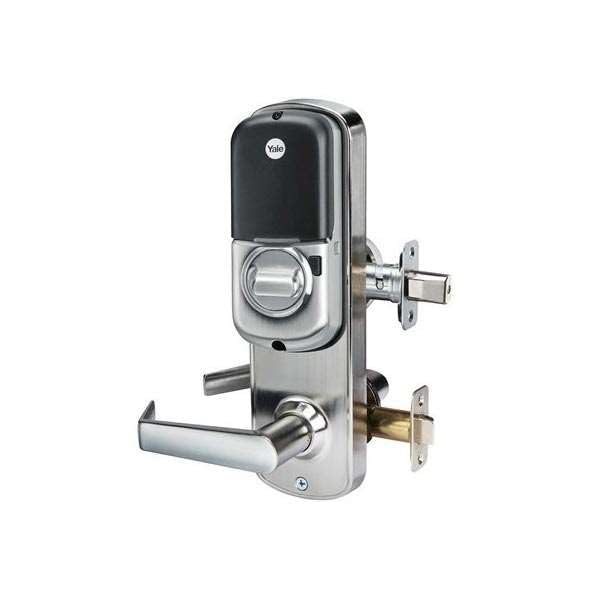
- Combines lever and deadbolt so one motion secures the entire door
- Supports up to 250 codes for multiple household members
- Includes two physical keys for reliable backup access
- Allows manual reconfiguration for left or right hand doors
Cons
- Requires a separate compatible hub for Z-Wave smart features
- Default right hand setup needs adjustment on many doors
- Push buttons offer no illumination for use in low light
The Yale YRC216 provides code entry on the front door so homeowners can come and go without keys while the deadbolt stays engaged for security. This setup works well for monitoring deliveries left on the porch since the auto relock ensures the door secures itself after each use.
For side entrances or backyard gates the interconnected design lets the interior lever retract both latch and deadbolt at once which simplifies exit when watching kids or pets in the yard. The push button keypad reduces the need to carry keys but still accepts the two included physical keys as backup during outages.
Owners can assign separate codes to family members or visitors which avoids handing out keys for repeated access to the main entrance. The lock ships ready for right hand doors but converts manually for left hand installations on various home layouts.
Adding the included Z-Wave module later connects the lock to a compatible system for phone based locking when away which adds convenience for checking the front porch remotely without extra wiring.
This lock fits doors with a 5.5 inch center to center measurement between handles and deadbolt. It ships configured for right hand doors but converts to left hand with basic adjustments during setup.
- Measure existing door prep to confirm spacing before purchase
- Plan for a compatible Z-Wave hub if smart features are desired
- Keep the two included keys accessible for initial programming and backup
The included Z-Wave module enables phone control once paired with a separate hub for remote locking and unlocking. This helps check the front door status when monitoring packages or away from home.
- Confirm hub compatibility before adding smart functions
- Use app features to manage codes and auto relock settings
- Expect basic integration rather than direct Wi-Fi connection without extra hardware
Buying Guide for Best Interconnected Smart Locks
An interconnected lock is a specific piece of hardware, and not every smart lock qualifies. Understanding what makes one genuinely interconnected and what to look for beyond that label keeps you from buying something that only solves half the problem. Here is what to look at before you decide.
Mechanical Interconnect vs. Software Pairing
Some locks advertise interconnected behavior by syncing two separate devices through an app, which is not the same as a true mechanical interconnect. A real interconnected lock uses a physical linkage between the deadbolt and latch so that one turn or press engages both simultaneously.
This distinction matters for reliability. A software-synced setup can fall out of step if connectivity drops, while a mechanical interconnect works regardless of battery level or Wi-Fi status. Confirm the lock uses a physical mechanism before you buy.
Door Prep and Hardware Cutouts
Interconnected locks require specific door prep that differs from a standard deadbolt replacement. The lock body spans both the deadbolt and latch positions, so your door needs the right spacing between bore holes and the correct backset to match.
Measure your door’s existing hole spacing before ordering, and check whether your frame and strike plate need modification. If you want to handle the install yourself, smart locks designed for easy DIY installation are worth looking at, though interconnected models sometimes require more prep than a straight deadbolt swap.
Access Methods and Entry Flexibility
An interconnected lock on a front door usually serves everyone in the household, so the access methods need to cover different habits and ages. A keypad code works for most people; adding fingerprint or app access fills in the gaps for guests or situations where hands are full.
Look for a lock that supports multiple credential types and lets you manage them per user. If keyless entry is the main goal, options built around keyless access often overlap well with the interconnected category and give you a broader set of access methods to compare.
Smart Home and Remote Access
A front door lock that you can check or control remotely adds real value when you are managing deliveries, letting in a contractor, or just not sure if you locked up. Wi-Fi locks do this directly; Z-Wave or Zigbee models need a hub.
Think about what smart home setup you already have before deciding on a protocol. If you are already running Apple devices, HomeKit-compatible smart locks integrate cleanly with existing automations and keep the lock visible alongside your other devices.
Battery Life Under Load
Interconnected locks have more hardware to drive than a standard deadbolt the motor engages both the latch and the deadbolt simultaneously, which draws more current per cycle. On a busy front door, that adds up faster than most battery estimates assume.
Check the rated battery life against actual door usage and look for a model that sends low-battery alerts early. For households where a dead lock is a real inconvenience, locks with long battery life are worth prioritizing over feature count.
With those factors sorted, the right interconnected lock for your door becomes a much cleaner decision than the crowded market makes it look.
Why You Should Trust Us
Safe Home Upgrade evaluates smart security products through detailed analysis of manufacturer specifications, ANSI and BHMA certifications, and aggregated user data. Our SHU Score weighs build quality, safety compliance, and usability factors without physical product handling. This approach keeps recommendations grounded in verifiable information rather than marketing claims or isolated experiences.
Final Thoughts
Picking the right interconnected lock comes down to what you actually need it to do. If your front door has both a deadbolt and a knob already, an interconnected setup is one of the cleanest upgrades you can make one motion handles both, and the smart features layer on top without complicating the core function.
The Philips WiFi Smart Lock suits households that want reliable front door security without managing two separate locks. The WiFi connection keeps it accessible from anywhere, and the family access features mean you can add or remove entry without cutting new keys.
FAQs
How do interconnected smart locks handle power outages?
Interconnected smart locks retain physical key backup so entry remains possible during outages. Most models also accept USB emergency power for app or code use when batteries drop. This setup works well on front doors that see daily family traffic where sudden power loss would otherwise block access.
Do interconnected smart locks require a hub?
Many interconnected models operate directly over Wi-Fi without a separate hub. Others need an existing HomeKit or Z-Wave bridge for full remote functions. Check your current network before purchase to avoid buying extra hardware for basic operation.
Can interconnected smart locks work with rental properties?
Interconnected smart locks install on standard doors without permanent modifications in many cases. Temporary codes allow owners to grant and remove access without rekeying. Confirm lease terms on modifications first, then select models that reverse to original hardware easily.
Is it better to choose fingerprint or keypad entry on interconnected locks?
Fingerprint entry speeds daily use for primary residents while keypads suit guests or visitors without stored biometrics. Most quality units include both methods for flexibility. Busy households benefit from the dual approach because it covers varied access needs without extra remotes.
How often should interconnected smart lock batteries be replaced?
Interconnected smart lock batteries typically last 12 months under normal use before replacement. App alerts usually appear weeks ahead to prevent unexpected lockouts. Keep a spare set on hand for high-use doors to maintain continuous protection.
Write Your Review
No reviews yet. Be the first to share your experience!