

Physical keys are easy to lose, easy to copy, and impossible to revoke once they are out in the world. If you have ever had to rekey a lock because a spare ended up with the wrong person, you already know how much overhead a traditional lock quietly adds to running a household.
Keyless smart locks cut that overhead by replacing the key with a code, a fingerprint, or an app – entries you can grant and take back without touching the hardware. We reviewed the current options to find the best keyless smart locks that hold up on a front door and stay reliable past the first week of setup.
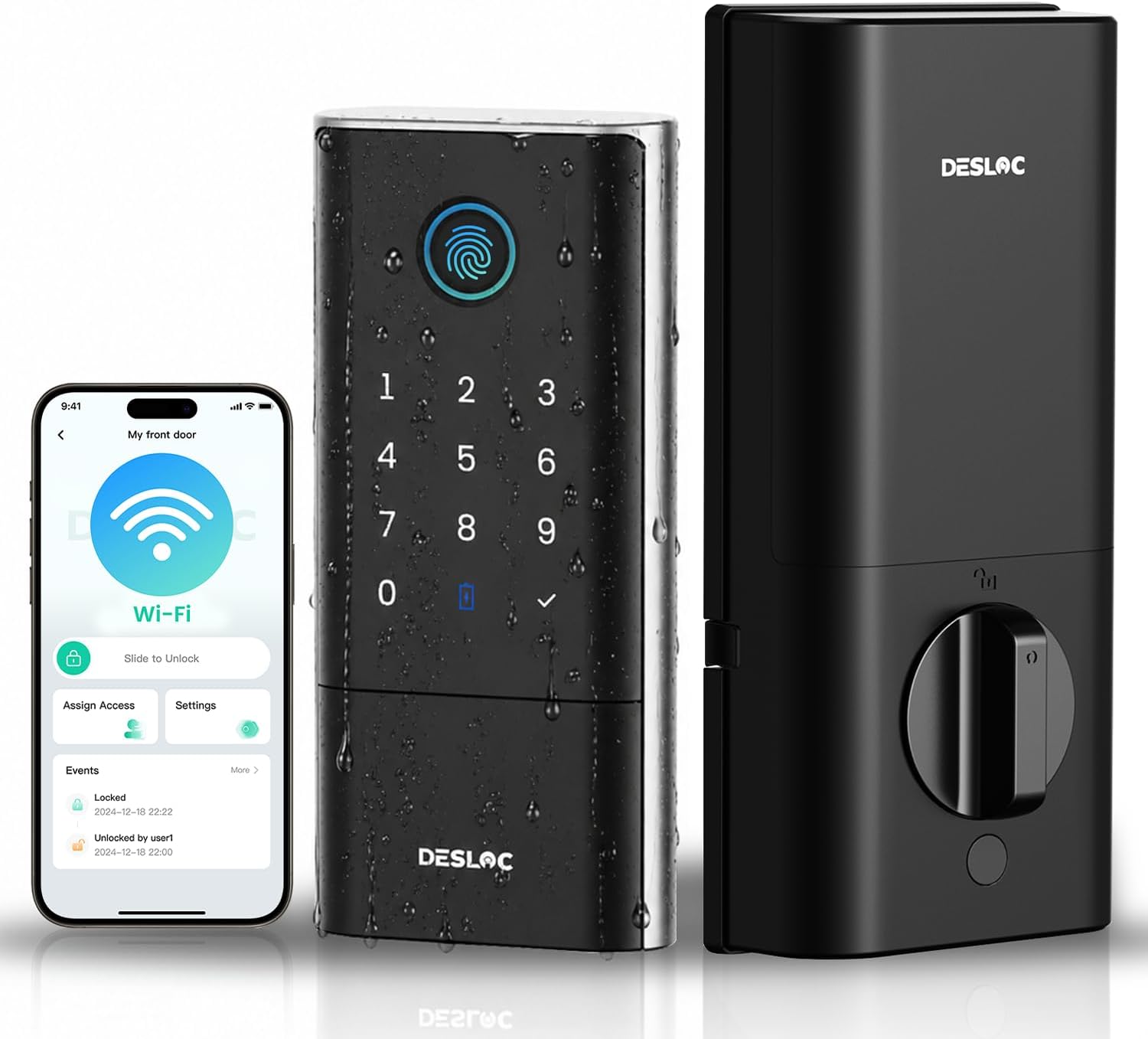
Our top pick for best keyless smart locks is the DESLOC K120 Smart Lock. It handles front door security with app alerts so you always know what is happening at your door, and you can manage access without being home. Have a look at the rest of our picks below and find the one that fits your needs.
Our Top Picks

Pros
- Fits entirely inside the door to maintain a standard look on both sides of the entry
- Detects open doors without extra magnets or parts stuck to the frame
- Installs with basic tools on most common U.S. doors in under an hour
- Supports multiple unlock methods including phones and fobs for flexible household use
Cons
- Remote features need an extra hub or bridge that adds cost and setup steps
- Only works on doors between 1.75 and 2 inches thick
- Full smart home connections depend on compatible Thread routers already in the home
The Level Lock Pro fits inside a standard door to secure the main entry without changing its appearance. Homeowners gain the ability to check and control the front door from anywhere when paired with a compatible hub.
This setup works well for monitoring deliveries left on the porch by confirming the door stays locked after carriers arrive. Families can grant temporary access to caregivers or kids returning from school without physical keys.
Door status alerts help confirm the entry is secure at night before bed. The design supports everyday use on front and side doors while avoiding bulky add-ons that stand out.
Overall it provides reliable physical locking for typical home situations with straightforward phone control when the network is set up.
This lock replaces an existing deadbolt on doors 1.75 to 2 inches thick using only a screwdriver.
- Measure the current deadbolt hole spacing before purchase to confirm fit.
- Standard strike plates are included while longer versions require a separate purchase.
- No wiring or drilling is needed so renters can install and remove it without wall changes.
Basic lock and unlock works over Bluetooth when near the door.
- Full remote access needs a Matter hub or separate Wi-Fi bridge for control from anywhere.
- Activity logs show door use to track when family members come and go.
- Guest access can be shared through the app for temporary visitors without extra hardware.
Pros
- Long battery life reduces the need for frequent changes or checks
- Multiple unlock methods provide options when one method fails
- Weatherproof design holds up for exterior doors exposed to rain or sun
- Auto-detection for door handing simplifies setup on various homes
Cons
- Remote features stop working if home WiFi goes down
- Fingerprint sensor can reject worn or wet fingers on first try
- Rechargeable battery requires occasional access to a charger port
This deadbolt helps homeowners keep track of the main entry point without needing to walk over and check it manually. It supports fingerprint use for daily entries while also sending phone alerts when someone unlocks the door after dark.
Landlords can issue short-term codes for tenants arriving late without extra trips to the property. Families benefit when multiple people need entry at different times without sharing one key.
The system records each access event so owners can review who entered during the day. This setup works well for watching package deliveries or confirming the door stayed locked while away on vacation.
Overall the lock gives steady control over who comes and goes at the front of the house through simple app checks rather than constant physical inspections.
This lock fits standard doors between 1-3/8 and 2 inches thick with a typical deadbolt hole already present. Measure your existing cutout first to confirm compatibility before purchase.
Left or right swing doors are detected automatically during setup so no extra adjustments are needed in most cases. Tools required are basic and the whole process takes under fifteen minutes for most users.
- Confirm door thickness and backset distance match common sizes
- Ensure clear space inside for the interior unit and battery pack
- Test the door alignment before final tightening to avoid binding
The app allows remote locking or unlocking from anywhere with an internet connection. Real-time alerts arrive when the door is opened or when battery levels drop low.
Multiple users can be added with their own codes or fingerprints for shared homes. Access logs show every entry event so owners can review activity without extra hardware.
- Share one-time codes for visitors or contractors
- Turn off remote access if privacy is a concern for certain periods
- Check status quickly during travel without extra devices

Pros
- Multiple unlock options including fingerprint, code, app, and key provide flexibility for daily routines
- Built-in WiFi allows remote locking and notifications without extra hardware
- Long battery life means fewer replacements, suitable for busy households
- Stores up to 50 fingerprints and 100 codes for family and frequent visitors
- IP53 rating handles rain and temperature swings for exterior front door use
Cons
- Limited compatibility with only eufy doorbells and Alexa/Google, not Apple HomeKit or Matter
- Requires doors 35-55mm thick and specific handle spacing, not for all setups
- Physical key cannot be rekeyed, so rely on electronic methods for security
The eufy Security Smart Lock C220 fits standard deadbolts on front doors, offering fingerprint unlocking that gets faster over time for quick entry after work or when hands are full with kids' gear. Homeowners gain control by setting passcodes for family or service visits, viewing entry logs to track deliveries left inside, and locking remotely if forgotten. This setup reduces key hassles while monitoring access around the property.
For everyday protection, the lock sends alerts for unusual attempts, helping spot issues like someone testing the door while you're away. Built-in WiFi connects directly to your home network for app checks on door status from anywhere, integrating with eufy doorbells to arm routines for porch monitoring. Battery lasts about eight months with normal use, avoiding lockouts during bad weather when changing batteries outside is tough.
Placed on exterior doors exposed to rain or cold, its weather resistance holds up from -22°F to 158°F, maintaining reliability for gates or entries. Voice control with assistants opens doors hands-free for arrivals with packages, while anti-peep codes protect pins from neighbors. Overall, it delivers straightforward access management that fits routines without complexity, bolstering peace of mind for family homes.
Users managing shared properties find value in deleting codes post-visit, ensuring no lingering access for guests or workers. The physical key backup covers power failures, though electronic methods dominate for convenience in monitoring front porches or driveways.
Check your door before buying to ensure compatibility for a smooth swap on front or back entries. Most standard US deadbolts work if dimensions match.
- Door thickness: 35-55mm (1.4-2.2 inches)
- Crossbore center to handle top: greater than 45mm
- Replaces standard deadbolts, no mortise locks
- 15-minute install without drilling, includes all parts
Measure first to avoid returns, ideal for renters updating apartment doors or homeowners securing garages.
The app handles remote control and notifications for front door oversight without a hub. Connects to home WiFi for use from work or travel.
- Real-time alerts for unlocks or tampering
- Event history logs all activity for reviewing deliveries
- Manage 50 fingerprints and 100 passcodes
- Works with eufy doorbells for combined routines
- Voice support via Alexa or Google, no Apple HomeKit
Setup is straightforward, focusing on access for family or guests watching pets.

Pros
- Multiple unlock options like palm, keypad, and app reduce reliance on lost keys for daily entry
- Built-in camera covers the full front step to spot packages left by deliveries
- Rear screen simplifies door checks for children or older adults at home alone
- Long battery life handles months of use with easy recharges for reliable access
- Weatherproof build holds up outdoors to protect the front entrance year-round
Cons
- Not recommended for doors with a storm door in front, as it blocks the camera view
- Palm recognition only unlocks the door and cannot be used to lock it
- Matter integration does not support camera streams, limiting video access in smart home setups
This smart lock installs on the front door to handle entry and monitoring in one unit. The palm vein scanner lets family members unlock by waving a hand, which works well when carrying shopping bags or watching kids on the porch. Combined with the doorbell camera, it provides a clear view of visitors and packages, sending alerts to your phone so you know about deliveries even when away from home.
The rear screen on the indoor side shows the front door feed directly, making it straightforward for children or elderly relatives to check who's there without needing a smartphone. This setup adds peace of mind for households where not everyone uses apps comfortably. Motion detection focuses on people at the door, cutting down on unnecessary alerts from passing cars or leaves.
Physical security comes from the heavy-duty deadbolt that resists kicking or prying, suitable for standard exterior doors. Battery power lasts several months with a backup option for emergencies, ensuring you can always get inside. Local storage keeps video clips secure on the device itself, ready to review porch activity whenever needed.
Overall, it fits everyday front door needs by blending access control with visibility, helping secure the home entrance against break-ins while keeping tabs on daily visitors and deliveries.
Check your door setup before buying to ensure a smooth fit on standard front or exterior doors.
- Door thickness must measure 35-55 mm for proper installation.
- Fits most standard doors, but avoid those with a storm door directly in front, as it blocks the camera.
- If the latch recess is round, contact support for a compatible faceplate.
- Works with doors using typical deadbolt prep; tools and guides come included for DIY setup.
Several options provide flexible entry for family use without keys.
- Palm vein scan recognizes up to 50 palms in under a second for quick hands-free access.
- Wi-Fi keypad allows PIN entry, ideal for guests or shared use.
- App control locks or unlocks remotely to manage access from your phone.
- Auto-lock engages after closing the door for hands-off security.
- Note: Palm scan unlocks only and stores data locally on the device.

Pros
- Built-in WiFi removes the need for extra hubs when setting up remote control from anywhere
- Physical keypad works reliably even if phones are unavailable during power issues
- Auto-lock feature reduces the chance of forgetting to secure the door after leaving
- Multiple access options including keys provide backup if the app or batteries fail
Cons
- Requires eight AA batteries that need periodic replacement every few months
- Setup involves aligning the lock components precisely on thicker or nonstandard doors
- App notifications can arrive with slight delays depending on home WiFi strength
This smart deadbolt fits most standard front doors and lets homeowners check entry activity through the app while at work or running errands. It supports multiple unlock methods so family can use codes or keys when returning from school or activities. The auto-lock setting engages after a set time to secure the door even during busy evenings with packages or pets coming in.
Real-time alerts notify when someone uses a code or the app at the main entrance, which helps track deliveries or visitors without constant monitoring. Vacation mode limits access to only essential users, keeping the property secure during extended trips away from home. The keypad design avoids touchscreens that can fail in cold or wet conditions common in many regions.
Physical key backup ensures entry remains possible if batteries run low or connectivity drops. Temperature range covers typical outdoor conditions from freezing winters to hot summers for reliable operation year-round. Overall the lock addresses daily entry routines by combining remote oversight with simple mechanical reliability.
Confirm door thickness falls between 1 3/8 and 2 inches and that the existing bore holes match standard sizes before purchase. The process typically takes under 15 minutes with basic tools for most U.S. doors.
- Align the deadbolt and handle components carefully to avoid binding during operation
- Test the latch and strike plate fit after mounting to ensure smooth locking
- Insert batteries last to complete the setup and connect to WiFi
The built-in WiFi connects directly to home networks for remote locking and alerts without additional devices. This setup supports checking status from work or while traveling.
- Create and manage up to 100 codes including permanent or one-time options for regular users
- Receive notifications for each access event at the front or side door
- Adjust auto-lock timing and activate vacation restrictions through the app menu
Buying Guide for Best Keyless Smart Locks
Going keyless sounds simple, but the category covers a wide range of hardware with very different day-to-day experiences. A few decisions early in your search will narrow the field quickly and save you from buying something that works fine in a demo but frustrates you in daily use. Here is what to think through.
Entry Methods and Redundancy
Keyless does not mean one-method, most smart locks in this category offer a keypad, fingerprint reader, app, or some combination. The risk is picking a lock with only one entry method that fails at the wrong moment, whether that is a dead phone, a forgotten code, or a wet finger the sensor cannot read.
Look for a lock that supports at least two independent entry methods so a single failure does not strand anyone. If keypad entry is the primary method for your household, keypad smart locks with solid per-user code management are worth comparing directly against the broader keyless field.
App Connectivity and Alerts
The app is where remote access, entry logs, and real-time alerts live and on a front door, those features earn their keep quickly. The gap between a lock with a polished app and one with a sluggish or buggy one is felt every single day.
Check app reviews alongside the hardware reviews, particularly around notification reliability and how the lock behaves after a phone OS update. A lock that sends consistent alerts when the door opens or if a code is entered incorrectly is genuinely useful, not just a marketing checkbox.
Smart Home Compatibility
Not every keyless lock plays well with the smart home platforms already running in your house. Some require a separate hub; others connect via Wi-Fi directly but only support one or two voice assistants.
Confirm the lock works with whatever platform you are on before buying. If your home runs on Apple devices, HomeKit-compatible smart locks integrate into existing automations and keep the lock manageable from the Home app alongside everything else.
Installation and Door Requirements
Keyless smart locks still need to physically fit your door, and that part trips people up more than anything else. Backset length, door thickness, and whether the lock replaces a knob or a deadbolt all affect compatibility.
Measure your existing hardware before you order and confirm the backset matches the lock spec. If you want a straightforward install without calling a locksmith, smart locks built for easy DIY installation are worth narrowing to from the start.
Battery Life and Failure Modes
A keyless lock with a dead battery is not just inconvenient on a front door, it can be a real problem. Battery drain varies significantly between models, especially those with Wi-Fi radios or fingerprint sensors running constantly.
Look for a lock with a low-battery alert that gives you enough lead time to act, and check whether emergency external power is supported. For households where reliability is the top concern, locks built for long battery life reduce the chance of a dead lock catching you off guard.
Once you know which entry methods you need, how connected the lock should be, and what your door actually requires, the right keyless lock becomes an easy call.
Why You Should Trust Us
Our team at Safe Home Upgrade evaluates products through detailed market research and specification analysis. We apply the SHU Score to weigh build quality, safety certifications such as BHMA and IP ratings, and real-world usability data from manufacturer documentation.
This approach relies on cross-referenced standards and aggregated verified information instead of subjective impressions. The goal remains clear recommendations grounded in measurable attributes.
Final Thoughts
Most of the options on this list are reliable enough that you really cannot go wrong once you match one to your door type and access habits. Where things diverge is in the details – how many entry methods are supported, whether remote access needs a hub, and how the lock behaves when batteries run low.
The DESLOC K120 is a strong fit for anyone who wants front door security with real-time oversight. The app alerts keep you informed without requiring you to check manually, and the keyless setup means you can hand out or revoke access on your own terms.
FAQs
How long do keyless smart locks typically run on one set of batteries?
Most keyless smart locks run six to sixteen months on standard batteries depending on usage frequency. High-traffic doors shorten this interval while low-use entries extend it. Check manufacturer estimates against your door activity patterns.
Do you need Wi-Fi for basic keyless smart lock operation?
Basic functions such as fingerprint or keypad entry work without Wi-Fi on all reviewed models. Remote app control and alerts require a connection. Local operation remains available during outages.
Can keyless smart locks fit rental properties without permanent changes?
Many keyless smart locks install on existing deadbolts without drilling and remove cleanly at lease end. Verify door compatibility before purchase to avoid issues. Some landlords restrict modifications.
Is it better to choose fingerprint or keypad entry on keyless smart locks?
Fingerprint entry provides faster access for frequent users while keypads suit guests or gloved hands. Both methods appear on several models reviewed here. Select based on primary household needs.
What happens to keyless smart locks during a power outage?
Keyless smart locks continue local operation on battery power during outages. App features pause until power returns. Manual keys provide entry if batteries also fail.
Write Your Review
No reviews yet. Be the first to share your experience!