

Most smart locks work with Alexa or Google Home without much setup, but Apple HomeKit has its own set of requirements that can leave you with a lock that looks right on the shelf but won’t connect the way you expect. If your home runs on iPhones and HomePod, picking the wrong lock wastes money and time.
The best HomeKit smart locks are built to stay in sync with the Home app, respond to Siri, and fit into automations alongside your other Apple devices. We reviewed the current field to find locks that connect reliably and keep working after iOS updates without breaking.
The one we keep coming back to for best HomeKit smart locks is the SMONET AH1 Smart Lock. It pairs fingerprint and app control so you get flexible, keyless entry without rebuilding your Apple Home setup every time something changes. Check out our top picks below to find the right fit for your setup.
Our Top Picks

Pros
- Multiple unlock options cover daily routines and emergencies without keys
- Fingerprint recognition gets faster and more reliable for frequent family use
- USB emergency charging avoids lockouts from dead batteries
- Fits standard US doors with simple setup for quick front door upgrade
- Durable construction works in outdoor conditions from cold winters to hot summers
Cons
- Requires Apple Home Hub for remote app control and sharing access
- No built-in WiFi means setup relies on Apple ecosystem or app bridge
- Fingerprint storage maxes at 50, which may limit larger households
This deadbolt replaces your standard front door lock with keyless options that fit everyday home life. Tap an iPhone or Apple Watch to unlock instantly, which saves time when unloading deliveries from the porch or herding kids inside after school. The fingerprint reader learns family prints for reliable, quick entry, storing data securely on the lock itself to protect privacy during routine comings and goings.
Auto-lock kicks in right after you shut the door, ensuring security without remembering to twist the lock, especially useful for busy households monitoring backyard gates or driveways. Multiple methods like app remote, passcodes, or backup keys handle guests dropping by or emergencies, giving peace of mind when watching packages left out front. The year-long battery from included AA batteries means fewer interruptions, with USB charging as a backup if needed.
Built tough with weather resistance, it stands up to rain and temperature swings on exterior doors, maintaining function year-round. While it shines for Apple users securing main entries, full remote features need a Home Hub, making it a solid pick for straightforward front door protection without complexity.
Works on most standard US exterior doors from 1-3/8 to 1-3/4 inches thick. No drilling or special tools needed beyond a screwdriver for basic swap-out.
- Measures fit doors 2-3/16 inch hole standard, common on front entries
- Full install takes 15-20 minutes for handy homeowners securing porches
- Check door alignment first to ensure smooth auto-lock for daily use
- Aluminum body handles outdoor exposure without rust on gates or doors
Connects via Apple Home ecosystem or Dreame NAVO app for control from anywhere. Needs Home Hub like HomePod for remote unlocks when away from home.
- Alerts notify on unlocks or low battery for monitoring deliveries
- Set timed auto-lock or passcodes for family and guests entering driveways
- Works offline for basic taps and fingerprints, no WiFi required daily
- Share access permissions to watch kids or pets safely from your phone

Pros
- Multiple unlock options reduce the need to carry keys for different household members.
- Built-in WiFi enables remote locking without requiring an extra device.
- Fits common door thicknesses and both left and right swings for straightforward setup on most homes.
- Weather resistance supports outdoor use on exposed front doors.
Cons
- Requires a stable WiFi connection for full remote features which may not work in all homes.
- Battery changes are needed periodically and the lock does not indicate remaining power clearly.
- Fingerprint sensor can fail to read in cold weather or with dirty hands.
This smart lock installs on a standard front door to give residents several ways to enter without fumbling for keys. Fingerprint scanning and passcode entry help when carrying items from the car or managing kids coming home after activities.
Remote app control means you can check the door status or grant access to a service provider while at work. Auto-lock activates after entry so the home stays secured even during rushed mornings or evenings.
The system sends notifications for each lock or unlock event which helps track who is coming and going at the main entry. It also pairs with common voice assistants for hands-free operation when approaching the door with packages.
Weather protection allows reliable performance on doors exposed to rain or sun while the backup key option covers situations where batteries run low unexpectedly.
Measure your door thickness first since this lock fits doors between 1-3/8 and 2-1/8 inches thick. Confirm the existing deadbolt hole aligns with standard sizes before purchase.
Tools needed include a screwdriver and possibly a drill for new holes if replacing an older model. The process takes about 30 minutes for most users with basic experience.
- Check door swing direction to select the correct handing during setup.
- Ensure WiFi reaches the door location for full app features after installation.
- Test the mechanical key backup immediately to confirm it works in an emergency.
The companion app lets you lock or unlock from anywhere with an internet connection and monitor activity logs for the front door. Share codes with guests or service providers without physical keys.
- Apple users can add the lock to HomeKit for control through iPhone or watch.
- Android users manage everything through the brand app including passcode changes and alerts.
- Voice assistant linking allows simple commands like locking up at bedtime.
Connectivity depends on your home WiFi signal strength at the door location.

Pros
- Built-in WiFi removes the need for an extra hub
- Fingerprint access speeds entry without searching for keys
- Auto-lock option reduces worry about forgetting to secure the door
- Handle set provides a complete matching look for the entryway
Cons
- Limited to wooden doors between 1-3/8 and 2 inches thick
- Requires precise door alignment during setup to avoid friction issues
- Battery changes needed periodically with no wired backup option
This smart lock fits standard front doors and lets homeowners monitor access from a phone app. Real-time alerts show when the door opens for deliveries or family returns, adding peace of mind without constant checking.
Fingerprint entry works well for busy moments like carrying groceries or helping children inside. Temporary passcodes allow service providers or guests to enter on schedule and expire afterward to maintain control.
The auto-lock timer secures the door after use, which helps in households with frequent comings and goings. Voice control through Alexa or Google Assistant offers hands-free locking when leaving the property.
Overall the lock handles daily entry needs while keeping activity records for review later in the day.
Measure the door thickness first to confirm it falls between 1-3/8 and 2 inches and verify the door is wood only.
- Align the door and frame flush before mounting to prevent latch strain.
- Use a screwdriver only and avoid over-tightening screws that could jam the mechanism.
- Follow the provided video to route internal wires correctly and keep debris out of the cylinder.
The app connects directly over home WiFi for remote lock control and access sharing. Set permanent codes for family or one-time codes for visitors through the same interface.
- View activity history to track who entered and at what time.
- Enable vacation mode to limit access while away from the property.
- Adjust auto-lock timing and silence alerts as needed for daily routines.
Pros
- Multiple unlock methods handle different household needs without extra gadgets
- Automatic locking reduces the chance of forgetting to secure the door after leaving
- Grade 2 certification provides solid resistance for standard home use
- Rechargeable battery with USB-C backup prevents sudden power loss
- Works with common smart home systems for unified door control
Cons
- Matter features require a compatible hub that many homes may not already have
- Fingerprint setup can take several attempts for consistent recognition
- Battery life shortens with frequent remote or app use
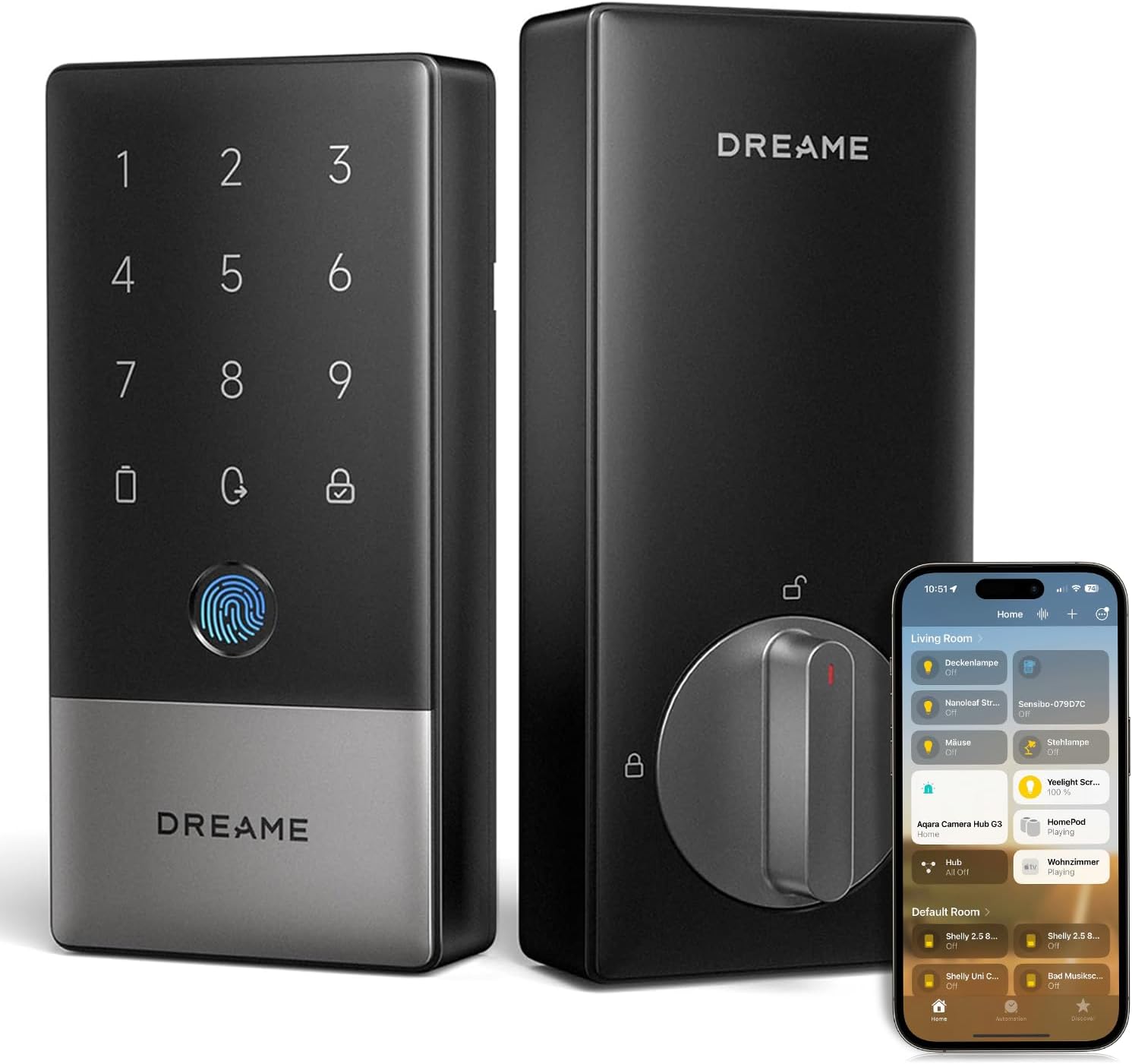
The Dreame NAVO A10 smart lock fits standard front doors and handles everyday entry needs for homeowners. It automatically secures the door after closing, which helps when carrying items or managing kids running in and out.
Multiple ways to unlock include fingerprint, phone app, or physical key, making access straightforward for family members with different preferences. Alerts notify if the door stays ajar, reducing risks like unwanted entry or pets getting out.
The lock integrates with major smart home platforms for remote control from anywhere. This setup allows checking status or granting temporary access during deliveries without being present.
Its durable build withstands regular use on exterior doors, and the battery supports months of operation before needing a recharge through the built-in port.
This lock replaces most standard deadbolts on US doors with minimal tools. Check door thickness and backset measurements first to confirm fit.
- Align the interior and exterior assemblies through the existing hole
- Secure with provided screws and test the latch movement
- Connect to power and pair with a smart home hub if using advanced features
Most users complete setup in under 30 minutes on compatible doors.
The companion app manages unlock methods and receives status notifications for the front door. It supports remote commands when connected through a compatible hub.
- View lock status and history from a phone
- Set temporary codes for visitors or service workers
- Enable geofence rules for automatic actions based on location
Connection stability depends on the home network and hub placement near the door.

Pros
- Multiple entry options mean no more fumbling for keys at the door with arms full
- Weatherproof build holds up on exposed front doors through rain, snow, and extreme temperatures
- Long battery life reduces maintenance, letting you focus on family routines
- Local data storage keeps fingerprints secure without cloud risks
- Easy setup fits most standard doors without extra drilling
Cons
- Requires a separate hub for remote unlocking from your phone away from home
- Limited to specific door measurements, so check fit before buying
- Full smart features like voice control need compatible hubs and setup
The Aqara U100 deadbolt provides straightforward keyless access for your main entry door, where you need reliable security without daily hassles. A quick fingerprint scan lets you enter carrying groceries or holding a child's hand, while the keypad allows codes for teens coming home from school. This setup cuts down on lost keys and forgotten spares, giving you peace of mind that the door stays locked against casual break-ins.
Built tough for outdoor use, the lock handles rain on covered porches or freezing nights watching over driveway arrivals. Its auto-lock feature engages right after you shut the door, protecting against forgetting to secure it while distracted with pets or packages. For family homes, set quiet modes during bedtime hours so late-night entries do not disturb sleepers inside.
Backup options like a physical key or USB charging port ensure you get in during rare glitches, such as low batteries after months of use. Pair it with a doorbell for viewing visitors before unlocking, adding control over who approaches your gate or front steps. Overall, it delivers solid physical security for everyday homeowners focused on practical protection.
While it shines in local use around the property, remote access depends on adding a hub, which suits those integrating with existing smart setups for broader home coverage.
Confirm your door matches these sizes before installing the Aqara U100 to avoid returns. It fits standard U.S. doors with no wiring or drilling needed for most setups.
- Backset: 2-3/8 inches or 2-3/4 inches for the latch alignment
- Door thickness: 1-3/8 inches to 2-11/64 inches, common on front and side entry doors
- Bore hole: 2-1/8 inches diameter, standard pre-drilled hole from existing locks
Use basic tools like a screwdriver for a 15-20 minute swap on your exterior door, keeping security tight without professional help.
Local Bluetooth connects your phone directly to manage fingerprints and codes near the door, ideal for quick family updates. For remote control from work or vacation, add an Aqara hub plus Apple Home, Google, or Alexa setup.
- No hub needed: Set local passwords and fingerprints for porch or garage access
- With hub: Unlock remotely, automate with lights for arrivals, share guest keys via Apple Home app
- Works offline: One-time codes generate locally for deliveries when internet drops
Apple Home Key taps work even on dead phones, but sharing keys requires a hub. No direct Wi-Fi means steadier performance without network glitches.
Buying Guide for HomeKit Smart Locks
HomeKit puts a tighter filter on which locks actually qualify, and that extra layer of certification is worth understanding before you pick one. A lock with strong hardware but a shaky app integration will frustrate you far more than a simpler model that just works. Here is what to look at before you buy.
HomeKit Certification
A lock that says “works with Apple HomeKit” on the box is not always the same as one built with native HomeKit support. Some connect only through a third-party bridge, which adds a point of failure and means the lock may stop responding if that bridge goes offline.
Look for locks with onboard HomeKit support rather than adapter-dependent ones. That way it shows up directly in the Home app, responds to Siri, and keeps working even when your Wi-Fi hiccups. If you want the smoothest Apple integration, locks with Apple Home Key support add tap-to-unlock from your iPhone or Apple Watch.
Access Methods and Backup Entry
A lock that only opens from your phone leaves your household stranded when the app misbehaves or a guest does not use Apple devices. Most HomeKit locks solve this with a keypad, fingerprint reader, or physical key, but the mix varies.
Think about who regularly needs to get in and whether they carry an iPhone. A keyless entry option that covers multiple access methods means one device failure does not lock everyone out.
App and Siri Reliability
The Apple Home app is where your lock lives alongside your lights, thermostat, and cameras. A lock that drops off or needs re-pairing after every iOS update costs you more time and annoyance than it saves.
Check user reviews specifically around software updates, not just first-run setup. Locks with consistent firmware update records tend to stay paired through OS changes without manual fixes.
Battery Life and Low-Power Alerts
A dead battery on a smart lock is a more specific problem than on a camera: it can physically leave you outside. HomeKit locks still run on AA or AAA batteries for the most part, and drain rates vary a lot between models.
Look for a lock that sends a low-battery notification through the Home app before it gets critical. Some models built for longer battery life also support emergency charging through a micro-USB or USB-C port on the exterior if you need to buy yourself a few minutes.
Installation and Door Compatibility
HomeKit locks tend to skew toward deadbolt replacements, but backset length, door thickness, and existing hardware all affect whether the lock fits your actual door. A lock that requires a locksmith to install adds cost that is easy to overlook upfront.
Measure your door before ordering, and check whether your existing deadbolt hole is 2-1/8 inches or 2-3/8 inches. If you want to handle the swap yourself, smart locks built for easy DIY installation are worth narrowing to from the start.
Once you know which of these factors matters most for your setup, the right HomeKit lock becomes a much shorter list to choose from.
Why You Should Trust Us
Our team builds each SHU Score from manufacturer specifications, cross-checked safety ratings such as BHMA and ANSI, and aggregated owner data from verified sources. This approach keeps recommendations grounded in documented performance rather than isolated claims. We update selections each June to reflect current models and any certification changes.
Final Thoughts
There are a lot of solid options in this category, and honestly most of them will get the job done if your home is already on Apple. Where things diverge is in how much friction they add over time: some locks stay smooth after updates, and a few quietly stop working when iOS changes something small.
The SMONET AH1 is the pick for most people who want a reliable HomeKit lock that does not need much fussing. The fingerprint reader and app control cover daily entry, and the Apple Home integration holds steady in everyday use, so you can set it up once and move on.
FAQs
Do homekit smart locks need a hub?
Some models operate without an extra hub when using Bluetooth or Thread, while others require one for remote access. The Aqara U100 needs a compatible Home hub only for full sharing features.
How long do batteries last in these locks?
Battery life ranges from eight to twelve months depending on usage frequency and temperature. Emergency USB ports provide temporary power during outages.
Can you add temporary codes for guests?
Most reviewed models allow one-time or scheduled codes through the companion app. This works well for short-term visitors without sharing permanent access.
Is fingerprint unlock reliable in cold weather?
Fingerprint readers on these locks maintain accuracy down to the stated temperature limits. Keep the sensor clean and dry for consistent reads.
What happens during a power outage?
The lock continues to function on battery and can still accept physical keys or emergency charging. HomeKit automations pause until power returns.
Write Your Review
No reviews yet. Be the first to share your experience!